Sfx recolor
⚪ Last updated 2021⚠️ Install Order · 1 step
Install in this order, then this mod last — most mods fail to load without their framework and dependencies in place.
Preview
🔍 Analysis
- 👍 4.2% endorsement rate — high engagement, a strong quality signal
- 🏆 #51 of 195 Visuals and Graphics mods in this game by downloads
📋 About This Mod
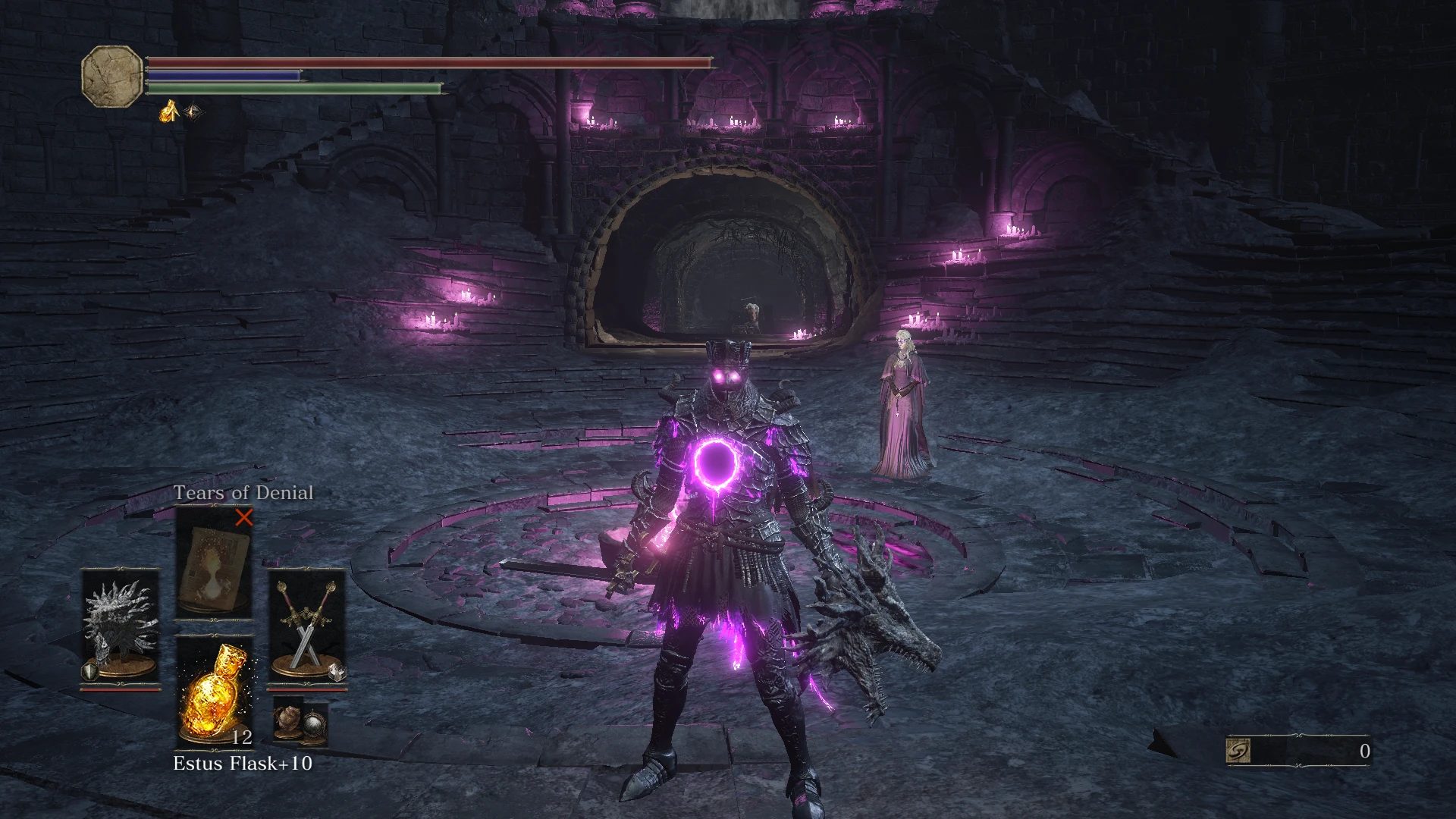
It's just a visual mod that changes the colors of the illuminations, only for you.
I don't know if the mod can ban you, use it at your own risk, I recommend you use steam family library share.
Installation 1 - Using UXM (https://www.nexusmods.com/sekiro/mods/26)
1) Unpack your game with UXM
2) Open the sfx folder
3) Drag and drop the sfx mod files into the sfx folder and choose to replace/overwrite
4) Open the parts folder and drag the parts file into the folder and replace/overwrite
5) Hit patch in UXM
Installation 2 - Using Mod Engine (https://www.nexusmods.com/darksouls3/mods/332)
1) Drag and drop dinput8.dll and modengine.ini on darksouls3.exe
2) Create a paste named mods drag and drop sfx and parts of the color u want on the mods folder
3) Configure modengine
3)1) Go to modengine.ini and open with notepad
3)2) Turn blockNetworkAccess=1 to blockNetworkAccess=0
3)3) Turn useAlternateSaveFile=1 to useAlternateSaveFile=0
Sfx recolor is a simple visual mod that changes the color of illuminations to pink, cyan, or green. It has 118 endorsements and was last updated in March 2021. Suitable for players who want a quick cosmetic tweak to lighting effects.
✨ Key Features
📊 Pros & Cons
✅ Pros
- Lightweight and easy to install—just drop in and go
- Gives your game a fresh look with three color options
- Community-tested with 118 endorsements and 2,804 downloads
⚠️ Cons
- Last updated in 2021—may not work with the latest game patches
- Only changes illumination colors, so if you want more visual overhauls, this won't cut it
- No screenshots or detailed instructions provided by the author
For players who want a quick, simple way to change the mood of their game's lighting without installing a heavy mod. If you're into customization and don't mind a bit of trial and error, this is for you. Skip if you're looking for a comprehensive visual overhaul.
💡 Beginner Tips
- Make sure to back up your original files before replacing them, just in case you want to revert.
- If the mod doesn't work after an update, check the mod page for patches or compatibility notes.
- Try each color option to see which one fits your game's atmosphere best.
📊 Mod Details
- Game
- Dark Souls 3 Mods
- Author
- Zeni aka Sr Bordinhas
- Version
- BatiOcuNaparede.4.1
- Downloads
- 2,804
- Endorsements
- 118
- Category
- Visuals and Graphics
- Created
- 1/2/2021
- Updated
- 3/25/2021
🔧 How to Install Dark Souls 3 Mods
Download from Nexus.
📖 Full step-by-step install guide for Dark Souls 3 →
Visit the official mod page for specific installation instructions for this mod.
🎮 Need cheat codes or console commands? Check ur gaming wiki for Dark Souls 3 commands, item IDs, and more.
Keep browsing — more Dark Souls 3 mods await