Kontrast ReShade
⚪ Last updated 2016⚠️ Install Order · 2 steps
Install in this order, then this mod last — most mods fail to load without their framework and dependencies in place.
Preview
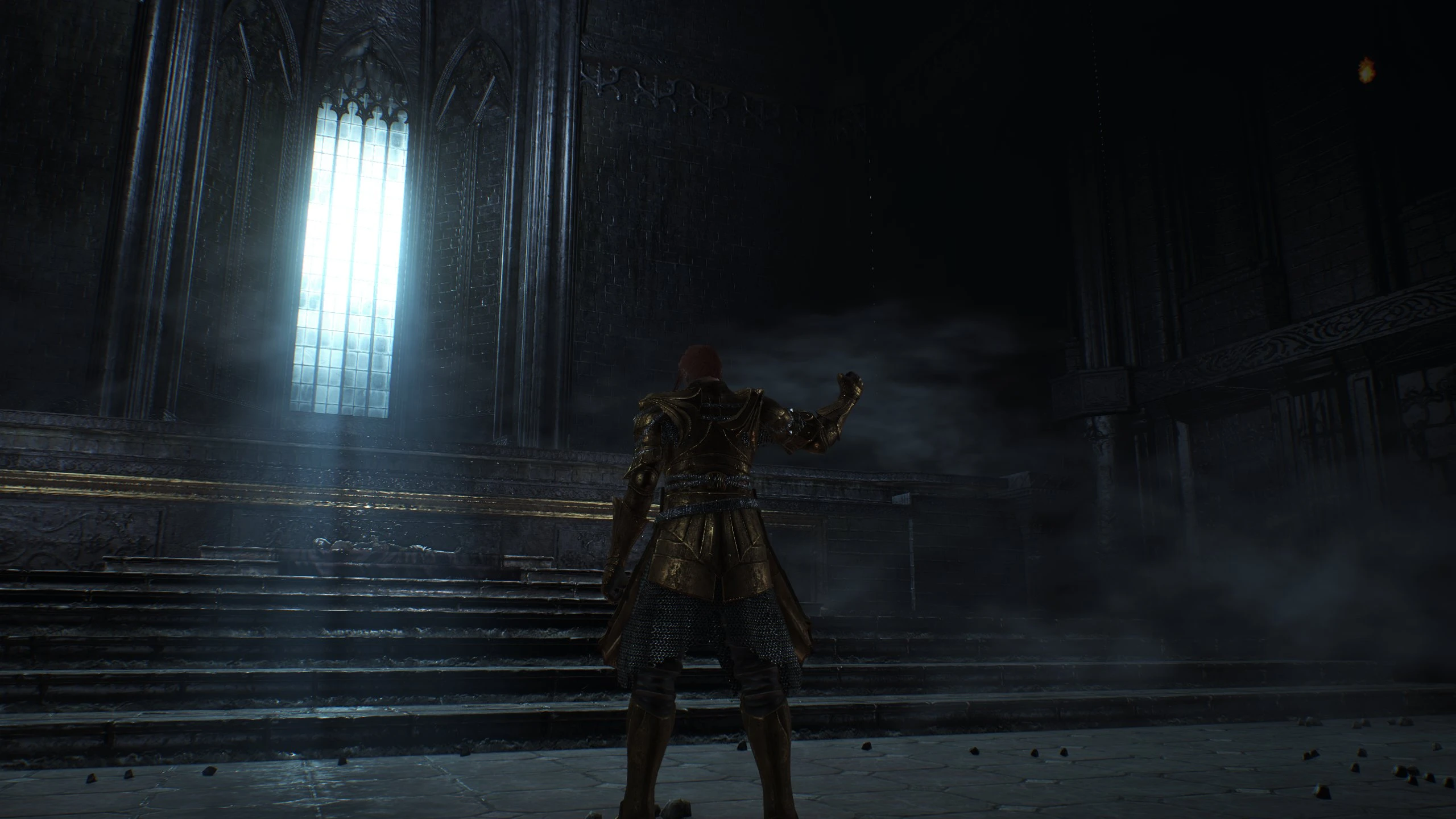
🔍 Analysis
- 👍 4.2% endorsement rate — high engagement, a strong quality signal
- 🏆 #76 of 195 Visuals and Graphics mods in this game by downloads
📋 About This Mod
gMhQZh9WN7k
Installation Before installing make sure there are no previous versions of ReShade installed in your Gamefolder. This includes the ReShade folder, ReShade.fx, dgxi.dll .
If you downloaded the latest file just drag and drop the contents to your Dark Souls 3/Game folder.
If you downloaded the Old Config follow these steps:
1. Download Reshade from http://reshade.me/ (not Legacy Version) Open with winrar, winzip or whatever. 2. Copy "ReShade" Folder, ReShade.fx and ReShade64.dll to your "DARK SOULS III\Game" Folder.
3. Rename Reshade64.dll to dxgi.dll. (If there is no .dll extension just rename it to dxgi) Now download my preset. 4. Open with winrar or whatever again and copy all the .cfg files to: DARK SOULS III\Game\ReShade\Presets\Default If asked to override, click yes. 5. You can now delete the Downloaded Reshade Folder and Preset and Start the game. A message should pop up on the upper left corner. You can toggle Reshade with the "Scroll lock key"(Usually on the top left of your Keyboard next to the print key.)
Crash on Gamestart?
1. If you are using windows 7 you might want to make the platform update:
https://www.microsoft.com/en-us/download/details.aspx?id=36805
2. For some people it worked to change dxgi.dll to d3d11.dll
3. make sure there is no Software running in the background that monitors fps or other stuff
this includes Steam Overlay, MSI Afterburner and other Overclocking programms, Fraps and so on...
If there is any other problem feel free to let me know in the discussion tab.
Kontrast ReShade is a ReShade preset that darkens shadows and occlusion for enhanced visual depth. With 62 endorsements and 1,492 downloads, it offers a simple, performance-friendly way to boost contrast in games. Last updated in 2016, it may require tweaking for modern titles.
✨ Key Features
📊 Pros & Cons
✅ Pros
- Simple preset that does exactly what it says—darkens shadows for more punchy visuals
- Decent community traction with 62 endorsements and 1,492 downloads
- Lightweight and easy to tweak if you know your way around ReShade
⚠️ Cons
- Last updated in 2016—might not work perfectly with newer games or ReShade versions
- No screenshots or detailed settings provided, so you're flying blind until you test it
- Only darkens shadows—if you want color grading or other effects, this isn't it
For gamers who want a quick contrast boost without fiddling with complex presets. If you're into photography-style tweaks or want deeper shadows in your favorite titles, this is a solid starting point. Skip if you need a full visual overhaul or play games released after 2016.
💡 Beginner Tips
- Make sure you have ReShade installed and set up for your game before dropping this preset in.
- Start with the preset's default settings, then adjust the shadow intensity in the ReShade menu to match your taste.
- If the preset looks too dark, lower the 'Shadow Intensity' or 'Darken' slider in the ReShade in-game overlay.
📊 Mod Details
- Game
- Dark Souls 3 Mods
- Author
- LunaticChair
- Version
- 1.1
- Downloads
- 1,492
- Endorsements
- 62
- Category
- Visuals and Graphics
- Created
- 4/24/2016
- Updated
- 5/21/2016
🔧 How to Install Dark Souls 3 Mods
Download from Nexus.
📖 Full step-by-step install guide for Dark Souls 3 →
Visit the official mod page for specific installation instructions for this mod.
🎮 Need cheat codes or console commands? Check ur gaming wiki for Dark Souls 3 commands, item IDs, and more.
Keep browsing — more Dark Souls 3 mods await