HereticFX Reshade
⚪ Last updated 2017⚠️ Install Order · 2 steps
Install in this order, then this mod last — most mods fail to load without their framework and dependencies in place.
Preview
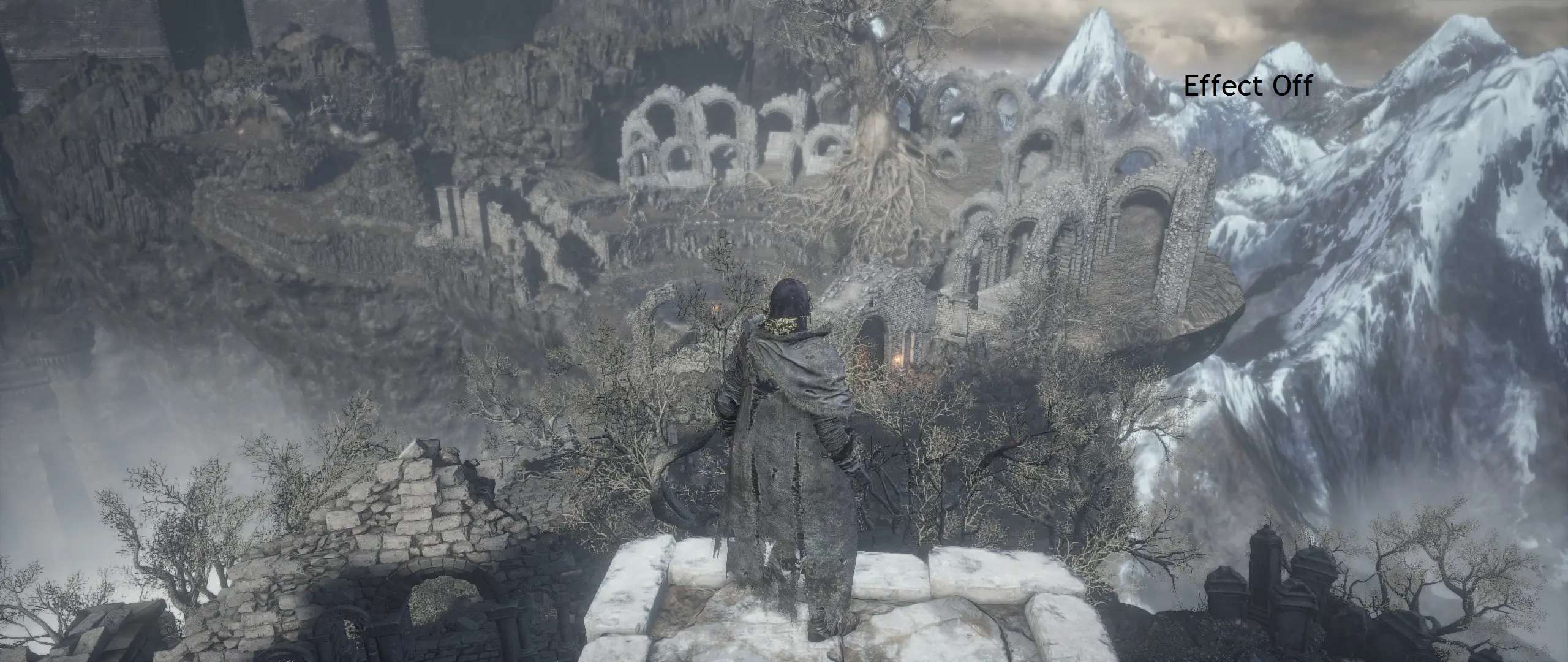
🔍 Analysis
- 👍 2.8% endorsement rate — high engagement, a strong quality signal
- 🏆 #52 of 195 Visuals and Graphics mods in this game by downloads
📋 About This Mod
Hi guys!
This is my personal improvement to Dark Souls III using the SweetFx and ReshadeFX Suite.
This preset is made for improve visual aesthetics without lose performace and denaturalize the original atmosphere of the Souls saga.
There are two type of presets:
SweetFX package: improve graphics and color correction Reshade package: all of SweetFx settings are included plus more adjustement (make the game more grim and rotten, Bloodborne style)
Best settings for light/dark situation with 0 FPS impact (fully tested on GTX 960/970/980 at 1920x1080p and 980ti at 2560x1080p ultrawide 21:9 and 2560x1440p)
SweetFx Features Effects:
FXAA HDR LUMASHARPEN LEVELS DPX TONEMAP VIBRANCE CURVES
ReshadeFx Suite plus Effects:
Technicolor 2 Tuningpalette FilmGrain
Remember to calibrate VERY WELL your monitor space color sRGB, brightness and contrast, for superior and stunning experience!
http://www.lagom.nl/lcd-test/ (for calibration)
http://www.tftcentral.co.uk/articles/icc_profiles.htm (for ICC profile, not all monitors listed)
(or search your personal monitor model for an explanation, google will be your friend)
Gameplay captured directly with HereticFX ON
HereticFX SweetFX:
cQElYNV_Arw
Area Tested:
Cemetery of Ash Firelink Shrine Irithyll of the Boreal Valley Archdragon Peak
Music: Abyss Watcher - Yuka Kitamura
HereticFX v2 Reshade:
vJx7qxclpiE
Area Tested: 1: Cemetery of Ash 2: Cathedral of the Deep 3: Abyss Watcher 4: High Lord Wolnir 5: Irithyll of the Boreal Valley 6: Pontiff Sulyvahn 7: Anor Londo 8: Yhorm the Giant 9: Archdragon Peak 10: Lothric Castle 11: Kiln of The First Flame 12: Firelink Shrine
Abyss Watcher - Original Soundtrack by Yuka Kitamura Abyss Watcher - Metal Cover by RichaadEB (thank you!!)
(video: Avidemux, music: Audacity)
Some tips for Nvidia users (and AMD maybe)
FXAA enable Antialias settings: 8x Antialias mode: enhance the application settings Antialias transparency: 8x Anisotropic filter: 16x Texture filtering: high quality Number of max prerender frames: 1
Just download and put all the files contain in the zip in Steam\steamapps\common\DARK SOULS III\Game
Press the "Scroll Lock" key on your keyboard to toggle the preset on and off.
For any explanation, trouble or improvementes ideas of the shader, please contac
HereticFX Reshade is a visual enhancement mod for Dark Souls 3 that applies a Bloodborne-inspired aesthetic using ReShade, claiming no performance drop. With 76 endorsements and 2,687 downloads, it offers a stylized look for players seeking a darker, gothic atmosphere without heavy FPS costs.
✨ Key Features
📊 Pros & Cons
✅ Pros
- Bloodborne aesthetic is a great fit for Dark Souls 3's gothic world
- No performance drop claim is a big plus for smooth gameplay
- Decent download count (2,687) shows some community interest
⚠️ Cons
- Last updated in 2017 — may not work with current game patches or ReShade versions
- Only 76 endorsements, so it's a niche mod with limited testing
For Dark Souls 3 players who want a Bloodborne-like visual overhaul without sacrificing FPS. If you're into atmospheric, gothic aesthetics and don't mind tweaking ReShade settings, this is worth a try. Skip if you prefer vanilla visuals or want a more comprehensive graphics mod.
💡 Beginner Tips
- Make sure you have ReShade installed and set up for Dark Souls 3 before adding this preset.
- If the game updates, ReShade may break — check for ReShade updates and reapply the preset.
- Use the ReShade in-game overlay to tweak the preset's intensity to your liking.
📊 Mod Details
- Game
- Dark Souls 3 Mods
- Author
- Prophet Hereticae
- Version
- v3.0
- Downloads
- 2,687
- Endorsements
- 76
- Category
- Visuals and Graphics
- Created
- 7/7/2016
- Updated
- 3/29/2017
🔧 How to Install Dark Souls 3 Mods
Download from Nexus.
📖 Full step-by-step install guide for Dark Souls 3 →
Visit the official mod page for specific installation instructions for this mod.
🎮 Need cheat codes or console commands? Check ur gaming wiki for Dark Souls 3 commands, item IDs, and more.
Keep browsing — more Dark Souls 3 mods await