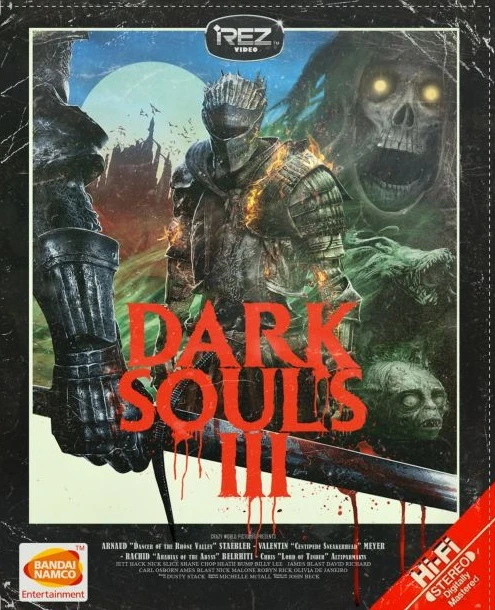
Dark Souls III VHS-Edition
⚪ Last updated 2017⚠️ Install Order · 1 step
Install in this order, then this mod last — most mods fail to load without their framework and dependencies in place.
Preview
🔍 Analysis
- 👍 3.7% endorsement rate — high engagement, a strong quality signal
- 🏆 #62 of 195 Visuals and Graphics mods in this game by downloads
📋 About This Mod
fETc77XokxE
What it does:
Gives the game old VHS tape look, and also adjust the colors and the general mood of the game
Also it really helps against that horrible aliasing, dark souls III suffers from and is more easy on the eyes for longer game sessions
How to use: Download and Install REshade from the official site, link provided here! (must be version 3. 0. 5 or above)
Follow the instructions from the REshade setup and select your Dark Souls 3 ''exe'' (''DarkSoulsIII.exe'' inside ''...\STEAM\SteamLibrary\steamapps\Common...'')
Paste the files (inside the archive) into ''...\STEAM\SteamLibrary\steamapps\Common...'' (you know, where your ''DarkSoulsIII.exe'' is located), replace files if asked and start your game
Inside your running game press ''shift+F2'' to open the REshade menu, select the ''vhs.ini'' in the bar next to the +/- icons
Pressing ''shift+Pg Dn (Page Down)'' enables/disables the mod
Also for the best possible effect disable ingame AA, DoF and Motion Blur
thats it!
Problems/Issues: This mod should work flawlessly on freshly intallled Dark Souls 3 (und a up-to-date version) folder but if you have any trouble after experimenting with other graphic enhancements mods try this:
Make sure you don't have some other custom .dlls from other graphic enhancement mods (for example ''d3d11.dll'' or ''d3d9.dll'' or something like that)
Second look out if you have some other files with the ending ''.fx'' that might caused you also some trouble
make sure to get rid of those files first and try adding my preset again
And last make sure to check out if something like ''fraps'', ''rivatuner'', ''msi afterbruner'' or similar monitoring/overclocking tools might cause this issue
as always make sure your drivers and your game is up-to-date
I hope this was helpful
If you still experience any trouble, make sure to leave a comment !
Uninstalling:
Uninstalling is pretty easy you just delete the same exact files you added (meaning the ones inside the archive file) or you could just delete the dxgi.dll file, but that wouldn't be a clean uninstall though
Disclaimer:
Big thanks to Namco/Bandai and whoever made REshade
And happy playing!
A visual enhancement mod for Dark Souls III that replicates the VHS spoof aesthetic from the official and Rouge Warrior trailers. Offers light and full versions, with 75 endorsements and 2,045 downloads. Last updated in 2017, so compatibility with current game versions is uncertain.
✨ Key Features
📊 Pros & Cons
✅ Pros
- Niche aesthetic that stands out from typical graphics mods
- Two versions give players a choice between subtle and heavy effects
- Decent traction with 75 endorsements and 2,045 downloads
⚠️ Cons
- Last updated in 2017 — may not work with the latest game patches
For Dark Souls III players who want a unique, retro VHS look for their game, especially fans of the spoof trailers. Skip if you prefer modern, high-fidelity graphics or need up-to-date mods.
💡 Beginner Tips
- Since the mod is from 2017, check if your game version is compatible before installing.
- Try the light version first to see if you like the effect before committing to the full version.
- Back up your original game files if you manually replace them, as the mod may overwrite textures.
📊 Mod Details
- Game
- Dark Souls 3 Mods
- Author
- urtim
- Version
- 1.00
- Downloads
- 2,045
- Endorsements
- 75
- Category
- Visuals and Graphics
- Created
- 12/1/2016
- Updated
- 1/17/2017
🔧 How to Install Dark Souls 3 Mods
Download from Nexus.
📖 Full step-by-step install guide for Dark Souls 3 →
Visit the official mod page for specific installation instructions for this mod.
🎮 Need cheat codes or console commands? Check ur gaming wiki for Dark Souls 3 commands, item IDs, and more.
Keep browsing — more Dark Souls 3 mods await