Dark Souls III FOV Fix
⚪ Last updated 2016⚠️ Install Order · 1 step
Install in this order, then this mod last — most mods fail to load without their framework and dependencies in place.
Preview
🔍 Analysis
- 👍 3.5% endorsement rate — high engagement, a strong quality signal
- 🏆 #10 of 195 Visuals and Graphics mods in this game by downloads
📋 About This Mod
Dark Souls III FOV Fix
Description:
Play Dark Souls III with correct FOV!
/!\ WARNING /!\
This file modifies the way the game works, so use it at your own risk. It could potentially trigger a ban on your account (you can still play, but the online functions of the game will be disabled).
I strongly suggest you use my tool only if you know about the risks. If you decide to play with it, take your responsabilities and don't blame me if From Software's anti cheat system catches you and punishes you. You have been warned.
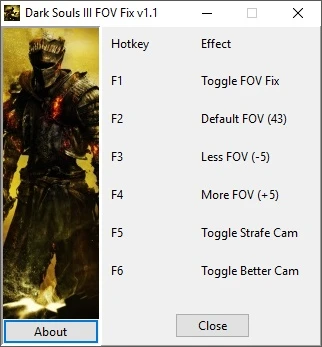
Launch the exe, launch Dark Souls III, press to toggle the FOV Fix on, and adjust your FOV with and keys. The FOV is decreased/increased by 5 degrees at each keypress. You can use key to reset FOV to default value (43).
Version 1. 1 introduces two new options for you to play with:
- Strafe Cam: very useful for keyboard + mouse players, it disables the auto follow cam to allow better strafing. Use key to toggle it.
- Better Cam: the vertical cam has more range for you to play with, top and bottom views are much enjoyable. Use key to toggle it.
Known Issues:
- Sometimes the FOV Fix won't work, simply close the program and relaunch it (no need to close Dark Souls III).
- Strafe Cam is not perfect, but it's far better than default cam behaviour for strafing.
Changelogs:
- Version 1. 1: Updated to work with 1. 04 patch, new Better Cam option, updated layout, changed keybinds to be compatible with keyboards with no numeric pads.
- Version 1. 0 K+M Cam Fix Beta: New unstable and unperfect option to disable auto follow cam, can be useful when playing with keyboard & mouse. Is not perfect and can cause game to crash and/or behaves oddly.
- Version 1. 0: Initial release
Design by Dr4Wm4N LUA scripts by jim2point0, Cielos & Phokz (were found on Cheat Engine forums) This program was made with Cheat Engine www.cheatengine.org
Dark Souls III FOV Fix is a compact utility mod that adjusts the field of view in Dark Souls III to a more comfortable setting. With 839 endorsements and nearly 24,000 downloads, it's a popular fix for players who find the default FOV too narrow. Last updated in 2016, it remains a simple solution for a common issue.
✨ Key Features
📊 Pros & Cons
✅ Pros
- Community-approved fix with 839 endorsements—clearly hits the spot for many players.
- Nearly 24,000 downloads show it's a go-to solution for FOV issues.
- Lightweight and focused—does exactly what it says without bloat.
⚠️ Cons
- Last updated in 2016—might not be compatible with the latest game patches or DLC.
- No detailed instructions or features listed, so you're on your own for installation.
- Only addresses FOV—if you're looking for other visual tweaks, this isn't it.
For Dark Souls III players who feel the default camera is too zoomed in and want a more natural field of view. Perfect for those who want a quick, no-frills fix without extra features. Skip if you're on the latest game version and worried about compatibility, or if you need more comprehensive visual mods.
💡 Beginner Tips
- Since this mod is from 2016, check if your game version is compatible before installing—if you're on the latest patch, it might not work.
- Back up your original game files before applying the fix, so you can revert if something goes wrong.
- If you're using a mod manager, you can install it manually by placing the files in the game directory—it's a simple drop-in.
📊 Mod Details
- Game
- Dark Souls 3 Mods
- Author
- Dr4Wm4N
- Version
- 1.1
- Downloads
- 23,950
- Endorsements
- 839
- Category
- Visuals and Graphics
- Created
- 4/26/2016
- Updated
- 4/28/2016
🔧 How to Install Dark Souls 3 Mods
Download from Nexus.
📖 Full step-by-step install guide for Dark Souls 3 →
Visit the official mod page for specific installation instructions for this mod.
🎮 Need cheat codes or console commands? Check ur gaming wiki for Dark Souls 3 commands, item IDs, and more.
Keep browsing — more Dark Souls 3 mods await