Cinematic Reshade
⚪ Last updated 2016⚠️ Install Order · 1 step
Install in this order, then this mod last — most mods fail to load without their framework and dependencies in place.
Preview
🔍 Analysis
- 👍 3.4% endorsement rate — high engagement, a strong quality signal
- 🏆 #21 of 195 Visuals and Graphics mods in this game by downloads
📋 About This Mod
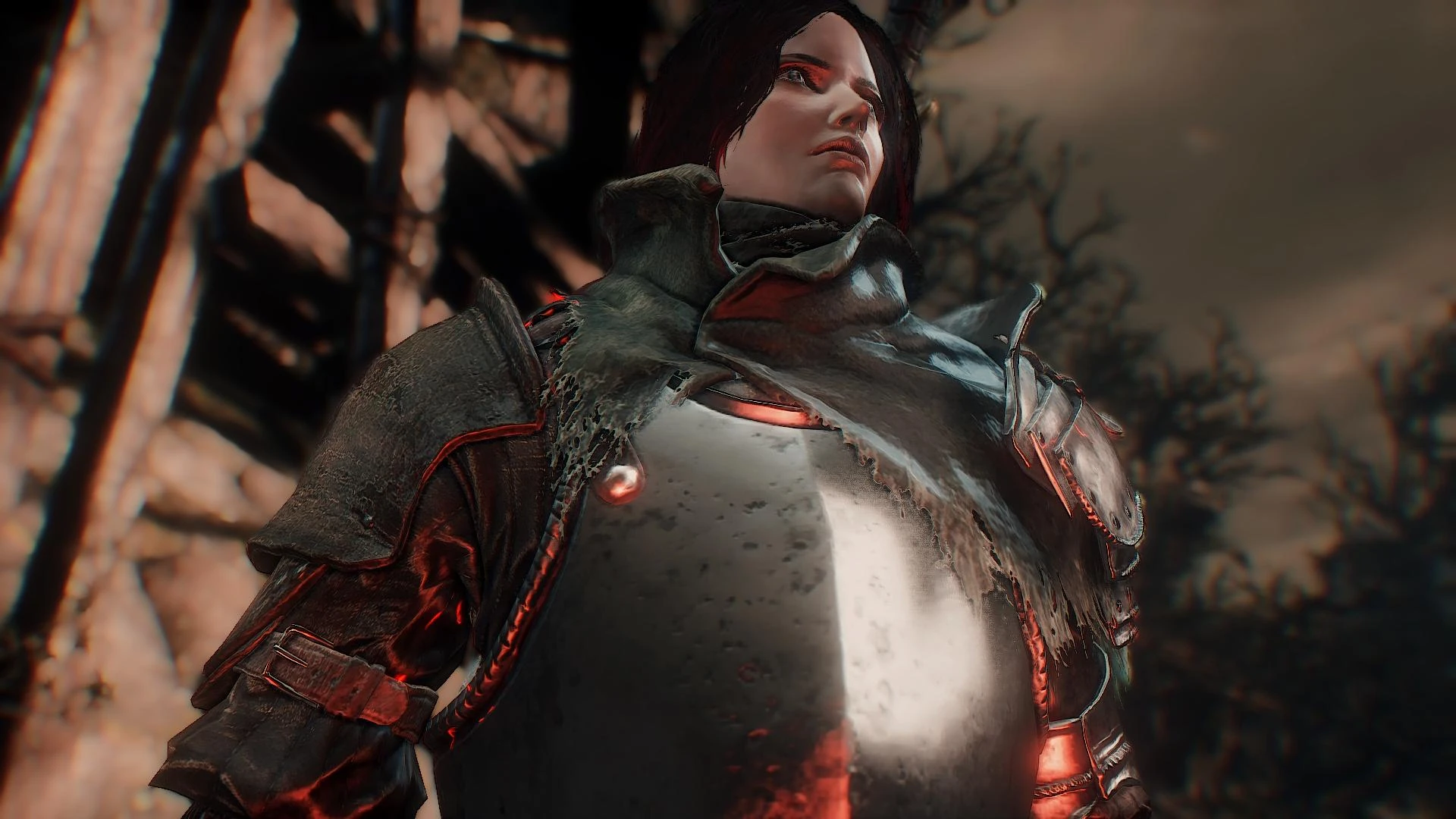
I Love the Dark Souls 3 Graphics they are amazing, but with time i decided to try something different, so i created this reshade after getting hands on the new Reshade 3. 0. 5 and tried to make the game looks more cinematic, with some collors in areas where i believe should have and more dark and defined shadows, so have in mind that you will probably have to adapt to lear to use a torch in more places than the usual, since the ligning will really matters now inside buildings and dungeons etc...
Installation:
Download and install the Reshade Version 3. 0. 5 follow the installation details from him. Download my reshade Main file, Extract the file where the game is installed Inside The "GAME Folder" after enter the game for the first time use the default shift+F2 to open the reshade menu and select my Reshade Darksoul.ini from the list and its done. have in mind that pressing shift can may the controls disabled, so when you still are on the reshade menu go to settings and change the default Shift+F2 to another key, i recommend the "End" Key and bellow you can choose a key to enable/disable the reshade, i recommend the "Pausebreak" Key, but its up to you.
there's a dof and Ambient light as optionals, by pressig the Num 9 for the Cinematic DOF, The Num - for the normal dof, and the Num / for the Ambient Light, all of them are disable by default since they can be very demanding depending of the Machine.
Requirements:
any pc able to run the default game in high or max settings more than 40fps, since this reshade can take 10 or more fps, this can vary, but its what happens to me.
Final Notes:
This reshade is just somethig i made for me, and im in love with it, and the collors in some areas maybe will be not for everyone tastes, and the reshade is not perfect, but i decided to share because i think that maybe have players with simillar tastes that can appreciate. and Put the Ingame Lightning from optionals around 5 or you will get a really dark insides.
you can see more images of this reshade on my Flickr Page clicking on the Image Bellow
Cinematic Reshade is a visual mod for Dark Souls 3 that applies a cinematic color grading and lighting preset to enhance the game's atmosphere. With 289 endorsements and 8,380 downloads, it has a modest following. Last updated in 2016, it may not be compatible with current game versions.
✨ Key Features
📊 Pros & Cons
✅ Pros
- Community-tested preset with 289 endorsements and 8,380 downloads
- Gives Dark Souls 3 a unique cinematic look that stands out from vanilla
- Lightweight and easy to install—no complex setup required
⚠️ Cons
- Last updated in 2016—may be incompatible with current game patches
- No detailed description of what exactly changes, so you're flying blind
- Requires ReShade, which isn't bundled—you'll need to grab it separately
For Dark Souls 3 players who want a fresh visual twist without overhauling the game. If you're into atmospheric, film-like graphics and don't mind tweaking settings, this is for you. Skip if you prefer vanilla visuals or want gameplay changes—this is purely cosmetic.
💡 Beginner Tips
- Make sure you have ReShade installed first, then drop the preset files into your Dark Souls 3 directory.
- If the game updates, check for compatibility patches—old presets can break with new versions.
- Use the in-game ReShade menu to tweak the preset to your liking; you can adjust intensity and effects.
📊 Mod Details
- Game
- Dark Souls 3 Mods
- Author
- Avallonkao
- Version
- 1.0
- Downloads
- 8,380
- Endorsements
- 289
- Category
- Visuals and Graphics
- Created
- 12/28/2016
- Updated
- 12/28/2016
🔧 How to Install Dark Souls 3 Mods
Download from Nexus.
📖 Full step-by-step install guide for Dark Souls 3 →
Visit the official mod page for specific installation instructions for this mod.
🎮 Need cheat codes or console commands? Check ur gaming wiki for Dark Souls 3 commands, item IDs, and more.
Keep browsing — more Dark Souls 3 mods await