Save Editor (Project CyberCAT-SimpleGUI)
🟠 Updated over a year ago⚠️ Install Order · 6 steps
Install in this order, then this mod last — most mods fail to load without their framework and dependencies in place.
Preview
🔍 Analysis
- 👍 1.9% endorsement rate — high engagement, a strong quality signal
- 🏆 #3 of 43 Utilities mods in this game by downloads
📋 About This Mod
An offshoot of SirBitesalot's CyberCAT, an in-development save editor. This fork focuses on ease-of-use and, as the name implies, simplicity.
Find us on the CP2077 Modding Community Discord!
Features
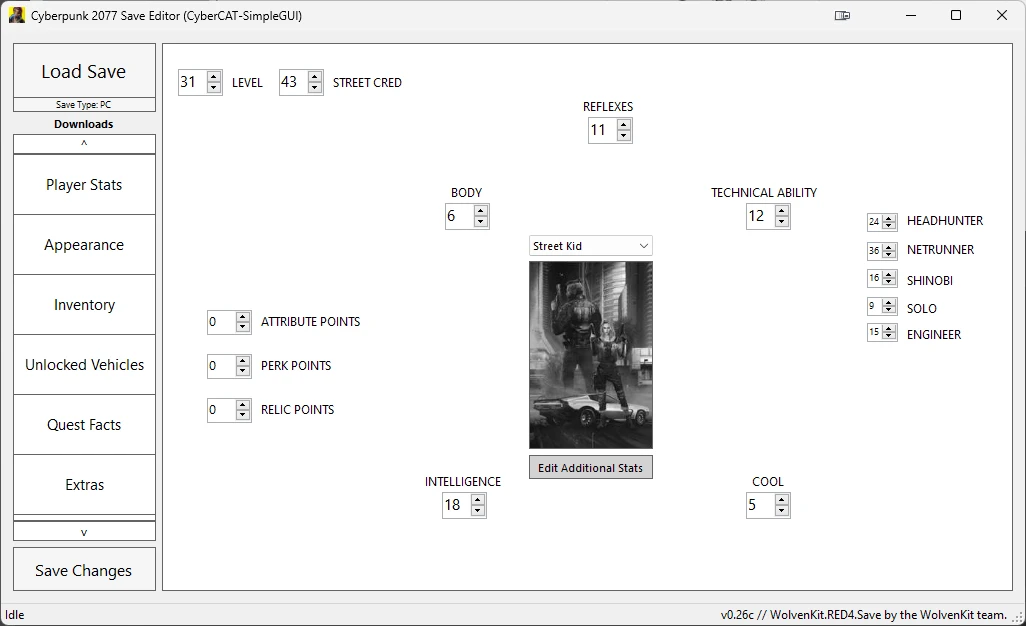
- Edit player stats such as level, street cred, etc.
- Save and load presets for your character's appearance.
- Edit the quantity, flags, stats & mod tree of items in your inventory.
- Edit quest facts.
- Quick actions - dedicated controls for common actions such as making items legendary & editing money.
- Run CP2077SaveEditor.exe
- Click "Load Save"
- Make changes to your save
- Click "Save Changes"
Player Stats Tab
This tab is fairly self-explanatory - any of the values can be changed.
Appearance Tab
"Save Preset" will save your character's appearance to a .preset file.
"Load Preset" will replace your character's appearance with one from a .preset file.
Inventory Tab
The "Inventories" box lists all inventories found within your save file. This includes your player inventory, stash & any other containers that the game has saved. Your player inventory will be selected by default. Selecting a different inventory will list all items within that inventory.
You can double click on any item listed to edit its quantity, flags, stats & mod tree. (This is also where the "Make Legendary" option is located.) Some options may be greyed out depending on what kind of item it is. You can also double click on any node in an item's mod tree to edit that node, or double click on a stat to edit that stat's values.
For example: To add extra damage to a weapon or extra armor to a piece of clothing, click on "New Constant" in its stats section. On the new window that pops up, put in "Additive" for the modifier, and "BaseDamage" or "Armor" for the stat (depending on which one you want), then enter how much you want for the value. Click "Apply and Close" and you're good to go.
Quest Facts Tab
Click on any row to edit the value of the corresponding quest fact. Only valid integers (numbers) are accepted. I would not suggest changing any values here unless you know what you're doing, messing with quest facts can cause problems that only appear further into your playthrough.
Backup
The first time a save gets edited, a backup of your save will be created. To restore that, you need to go into the save folder, delete the "sav.dat" and rename the "sav.old" to "sav.dat"
Credits
Save Editor (Project CyberCAT-SimpleGUI) is a user-friendly save editor for Cyberpunk 2077, branching from SirBitesalot's CyberCAT. It boasts 42,957 endorsements and 2.2 million downloads, making it a highly popular utility for players who want to tweak their save files. Last updated in July 2025, it remains actively maintained.
✨ Key Features
📊 Pros & Cons
✅ Pros
- Huge community trust – 42,957 endorsements is no joke, this is a go-to tool.
- 2.2 million downloads means it's battle-tested by a massive player base.
- Still getting updates as of July 2025, so it's not abandoned.
⚠️ Cons
- It's an offshoot of CyberCAT, so if you're already using that, you might not need this.
- No mention of compatibility with the latest game patches – check before you rely on it.
For Cyberpunk 2077 players who want to edit their saves without messing with complex tools. If you're a modder or just want to tweak stats, items, or quest flags, this is a solid pick. Skip if you're happy with vanilla saves or prefer command-line tools.
💡 Beginner Tips
- Always back up your save files before editing – a corrupted save can ruin hours of progress.
- Check the mod's forum or Discord for known issues with the latest Cyberpunk 2077 patch.
- Use the GUI to preview changes before applying them – it's simpler than raw editing.
📊 Mod Details
- Game
- Cyberpunk 2077 Mods
- Author
- DeweySalt and Papayu
- Version
- 0.28b
- Downloads
- 2,230,437
- Endorsements
- 42,957
- Category
- Utilities
- Created
- 1/4/2021
- Updated
- 7/22/2025
🧩 Commonly Used Together
Users add these mods to the same collections — a real compatibility signal, not an AI guess.
🔧 How to Install Cyberpunk 2077 Mods
Download from Nexus.
📖 Full step-by-step install guide for Cyberpunk 2077 →
Visit the official mod page for specific installation instructions for this mod.
🎮 Need cheat codes or console commands? Check ur gaming wiki for Cyberpunk 2077 commands, item IDs, and more.
Keep browsing — more Cyberpunk 2077 mods await