Native Settings UI
⚪ Last updated 2024⚠️ Install Order · 6 steps
Install in this order, then this mod last — most mods fail to load without their framework and dependencies in place.
Preview
🔍 Analysis
- 👍 1.4% endorsement rate — high engagement, a strong quality signal
- 🏆 #7 of 44 Modders Resources mods in this game by downloads
📋 About This Mod
What it does:
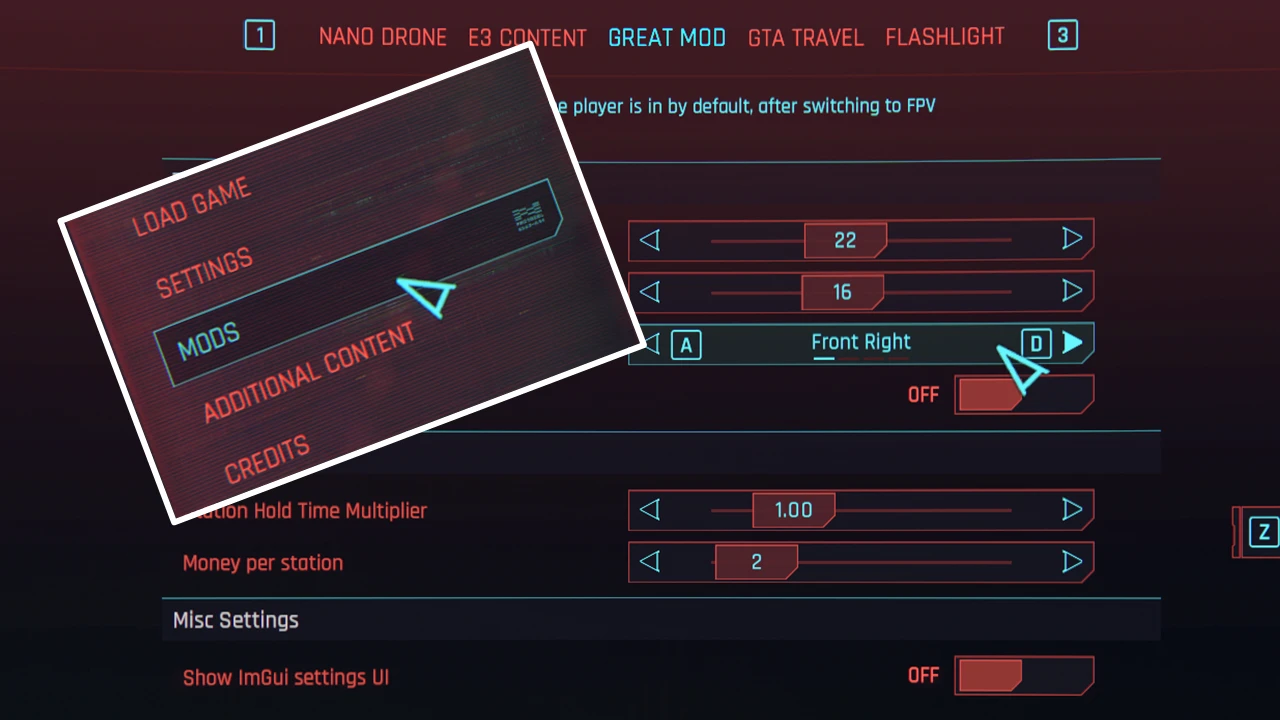
- Lets other mods add their own page and add settings widgets to the newly added "Mods" settings menu
- Easy to use, and useful features such as option descriptions and resetting to default values
- Looks and behaves just like the normal settings menu
- Fully compatible with controllers (Obviously)
- Offers adding of new tabs and subcategories. Widgets are switches, sliders, list selectors, keybinds and buttons
What it does not:
- Offer a way of saving the settings or anything like that, this mod just provides the UI, what you do with it is up to you
Installation:
- Download the LATEST version of CET
- Extract this mod into your base game folder (The one containing /bin)
For modders:
- If you want to use this mod, just add it to your mod's requirement list and nexus will prompt the user to download it
- For documentation and examples on how to add your own menu, please visit:
This mods GitHub Page
- Also feel free to ask me on the CP2077 Modding DiscordAvailable widgets:
-
[]psiberx for answering all my questions, as well as doing a lot of work on CET that makes this mod even work and creating Cron.lua,, UIButton.lua, Ref.lua and EventProxy.lua
[
]rmk for testing and helping me with bugfixing <3
- nim for hating ImGui
Native Settings UI is a modder's resource that lets other mods create settings menus using the game's native UI, making them look like the official settings menu. With 88,367 endorsements and 6.1 million downloads, it's a widely adopted framework for modders. Last updated January 2024, it remains a staple for mod authors seeking seamless integration.
✨ Key Features
📊 Pros & Cons
✅ Pros
- Massive community trust with 88,367 endorsements and 6.1 million downloads
- Makes mod settings feel like part of the base game, no more clunky custom menus
- Essential for mod authors who want a clean, native look
⚠️ Cons
- Not a standalone mod – it's a resource, so you need other mods to use it
- Last updated January 2024 – may not be updated for the latest game patches
- No documentation or install instructions provided in the description
For mod authors and modders who want to integrate settings seamlessly into the game's UI. Also for players who want a consistent, polished settings experience across their modded game. Skip if you're looking for gameplay changes – this is purely a framework.
💡 Beginner Tips
- If you're a mod author, check if your mod manager supports this resource – it's usually just a drop-in dependency.
- For players, you don't need to install this manually unless a mod requires it – your mod manager will handle it.
- Look for mods that list 'Native Settings UI' as a requirement to see it in action.
📊 Mod Details
- Game
- Cyberpunk 2077 Mods
- Author
- keanuWheeze
- Version
- 1.96
- Downloads
- 6,114,762
- Endorsements
- 88,367
- Category
- Modders Resources
- Created
- 12/4/2021
- Updated
- 1/6/2024
🔗 Required By 6 Mods
These mods list this mod as a dependency.
🧩 Commonly Used Together
Users add these mods to the same collections — a real compatibility signal, not an AI guess.
🔧 How to Install Cyberpunk 2077 Mods
Download from Nexus.
📖 Full step-by-step install guide for Cyberpunk 2077 →
Visit the official mod page for specific installation instructions for this mod.
🎮 Need cheat codes or console commands? Check ur gaming wiki for Cyberpunk 2077 commands, item IDs, and more.
Keep browsing — more Cyberpunk 2077 mods await