Immersive Sunglasses
⚪ Last updated 2023⚠️ Install Order · 6 steps
Install in this order, then this mod last — most mods fail to load without their framework and dependencies in place.
Preview
🔍 Analysis
- 👍 0.8% endorsement rate
- 🏆 #17 of 307 Gameplay mods in this game by downloads
📋 About This Mod
What it does:
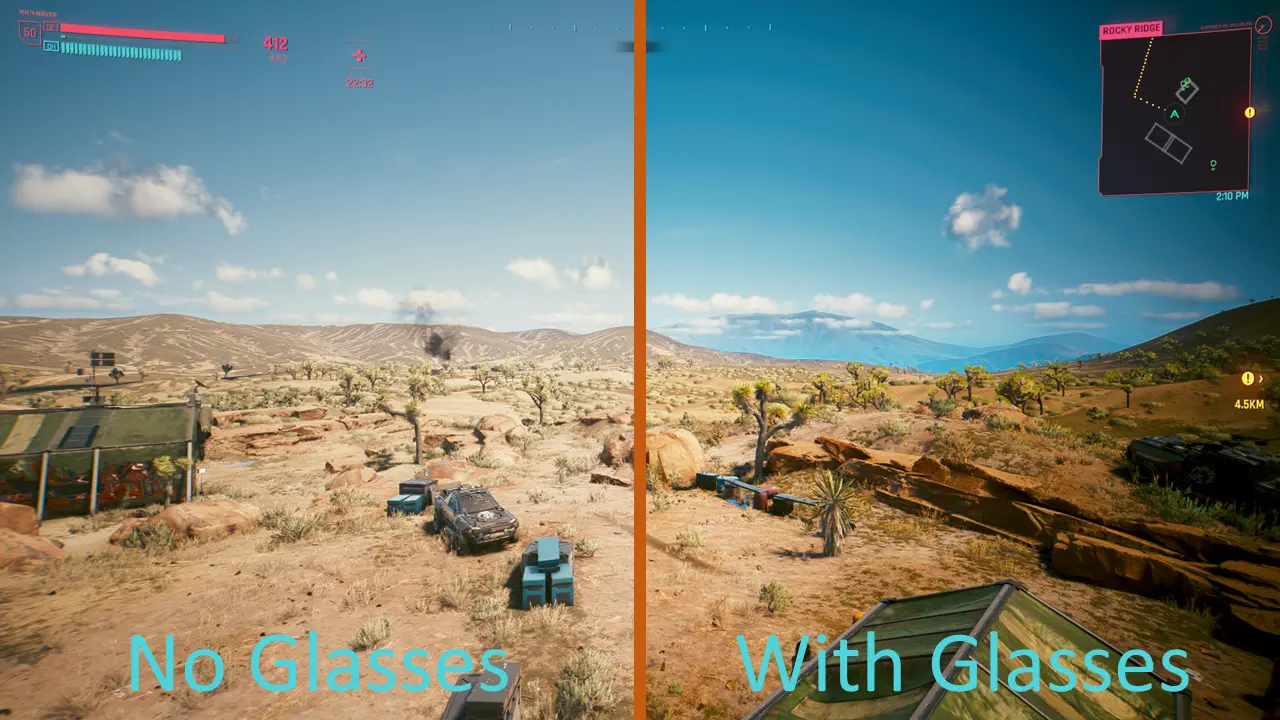
- Applies a sunglasses filter (Darker, more contrast and vignette) while wearing any type of glasses
Installation:
- Download and install CET (Latest version)
- Download the mod and extract it into your game folder (The one containing /bin, /r6 etc...)
How to use:
- Simply equip any glasses item into the "Face" slot
- Feel free to modify the sunglass effect to your liking using WolvenKit
FIY: While the glasses effect is active, certain other visual effects (Such as the crouch effect) are being disabled
Thanks to psiberx for GameUI.lua and Cron.lua
Immersive Sunglasses applies a sunglasses-style visual filter whenever your character wears glasses, adding a subtle tint to the screen. It's a simple, lightweight gameplay immersion mod for players who want a bit of extra flair from their eyewear. With 733 endorsements and nearly 100k downloads, it's a popular niche choice.
✨ Key Features
📊 Pros & Cons
✅ Pros
- Community-approved with 733 endorsements and nearly 100k downloads—clearly a hit for what it does
- Simple concept that adds a nice touch of immersion without bloating your load order
- Last updated in October 2023, so it's relatively recent and likely compatible with current game versions
⚠️ Cons
- The filter is a blanket tint, so it might not match every environment or lighting condition perfectly
- If you're not into cosmetic tweaks, this does nothing for gameplay mechanics—it's purely visual
For roleplayers and immersion enthusiasts who want a little extra flavor when their character dons shades. Also for anyone who likes subtle visual tweaks that don't overhaul the game. Skip if you're looking for gameplay changes or if you never wear glasses in-game.
💡 Beginner Tips
- Make sure you have a pair of glasses in your inventory to see the effect—otherwise you won't notice anything
- If the filter feels too strong or too weak, check if the mod has an MCM or config file to adjust the intensity (though none is mentioned)
- Since it's a simple filter, it should work with most mod setups, but test it in a new save to avoid conflicts
📊 Mod Details
- Game
- Cyberpunk 2077 Mods
- Author
- keanuWheeze
- Version
- 1.1
- Downloads
- 97,573
- Endorsements
- 733
- Category
- Gameplay
- Created
- 9/23/2022
- Updated
- 10/4/2023
🔗 Required By 1 Mod
These mods list this mod as a dependency.
🔧 How to Install Cyberpunk 2077 Mods
Download from Nexus.
📖 Full step-by-step install guide for Cyberpunk 2077 →
Visit the official mod page for specific installation instructions for this mod.
🎮 Need cheat codes or console commands? Check ur gaming wiki for Cyberpunk 2077 commands, item IDs, and more.
Keep browsing — more Cyberpunk 2077 mods await