InventoryMaid
⚪ Last updated 2021⚠️ Install Order · 6 steps
Install in this order, then this mod last — most mods fail to load without their framework and dependencies in place.
Preview
🔍 Analysis
- 👍 2.8% endorsement rate — high engagement, a strong quality signal
- 🏆 #10 of 10 Crafting mods in this game by downloads
📋 About This Mod
This mod requires Cyberpunk Engine Tweaks 1. 11. 2 or higher in order to work!
What it does:
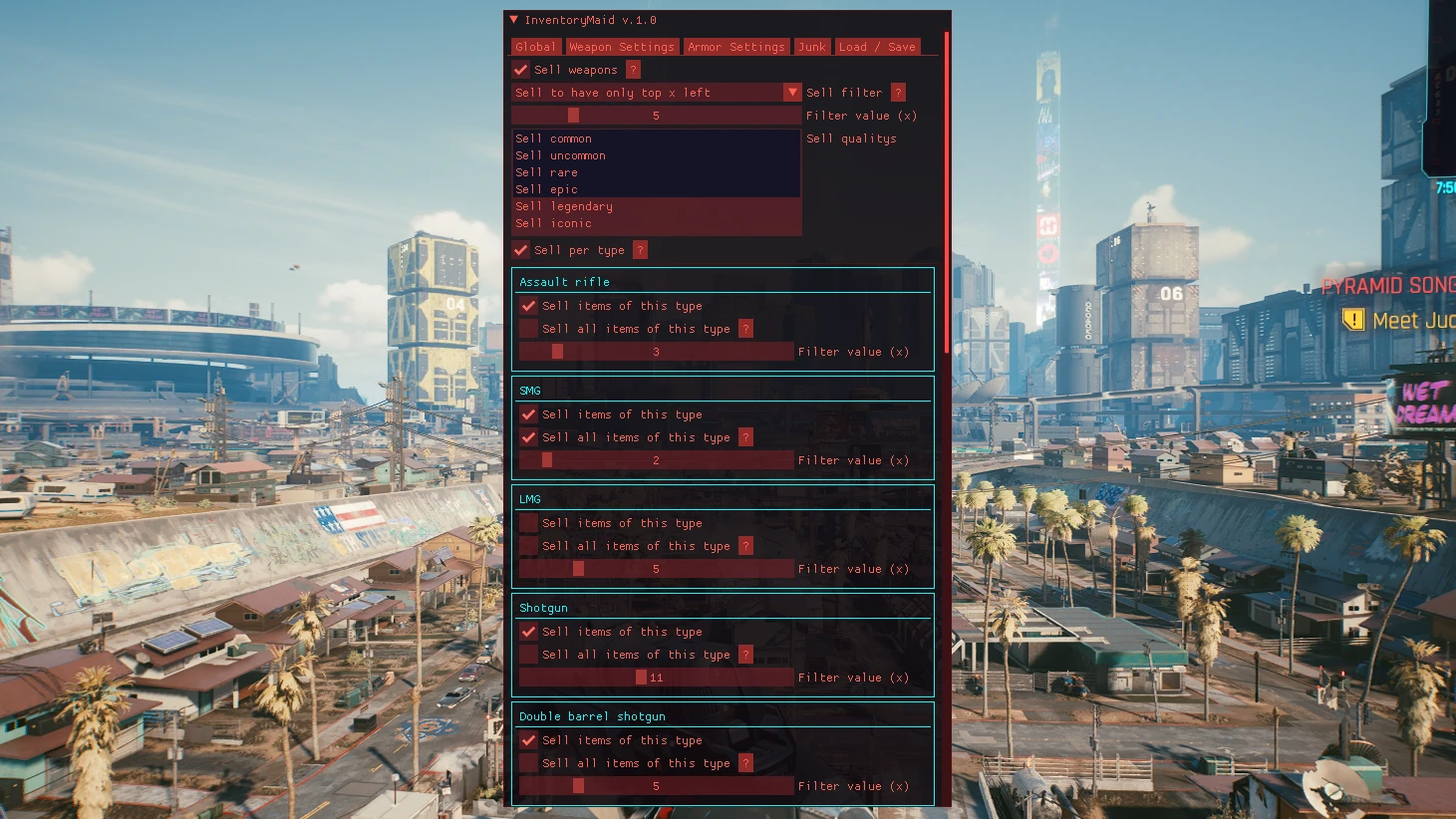
- Lets you configure filters to sell/disassemble Weapons, Armor, Junk and Grenades!
- To see what filters you can setup check out the images or read the different tab´s description down below
- Lets you save your filter settings for easy reuse
How to use:
- Open the CET console, this will also open the InventoryMaid window
- You can use CET´s hotkey menu to set keys for sell / dissasemble
- If you dont know what an option does, hover over the ? box next to it to learn more about it
Global Tab:
- When changing settings in here, they will overwrite the ones inside the Weapon/Armor tabs
- To configure filters for Weapon/Armor specifacally use the Weapon/Armor tabs
- Sell Filter: Choose how you want to filter you items. For more information use the ? next to it
- Filter value: Set the value (x Items / x %) that your selected sell filter will use
- Sell qualitys: Select the item qualitys that you want to be able to get sold
- Preview selected: Gives you a preview of what your current settings will sell (Items currently, items after sell, money gained)
- Sell selected: This sells all items that match the filters (Also sells selected Junk)
- Disassemble selected: This disassembles all items that match the filters (Also sells selected Junk)
- Reset: Resets all settings to their default
Weapon Settings Tab:
- Sell weapons: This toggles all the "Sell items of this type" boxes
- Sell Filter, Filter Value, Sell Qualitys: Works the same as the ones from the global tab, applys only to weapons
- Sell per type: This applys the sell filter per item type (Katan, Revolver, LMG....). For more information use the ? next to it
- Options per type: Lets you change settings for each weapon type.
- Sell items of this type: Enables selling of the item type
- Sell all items of this type: Needs the above to be checked, sells all items of that type (Still respects the quality filter)
Armor Settings Tab:
- Works the same as Weapon Settings Tab but applys to armor
Grenade Settings Tab:
- Works the same as Weapon Sett
InventoryMaid is a highly customizable inventory and equipment manager for crafting-focused gameplay. It features a user-friendly UI and allows loading and saving configs. With 822 endorsements and nearly 30k downloads, it's a popular tool for players who want streamlined inventory management.
✨ Key Features
📊 Pros & Cons
✅ Pros
- Community favorite with 822 endorsements and nearly 30k downloads
- Config saving means you can set up your perfect layout once and reuse it
- UI is designed to be user-friendly, so you won't need a manual to get started
⚠️ Cons
- Last updated in June 2021 — might not work with the latest game patches
- Only one category (Crafting) — if you're looking for a broader overhaul, this might be too focused
For crafters and hoarders who spend too much time sorting inventory and want a more efficient, customizable setup. If you're a modder who likes tweaking every aspect of your UI, this is for you. Skip if you want a complete inventory overhaul with new visuals — this is a utility, not a reskin.
💡 Beginner Tips
- Since it's a crafting-focused mod, try it with your favorite crafting mods to see how it integrates.
- Use the config save feature to back up your setup before experimenting with new settings.
- Check the mod's comments section for any known compatibility issues with recent game updates.
📊 Mod Details
- Game
- Cyberpunk 2077 Mods
- Author
- keanuWheeze
- Version
- 1.51h
- Downloads
- 29,804
- Endorsements
- 822
- Category
- Crafting
- Created
- 2/1/2021
- Updated
- 6/25/2021
🔧 How to Install Cyberpunk 2077 Mods
Download from Nexus.
📖 Full step-by-step install guide for Cyberpunk 2077 →
Visit the official mod page for specific installation instructions for this mod.
🎮 Need cheat codes or console commands? Check ur gaming wiki for Cyberpunk 2077 commands, item IDs, and more.
Keep browsing — more Cyberpunk 2077 mods await