GTA Travel
⚪ Last updated 2023⚠️ Install Order · 6 steps
Install in this order, then this mod last — most mods fail to load without their framework and dependencies in place.
Preview
🔍 Analysis
- 👍 1.3% endorsement rate — high engagement, a strong quality signal
- 🏆 #1 of 7 Scripts mods in this game by downloads
📋 About This Mod
What it does:
-
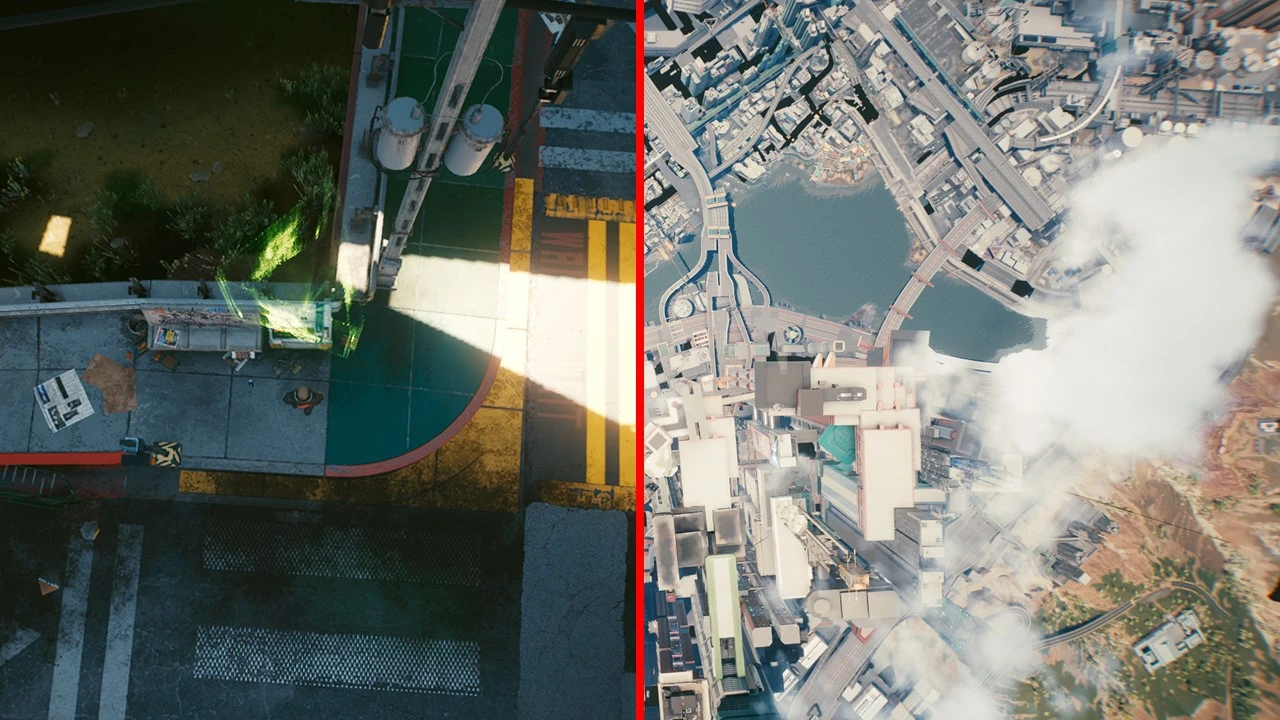
[]As seen above, it replaces the loading screen when fast traveling with a smooth camera transition (Gif is 10 fps)
[
]This mod comes with a variety of settings to change the speed and behaviour to your preference[]This mod also lets you choose between different fast travel from anywhere settings
-
[]When configured fast enough, it is faster than fast traveling (At least for me)
Installation:
- []Download and install CyberEngineTweaks
[]Download the mod
[]Extract the folder into your Cyberpunk 2077 folder (The one containing the /bin and /r6 folder)
[]File structure should be: "PATHTOCYBERPUNK\Cyberpunk2077\bin\x64\plugins\cyber_engine_tweaks\mods\gtaTravel\init.lua"
[]If installed using vortex, make sure to use "Hardlink Deployment" as deployment method
How to use / settings explained:
-
[]Hold down left-click on your destination marker, not just click it (Since patch 1. 5)
[]The UI shows and hides with the CET Console, no hotkeys required
[]Images of the UI / Settings tabs can be found under this mods image section
[]If you want to know more about an option, and what value you should choose, hover over the little ? next to it
[]Setting speed values too high might result in a loading screen, so start low and slowly increase the speed to find the maximum speed your PC can handle
Speed settings:
- Max Speed: This sets what's the maximum speed is you can reach during that phase (Available for up, sideways and down phase)
- Speed Increment: Use this to control how fast you accelerate / decelerate (Lower → Slower) (Available for up, sideways and down phase)
- Cam Height: This sets to what height the cam goes during the transition (Available for up phase)
- Player TP Distance: This controls at which distance to the ground the player, he gets teleported away from it. I recommend keeping the default
values, higher values also work most of the time but not everywhere (Depends on how busy the location is) (Available for up and down phase)
GTA Travel replaces fast travel loading screens with realtime dynamic camera transitions, similar to GTA V character switching. It also adds fast travel from anywhere options. With 7,081 endorsements and 533,735 downloads, it's a popular script mod for enhancing travel immersion.
✨ Key Features
📊 Pros & Cons
✅ Pros
- Huge community trust (7,081 endorsements) and massive download count (533k+)
- Kills the boring loading screen—you get a cinematic transition instead
- Fast travel from anywhere means less backtracking and more freedom
⚠️ Cons
- Last updated in October 2023—might not be compatible with the latest game patches
- Script mods can conflict with other mods that alter fast travel or loading screens
For GTA V players who hate staring at loading screens and want a more immersive travel experience. Perfect for roleplayers and content creators who want cinematic transitions. Skip if you prefer vanilla fast travel or don't want to risk mod conflicts.
💡 Beginner Tips
- Make sure to install Script Hook V and a mod manager like OpenIV to handle script mods properly
- Test fast travel from anywhere in a safe area first to avoid spawning in a glitched spot
- Check the mod's comments section for compatibility notes with other popular script mods
📊 Mod Details
- Game
- Cyberpunk 2077 Mods
- Author
- keanuWheeze
- Version
- 1.9
- Downloads
- 533,735
- Endorsements
- 7,081
- Category
- Scripts
- Created
- 3/16/2021
- Updated
- 10/6/2023
🧩 Commonly Used Together
Users add these mods to the same collections — a real compatibility signal, not an AI guess.
🔧 How to Install Cyberpunk 2077 Mods
Download from Nexus.
📖 Full step-by-step install guide for Cyberpunk 2077 →
Visit the official mod page for specific installation instructions for this mod.
🎮 Need cheat codes or console commands? Check ur gaming wiki for Cyberpunk 2077 commands, item IDs, and more.
Keep browsing — more Cyberpunk 2077 mods await