Cyber Engine Tweaks In-game Mod Manager (dofile script launcher)
⚪ Last updated 2024⚠️ Install Order · 6 steps
Install in this order, then this mod last — most mods fail to load without their framework and dependencies in place.
Preview
🔍 Analysis
- 👍 2.5% endorsement rate — high engagement, a strong quality signal
- 🏆 #33 of 43 Utilities mods in this game by downloads
📋 About This Mod
Don't forget to click the 👍Endorse and ⭐Vote buttons so more people can find this mod! Or maybe consider buying me a coffee.
-
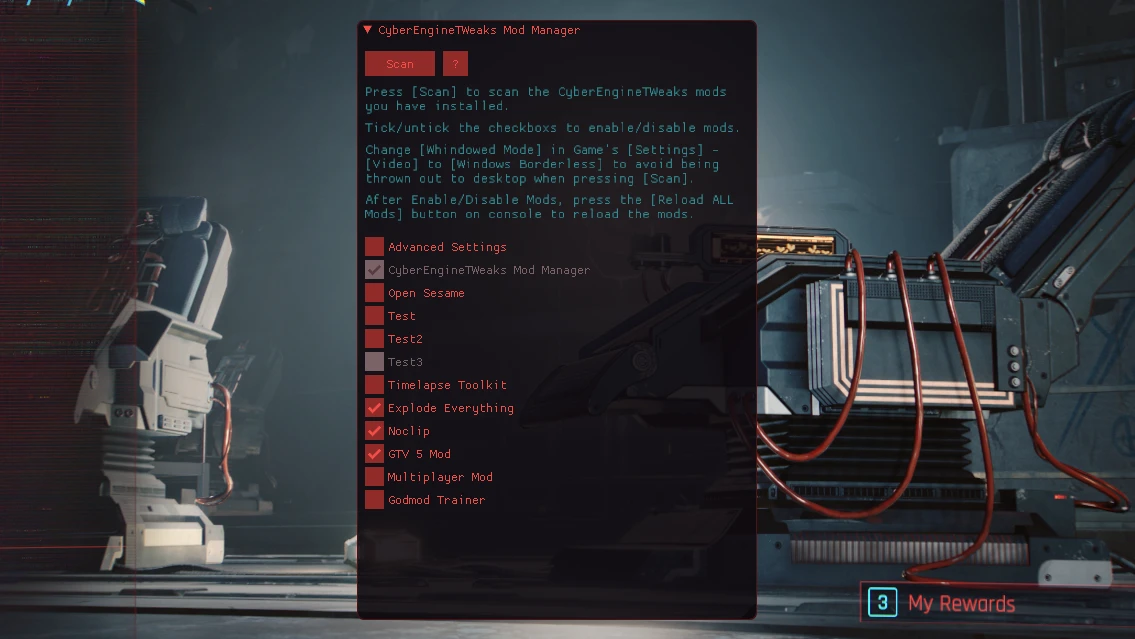
[]A Mod Manager for CyberEngineTweaks based mods
[
]Enable/Disable CyberEngineTweaks based mods inside the game with a single click[]It can be used to find out incompatible mods easily
[]Run the deprecated "Dofile()" mods with a click of a button. (Thanks for greggproops's suggestion)
[]Open the mod folders directly from the game. (Thanks for digitalbarrito's suggestion)
[]Toggle automatically scan mods after game launch (Also digitalbarrito's suggestion)
[]Open the mod manager interface by pressing a hotkey of your choosing
[]Open the dofile mod interface by pressing a hotkey of your choosing
Installation
-
[]This mod requires CyberEngineTweaks Mod. https://www.nexusmods.com/cyberpunk2077/mods/107
[
]This mod requires RED4ext. https://www.nexusmods.com/cyberpunk2077/mods/2380[]Unpack the zip. Put bin folder inside <your Cyberpunk 2077 install folder>\
[]Restart the game.
File Structure
Cyberpunk 2077
└── plugins
├── cet_mod_manager.asi
└── cyber_engine_tweaks.asi
-
[]To use it,
you need to bind keys inside Cyber Engine Tweaks
. And press the hotkey when the console is closed to open the interface.[
]Press the button Scan to scan your installed mods.[]Tick/untick the checkbox in front of the mod name to enable/disable them.
[]Press the Reload ALL Mods button on the console to reload the mods.
[]To run your dofile() script mods, put the .lua files inside \cet_mod_manager\dofiles\ , you can open the folder by pressing the Dofile Folder button.
[]After putting the .lua files inside the "dofiles\" folder, press the "Scan" button again to refresh it.
[]Press the Run button in front of the scripts that you want to run without typing a single command.
[]You can delete the example scripts if you want.
Multilingual
CyberEngineTweaks Mod Manager now supports multiple languages!
-
[]This mod requires CyberEngineTweaks Mod. https://www.nexusmods.com/cyberpunk2077/mods/107
This utility adds an in-game mod manager for Cyber Engine Tweaks, letting you toggle CET-based mods on and off without restarting. It also supports running legacy dofile() script mods, making it a handy tool for troubleshooting compatibility issues. With over 4,000 endorsements, it's a community favorite.
✨ Key Features
📊 Pros & Cons
✅ Pros
- Huge community trust (4,113 endorsements) — this is a go-to tool for Cyberpunk modders
- Saves time by letting you toggle mods without restarting the game
- Revives old dofile() mods that would otherwise be left behind
⚠️ Cons
- Only works with Cyber Engine Tweaks mods — doesn't manage other mod types
- No detailed instructions in the description, so you might need to figure out the setup yourself
- Last updated in March 2024 — check if it's still compatible with the latest game patches
For Cyberpunk 2077 players who run a lot of CET mods and want to quickly test compatibility or disable problematic ones. Also for anyone who misses old dofile() script mods and wants to run them again. Skip if you only use a few mods or don't use CET at all.
💡 Beginner Tips
- Make sure you have Cyber Engine Tweaks installed first, since this mod depends on it.
- Use the in-game menu to toggle mods one by one to isolate conflicts.
- If a mod isn't showing up, double-check that it's placed in the correct CET mod folder.
📊 Mod Details
- Game
- Cyberpunk 2077 Mods
- Author
- Ming
- Version
- 2.0.10
- Downloads
- 162,463
- Endorsements
- 4,113
- Category
- Utilities
- Created
- 1/12/2021
- Updated
- 3/7/2024
🔧 How to Install Cyberpunk 2077 Mods
Download from Nexus.
📖 Full step-by-step install guide for Cyberpunk 2077 →
Visit the official mod page for specific installation instructions for this mod.
🎮 Need cheat codes or console commands? Check ur gaming wiki for Cyberpunk 2077 commands, item IDs, and more.
Keep browsing — more Cyberpunk 2077 mods await