Arcade Anywhere
⚪ Last updated 2024⚠️ Install Order · 6 steps
Install in this order, then this mod last — most mods fail to load without their framework and dependencies in place.
Preview
🔍 Analysis
- 👍 0.3% endorsement rate
- 🏆 #295 of 457 Gameplay mods in this game by downloads
📋 About This Mod
Basics:
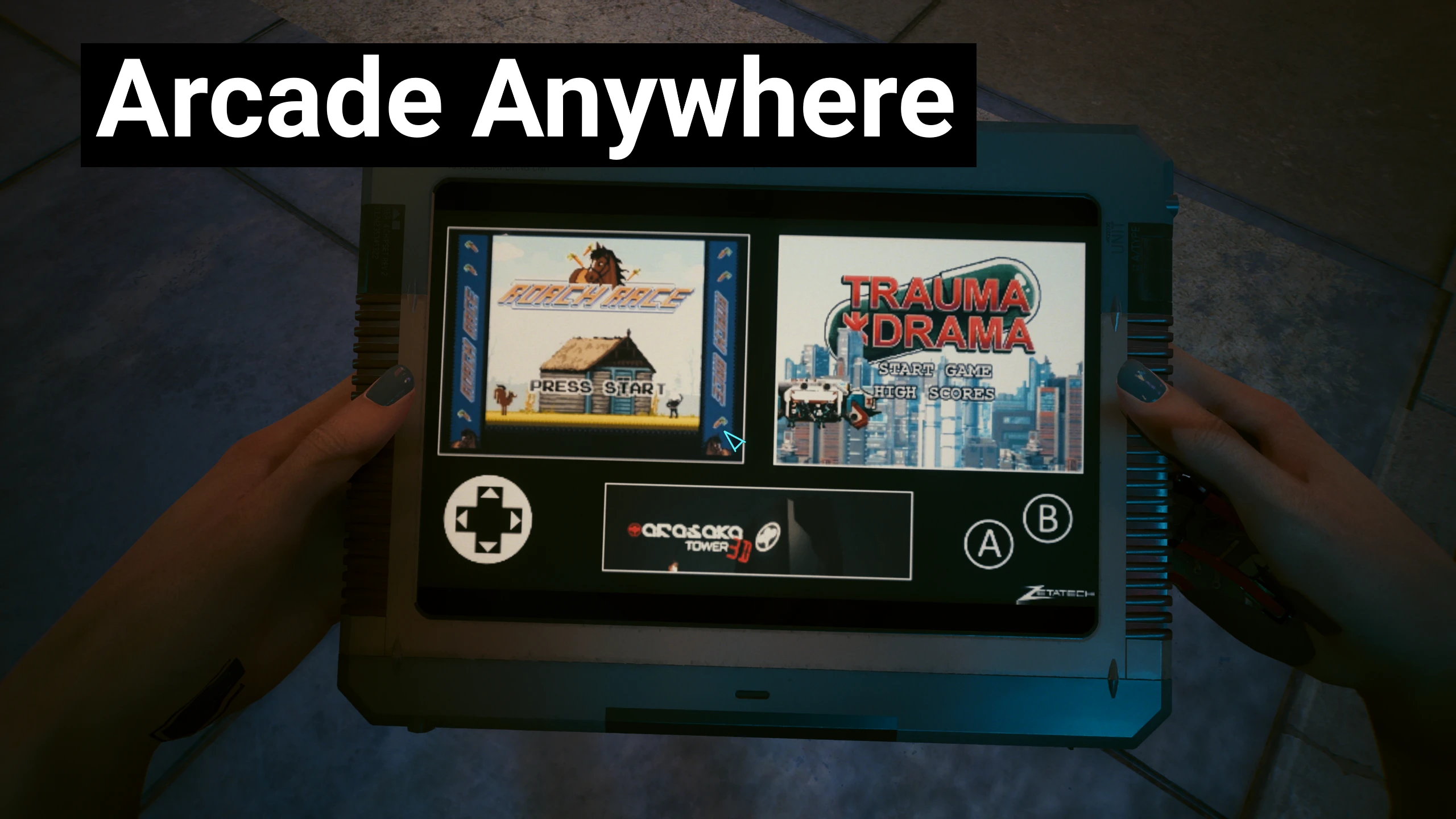
Allows V to play Roach Race, Trauma Drama, and Arasaka Tower 3D, on their Video Tab from TV Anywhere
Requires the Video Tab device from TV Anywhere
How to "use" the mod?
See the "How to "use the mod?" section from TV Anywhere.
Once the main TV Anywhere menu is onscreen, if Arcade Anywhere is install correctly a "Games" option will be present.
From this menu you can pick Roach Race, Trauma Drama, or Arasaka Tower 3D, or return to the main TV menu.
Support me:
Really like my mod(s)?:
Ko-Fi: Deceptious
Patreon: Deceptious
Installation:
Unzip the main zip into "Cyberpunk 2077" folder so that the .archive and archive.xl files end up in the "Cyberpunk 2077\archive\pc\mod" folder, and the .yaml and .reds files will end up in their own folders in "Cyberpunk 2077\r6\" scripts and tweaks folders respectively
Uninstall:
Avoid saving with the choice option on screen and then:
Simply delete the ArcadeAnywhere.archive file from the "Cyberpunk 2077\archive\pc\mod" folder.
You can also remove the ArcadeAnywhere folders from from "Cyberpunk 2077\r6\tweaks" and "Cyberpunk 2077\r6\scripts"
Requirements:
TweakXL (and that needs Red4Ext): The idle menu will not work without this
ArchiveXL (also needs Red4Ext): The new menu/options and arcade games will not work without this
Redscript: Roach Race and Trauma Drama won't play properly without this
TV Anywhere (which needs Deceptious Quest Core): The mod will not activate without this
Issues/limitations:
As this feature can be used anywhere, I can't currently pinpoint V's location in a way that can pre-fetch it while in Arasaka Tower 3D, this means there is a loading screen when exiting that arcade game. I have set it to pre-fetch the H10 apartment for now, so playing it at home is slightly more efficient than out in the world.
If you don't have the Games option then there is a general installation issue, or an ArchiveXL one.
If the screen doesn't change to the games on then there is a TweakXL issue.
If Roach Race and Trauma Drama fail to play properly then there is a Redscipt issue.
The mod file is so big (compared to most of my mods) because of the video file used for the Games screen/
Bugs
If anyone finds any bugs beyond what's listed in in Issues/Limitations, please let me know!
Arcade Anywhere lets V play Roach Race, Trauma Drama, and Arasaka Tower 3D from the Video Tab on TV Anywhere. A popular gameplay mod with 828 endorsements and 269,131 downloads, last updated January 2024.
✨ Key Features
📊 Pros & Cons
✅ Pros
- Huge download count (269k) shows tons of players want this feature.
- Solid endorsement ratio (828) indicates the community approves.
- Simple concept that adds a fun distraction without breaking immersion.
⚠️ Cons
- Only works with TV Anywhere — if you don't use that feature, this mod is useless.
- No mention of compatibility with other TV mods or game updates after Jan 2024.
- Limited to three specific arcade games — might not scratch the itch if you wanted more.
For Cyberpunk 2077 players who love the in-game arcade games and want to play them outside of the usual locations. If you're a completionist or just want a quick break from the main story, this is a nice quality-of-life addition. Skip if you never use TV Anywhere or don't care about the arcade minigames.
💡 Beginner Tips
- Make sure you have the base game and TV Anywhere feature unlocked before installing.
- If you're using other TV-related mods, test this one in a new save to avoid conflicts.
- Check the mod page for any required dependencies or patches if you're on a newer game version.
📊 Mod Details
- Game
- Cyberpunk 2077 Mods
- Author
- Deceptious
- Version
- 1.0.1
- Downloads
- 269,131
- Endorsements
- 828
- Category
- Gameplay
- Created
- 1/16/2024
- Updated
- 1/17/2024
🧩 Commonly Used Together
Users add these mods to the same collections — a real compatibility signal, not an AI guess.
🔧 How to Install Cyberpunk 2077 Mods
Download from Nexus.
📖 Full step-by-step install guide for Cyberpunk 2077 →
Visit the official mod page for specific installation instructions for this mod.
🎮 Need cheat codes or console commands? Check ur gaming wiki for Cyberpunk 2077 commands, item IDs, and more.
Keep browsing — more Cyberpunk 2077 mods await