Limited Mercenary Contract (Outdated)
⚪ Last updated 2020Preview
🔍 Analysis
- 👍 3.6% endorsement rate — high engagement, a strong quality signal
- 🏆 #358 of 688 Gameplay mods in this game by downloads
📋 About This Mod
WARNING!
Source: GitHub
Is you want to disable this mod in your save:
Install Aragas. SaveMissingModuleFix
Load the save without Limited Mercenary Contract and with Aragas. SaveMissingModuleFix enabled
Click yes for both messages
Load in the game
While in the game, create a separate save file which will "purge" mods data
Disable/keep Aragas. SaveMissingModuleFix
Enjoy your save without the mod!
Events are saved in it's own storage. I intentionally used a separate storage so the mod couldn't interfere with any data.
The mod uses Harmony for a workaround, but the way it's used should not introduce any incompatibilities with other mods at all.
Should the Faction also cover the daily costs of units?
Thanks to naiski3 for the inspiration!
Installation Instructions:
-
[]Download the zip file.
[]Unzip the zip file.
[]Copy the "Modules" folder to your "Mount & Blade II Bannerlord" directory.
You should now have the following directory structure:
Mount & Blade II Bannerlord
|---- Modules
|-------- Aragas. MercenaryContract
|------------ SubModule.xml
|------------ bin
|---------------- Win64_Shipping_Client
|-------------------- Aragas. MercenaryContract.dll
|-------------------- 0Harmony.dll
|------------ ModuleData
|---------------- global_strings.xml
Troubleshooting:
-
[]Make sure the files are in the proper directories (see above).
[
]Mod Crashing Your Game When Loaded?- Navigate to "Modules > Aragas. MercenaryContract> bin > Win64_Shipping_Client" in your game files.
- Right click the "Aragas. MercenaryContract.dll" and click properties
- Click unblock at the bottom.- Right click the "Aragas. MercenaryContract.dll" and click properties
- Do the same for "0Harmony.dll"
-
[]Make sure the files are in the proper directories (see above).
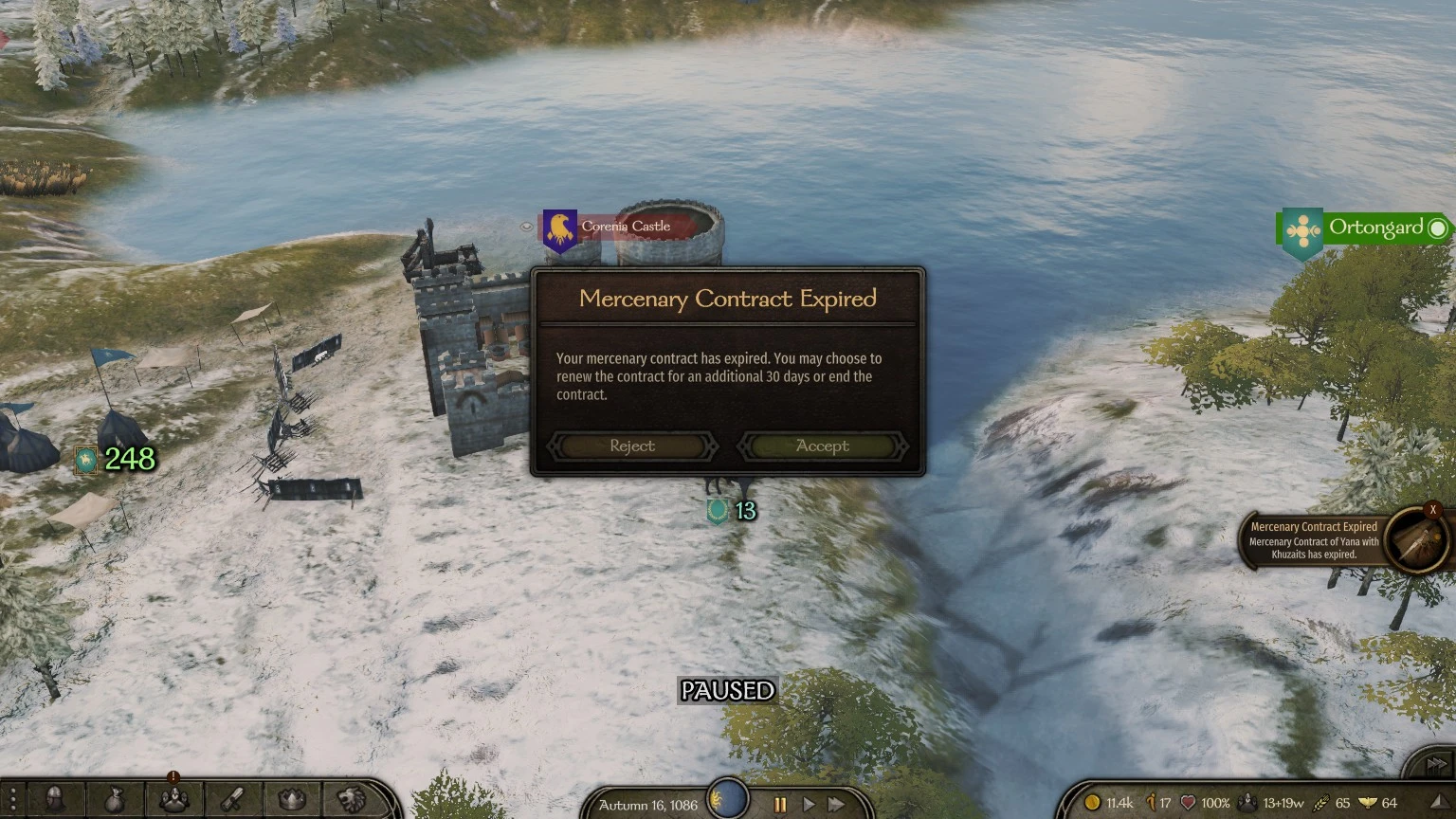
Limited Mercenary Contract reintroduces Warband-style mercenary contracts, adding a 30-day notification to renew or end your contract with a faction. It's for players who want more control over their allegiance. With 828 endorsements and 23,045 downloads, it's a popular but outdated mod, last updated in 2020.
✨ Key Features
📊 Pros & Cons
✅ Pros
- Brings back that classic Warband feel—no more being stuck in a faction forever.
- Simple and lightweight: just a notification, no bloat.
- Proven popularity with 828 endorsements and 23k downloads.
⚠️ Cons
- Outdated—last updated in 2020, so it may not work with the latest game patches.
- Only does one thing: if you wanted more complex contract mechanics, this isn't it.
- Potential compatibility issues with other mods that alter faction or mercenary systems.
If you're a veteran who misses Warband's contract system and wants a quick, no-fuss way to leave a faction after a month, this is for you. It's also great for roleplayers who want to switch allegiances without breaking immersion. But if you're on the latest game version, you might need to check for patches.
💡 Beginner Tips
- When the 30-day notification pops up, make sure you're not in the middle of a battle—it might pause the game.
- If you're planning to switch factions, end the contract right before the 30-day mark to avoid a penalty.
- This mod only affects mercenary contracts, so you can still join kingdoms normally.
📊 Mod Details
- Game
- Bannerlord Mods
- Author
- Aragas
- Version
- v1.0.13
- Downloads
- 23,045
- Endorsements
- 828
- Category
- Gameplay
- Created
- 4/5/2020
- Updated
- 8/30/2020
🔧 How to Install Bannerlord Mods
Use Vortex or manual. Enable mods in launcher. Harmony required.
📖 Full step-by-step install guide for Bannerlord →
Visit the official mod page for specific installation instructions for this mod.
🎮 Need cheat codes or console commands? Check ur gaming wiki for Bannerlord commands, item IDs, and more.
Keep browsing — more Bannerlord mods await