Save Missing Module Fix (Outdated)
⚪ Last updated 2020Preview
🔍 Analysis
- 👍 3.7% endorsement rate — high engagement, a strong quality signal
- 🏆 #9 of 70 Miscellaneous mods in this game by downloads
📋 About This Mod
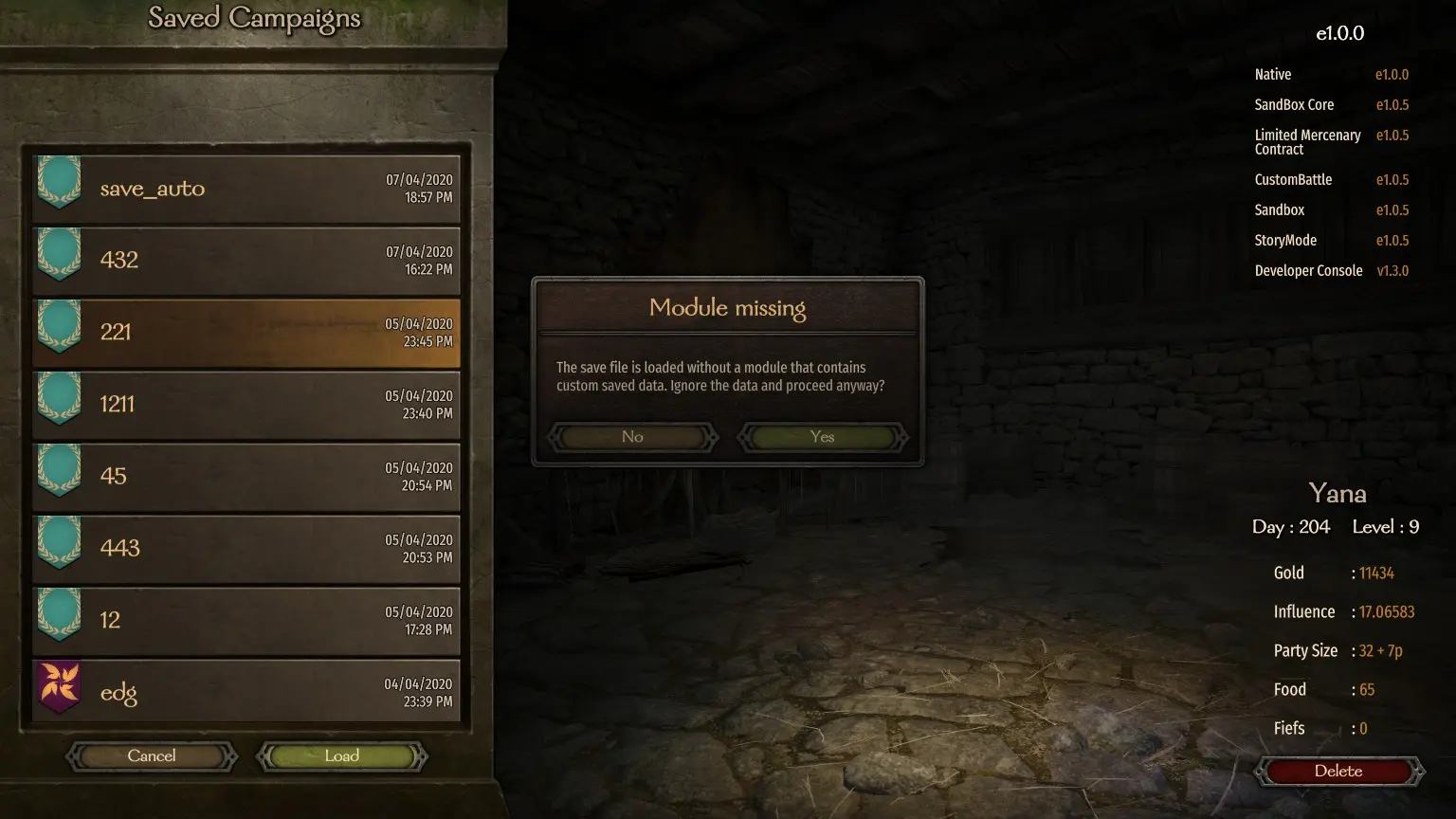
For now, I discovered an issue when a mod implements its own LogEntry classes.
My other mod, Limited Mercenary Contracts, implements such custom classes, preventing the game to load a save file when the mod is not present.
Should work with Entrepreneur!
The mod's behaviour is passive. It will be only triggered if the vanilla's loading code fails. You don't need to constantly enable/disable it, I suggest you to just keep it enabled if you use any mod that is using custom save data.
Source: GitHub
If you, %USERNAME%, have discovered that instead of loading a save the game simply "ignores" loading it, report this issue in BUGS section!
I need you to tell me which mods were present when the game worked and what mod(s), when disabled, prevented the save from loading.
I'll take a look and I'll try to fix it!
Loading save can take time, so be patient! It first tries to run the original loading code and if it fails, it runs the mods code, so waiting time for loading the save will be ~2x normal time!
But be warned! Saves are delicate files, so always have backups!
Installation Instructions:
-
[]Download the zip file.
[
]Unzip the zip file.[]Copy the "Modules" folder to your "Mount & Blade II Bannerlord" directory.
You should now have the following directory structure:
Mount & Blade II Bannerlord
|---- Modules
|-------- Aragas. SaveMissingModuleFix
|------------ SubModule.xml
|------------ bin
|---------------- Win64_Shipping_Client
|-------------------- Aragas. SaveMissingModuleFix.dll
|-------------------- 0Harmony.dll
|-------------------- Microsoft. CSharp.dll
|-------------------- ReflectionMagic.dll
Troubleshooting:
- []Make sure the files are in the proper directories (see above).
- Mod Crashing Your Game When Loaded?
- Navigate to "Modules > Aragas. MercenaryContract> bin > Win64_Shipping_Client" in your game files.
- Right click the "Aragas. MercenaryContract.dll" and click properties
- Click unblock at the bottom.- Right click the "Aragas. SaveMissingModuleFix.dll" and click properties
- Do the same for "0Harmony.dll"
- Do the same for "Microsoft. CSharp.dll"
- Do the same for "ReflectionMagic.dll"
Save Missing Module Fix addresses a bug in the game's save loading system that prevents loading saves with mods using custom classes for saving data. It generates the necessary enrichment JSON to fix this issue. With 3,103 endorsements and 84,393 downloads, it's a popular utility for modded playthroughs.
✨ Key Features
📊 Pros & Cons
✅ Pros
- Community-approved with 3,103 endorsements and 84,393 downloads.
- Solves a frustrating issue for modded saves.
- Simple utility with a clear purpose.
⚠️ Cons
- Last updated in 2020 — may not work with the latest game version.
- Author labels it as 'Outdated' in the title.
For modded players who have encountered save loading failures due to custom classes. If you're using mods that add custom save data, this fix is essential. Skip if you play vanilla or don't use such mods.
💡 Beginner Tips
- Check the mod's file structure and place files in the correct game directory.
- Ensure your game is updated to a version compatible with this fix.
- Test with a backup save before relying on it.
📊 Mod Details
- Game
- Bannerlord Mods
- Author
- Aragas
- Version
- v1.0.1
- Downloads
- 84,393
- Endorsements
- 3,103
- Category
- Miscellaneous
- Created
- 4/7/2020
- Updated
- 4/10/2020
🔧 How to Install Bannerlord Mods
Use Vortex or manual. Enable mods in launcher. Harmony required.
📖 Full step-by-step install guide for Bannerlord →
Visit the official mod page for specific installation instructions for this mod.
🎮 Need cheat codes or console commands? Check ur gaming wiki for Bannerlord commands, item IDs, and more.
Keep browsing — more Bannerlord mods await