Unread Descriptions - Sort Everything minor tweaks - Next-Gen Compatible
🟡 Updated this yearPreview
🔍 Analysis
- 👍 2.0% endorsement rate — high engagement, a strong quality signal
- 🏆 #55 of 155 User Interface mods in this game by downloads
📋 About This Mod
A few features tweaked mod, from the original mod Unread Descriptions made by veyn and Sort Everything made by DJ_Kovrik.
Next-Gen 4. 04 Compatible
Original mods functions:
"A small and simple script-only mod that makes it easier to see updates in quest and character journals. With this mod, updated entries will always be sorted before others and will be clearly marked. When clicked, the updated parts of a description will be highlighted with a distinct color."
"Sorting for books menu, crafting menu, journal menu and inventory (partial)."
Since the original mod Sort Everything resumed to be active again, this mod won't provide the combined version anymore. If you want to use my mod with those minor tweaked features, you should first download the original mod Sort Everything (Next-Gen version), then overwrite with my patch file. And please remember to endorse both original mods.
MINOR TWEAKED FEATURES
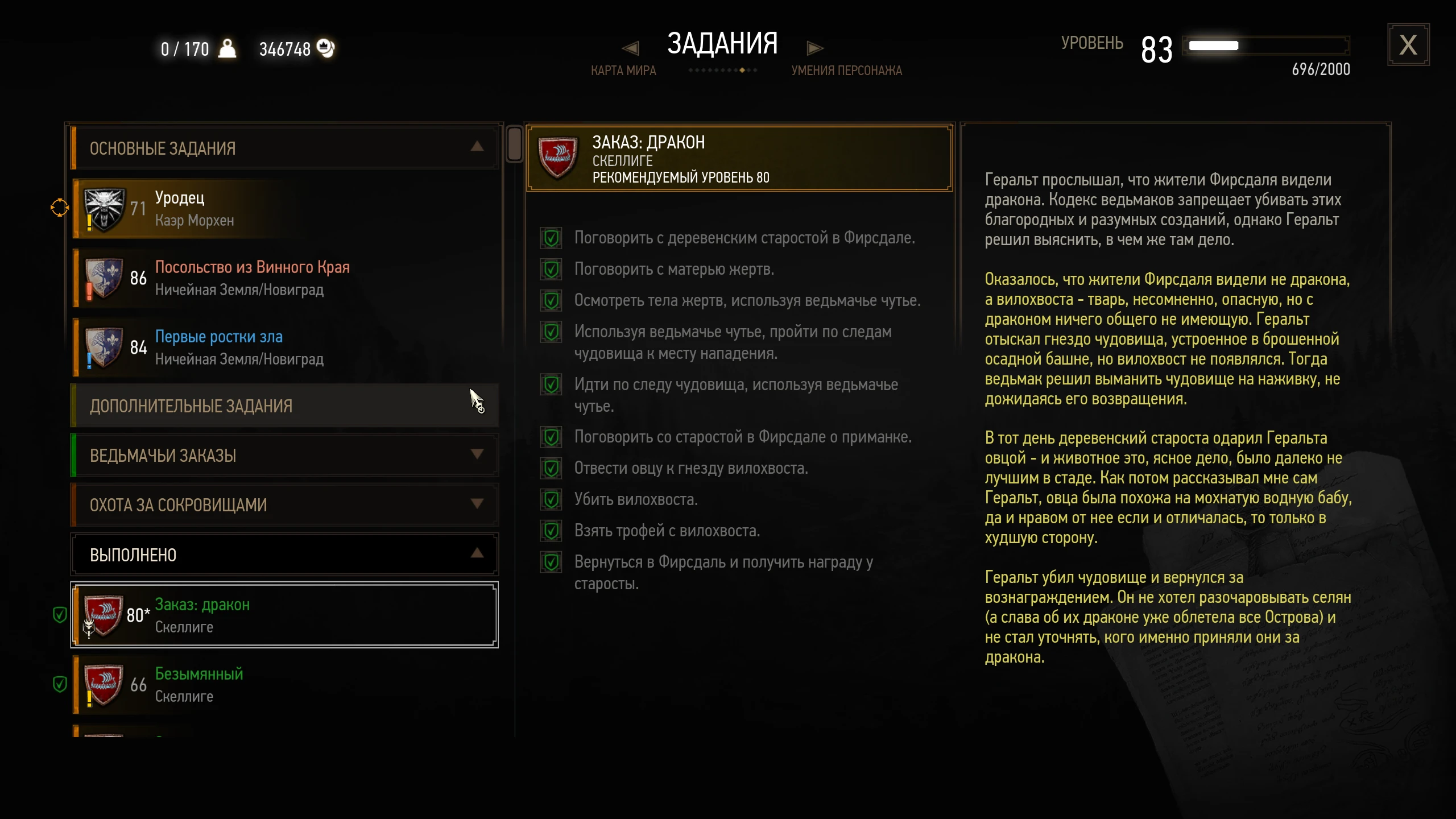
1. Now the “” mark is cleared instantly when you click or select the quest, instead of being cleared until you select the next quest. More like the way that the original game does.
2. Move the "" mark before the quest level.
3. Change the "*" mark and highlighted description text color to #d68f29 (orange), seems more beautiful and readable in-game.
4. The quests are sorted in the following order: the currently tracked quest→→new (unread) quests→→read quests.
Within each group, it also follows the sorting rules you set in the mod Sort Everything, such as ascending, descending, alphabetical, etc. When you have read the unread quests, they'll be sorted correctly as quests that have been read.
5. Now the finished quests also apply the sorting order: lately finished (unread) quests→→finished quests read.
6. The original toggleable option to group completed quests by location in modSortEverything works only if the "alphabetical sorting for completed quest lists" option enabled. Now I change the functioning logic as:
a. Alphabetical ON, location OFF: Only alphabetical sorting.
b. Alphabetical ON, location ON: First grouped by location, within each group alphabetical sorting.
c. Alphabetical OFF, location ON: First grouped by location, within each group quest level descending.
d. Alphabetical OFF, location OFF: Follow the common journal menu sorting settings.
The lately finished quests are still at the top by the above settings.
7. (A Sort Everything - Extras feature)
The quest items and books tab now applies the group-function.
a. Quest item category: starred(new)→→masks→→quest items and others→→books unread→→books read.
b. Other item category: starred(new)→→junk
📊 Mod Details
- Game
- Witcher3 Mods
- Author
- Freak
- Version
- 2.6d
- Downloads
- 39,748
- Endorsements
- 802
- Category
- User Interface
- Created
- 2/3/2021
- Updated
- 1/13/2026
🔧 How to Install The Witcher 3 Mods
Download from Nexus Mods.
📖 Full step-by-step install guide for The Witcher 3 →
Visit the official mod page for specific installation instructions for this mod.
🎮 Need cheat codes or console commands? Check ur gaming wiki for The Witcher 3 commands, item IDs, and more.
Keep browsing — more The Witcher 3 mods await