Gamepad Alternate
⚪ Last updated 2019Preview
🔍 Analysis
- 👍 5.0% endorsement rate — high engagement, a strong quality signal
- 🏆 #14 of 35 Controller Button Layout mods in this game by downloads
📋 About This Mod
HOW TO INSTALL
-
[] Backup your your current input.settings first before installing the mod.
[
] Install the mod just like any other Witcher 3 mod.[]Use Script Merger to resolve conflicts.
[]Copy all the content of the inputs_main to Documents/The Witcher 3/input.settings
OVERVIEW
-
[]This mod add an ingame modifier key that sequentially disable and enable action inputs.
[
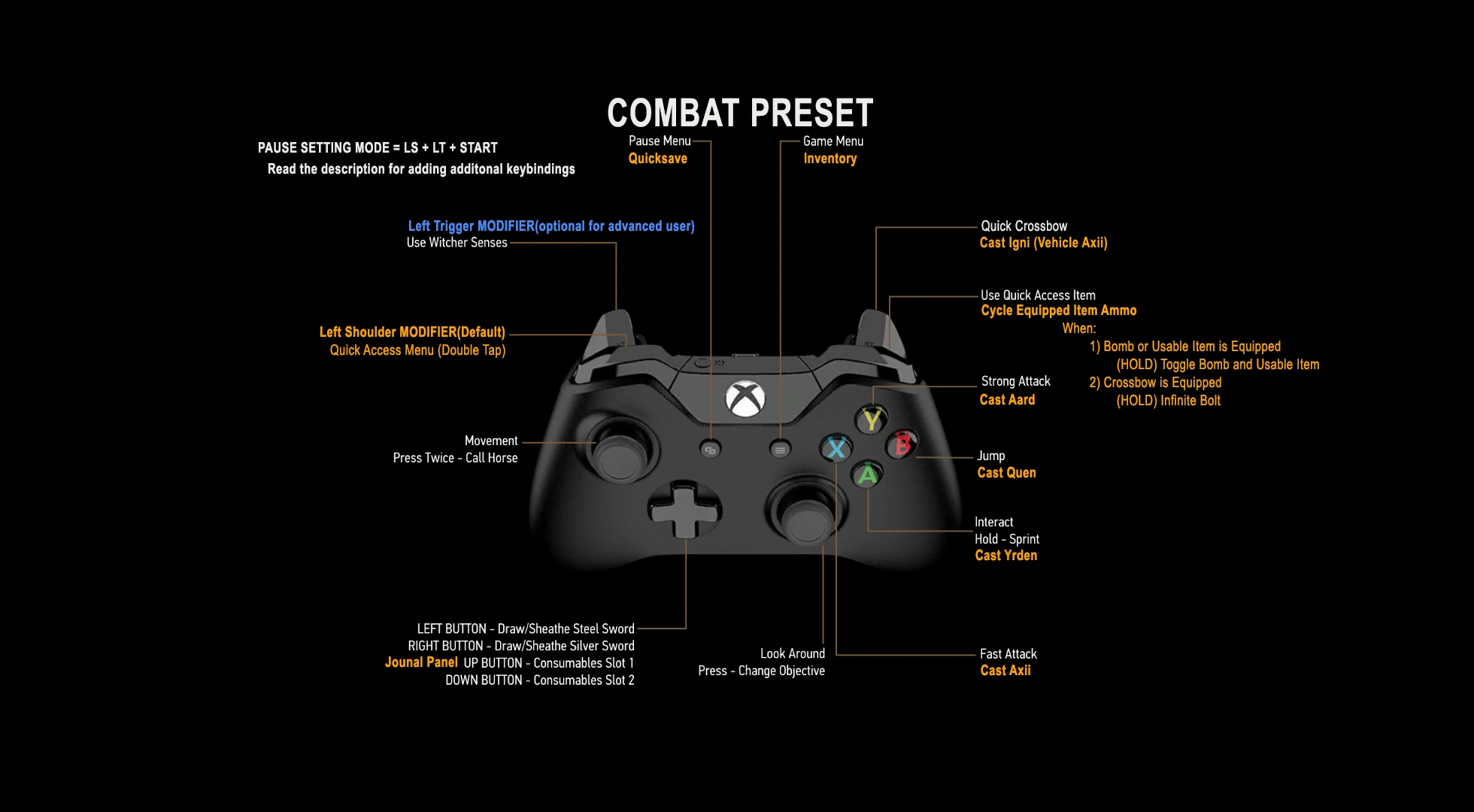
]The mod does not modify the original action inputs or any installed mod in the game. - Simultaneously press LS+LT and start button to enter PauseSetting mode, in this mode you can see all the assigned keys.
MODIFIERS
1. Left Shoulder/Bumper - The LS is the main modifier when it is pressed(hold). Radial Menu is accessible by double tapping it.
This are the default actions when you install the mod
LS + A = Cast Yrden
LS + B = Cast Quen
LS + X = Cast Axii
LS + Y = Cast Aard
LS + RT = Cast Igni(Vehicle Axii)
LS + Start = Inventory
LS + Back = QuickSave
LS + Dpad Up = Journal
RT = Quick Crossbow
RS = Bomb/UsableItem
LS + RS = (TAP) Cycle Ammo of Equipped Item
(HOLD) Equipped Item:
1) Crossbow - Infinite Bolt
2) Bomb/Usable Item - Toggle Bomb or Usable Item
2. Left Trigger - The LT is the optional(additional) modifier that can be toggled(disabled by default) within the game.
When LT is Enabled the Right Trigger action will be changed to Focus and LockAndGuard action.
FOR ADVANCED USER
A. (?)
This mod allows you to bind custom action inputs to Gamepad button without modifying the game scripts.
What are custom action inputs?
This are the action keys created by other modders:
a. QuickInventory - This action came from MoreQuickSlots
b. AutoLootRadius, ToggleTrueAutoLoot - This action came from AutolootMenu c. ToggleEssentials, Toggle3DMarkers - This action came from FriendlyHUDB. How to bind custom action inputs:
To bind those custom action inputs, I created an Action Groups. The Action Groups is where yo
-
[]This mod add an ingame modifier key that sequentially disable and enable action inputs.
📊 Mod Details
- Game
- Witcher3 Mods
- Author
- garchi
- Version
- 1.3
- Downloads
- 1,789
- Endorsements
- 89
- Category
- Controller Button Layout
- Created
- 6/6/2019
- Updated
- 12/8/2019
🔧 How to Install The Witcher 3 Mods
Download from Nexus Mods.
📖 Full step-by-step install guide for The Witcher 3 →
Visit the official mod page for specific installation instructions for this mod.
🎮 Need cheat codes or console commands? Check ur gaming wiki for The Witcher 3 commands, item IDs, and more.
Keep browsing — more The Witcher 3 mods await