DS4 Quicksave and Touchpad Shortcuts
⚪ Last updated 2015Preview
🔍 Analysis
- 👍 4.3% endorsement rate — high engagement, a strong quality signal
- 🏆 #6 of 35 Controller Button Layout mods in this game by downloads
📋 About This Mod
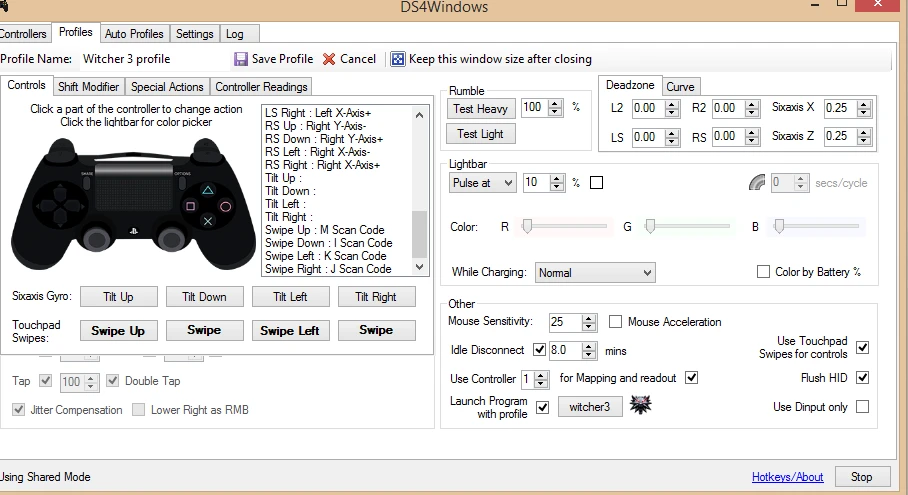
A simple profile to use with DS4windows
This is the profile I use in DS4Windows for this game. In no way does this change or have any effect on any of the base game files
It adds the following functions:
PS Button: Quick Save Swipe Up: MAP Swipe Down: Inventory Swipe Left: Character Swipe Right: Quest Journal
-------------
Installation:
1. You need to download DS4Windows if you don't already have it: http://ds4windows.com/ Follow the pretty straight forward installation instructions there. 2. Download and unzip Witcher 3 profile.zip wherever you want.
3. To start using this profile you can: a. Start Ds4Windows, go to profiles, select import and navigate to the extracted file OR b. Drag and drop the extracted file to Profile folder in your DS4windows installation directory. If there is no profile folder in your DS4windows directory simply create on, drop the extracted file there and you should be good to go.
📊 Mod Details
- Game
- Witcher3 Mods
- Author
- Da7mi
- Version
- 1.0
- Downloads
- 3,164
- Endorsements
- 136
- Category
- Controller Button Layout
- Created
- 5/29/2015
- Updated
- 5/29/2015
🔧 How to Install The Witcher 3 Mods
Download from Nexus Mods.
📖 Full step-by-step install guide for The Witcher 3 →
Visit the official mod page for specific installation instructions for this mod.
🎮 Need cheat codes or console commands? Check ur gaming wiki for The Witcher 3 commands, item IDs, and more.
Keep browsing — more The Witcher 3 mods await