Field of View (FOV) Slider
⚪ Last updated 2016Preview
🔍 Analysis
- 👍 2.9% endorsement rate — high engagement, a strong quality signal
- 🏆 #9 of 37 Camera mods in this game by downloads
📋 About This Mod
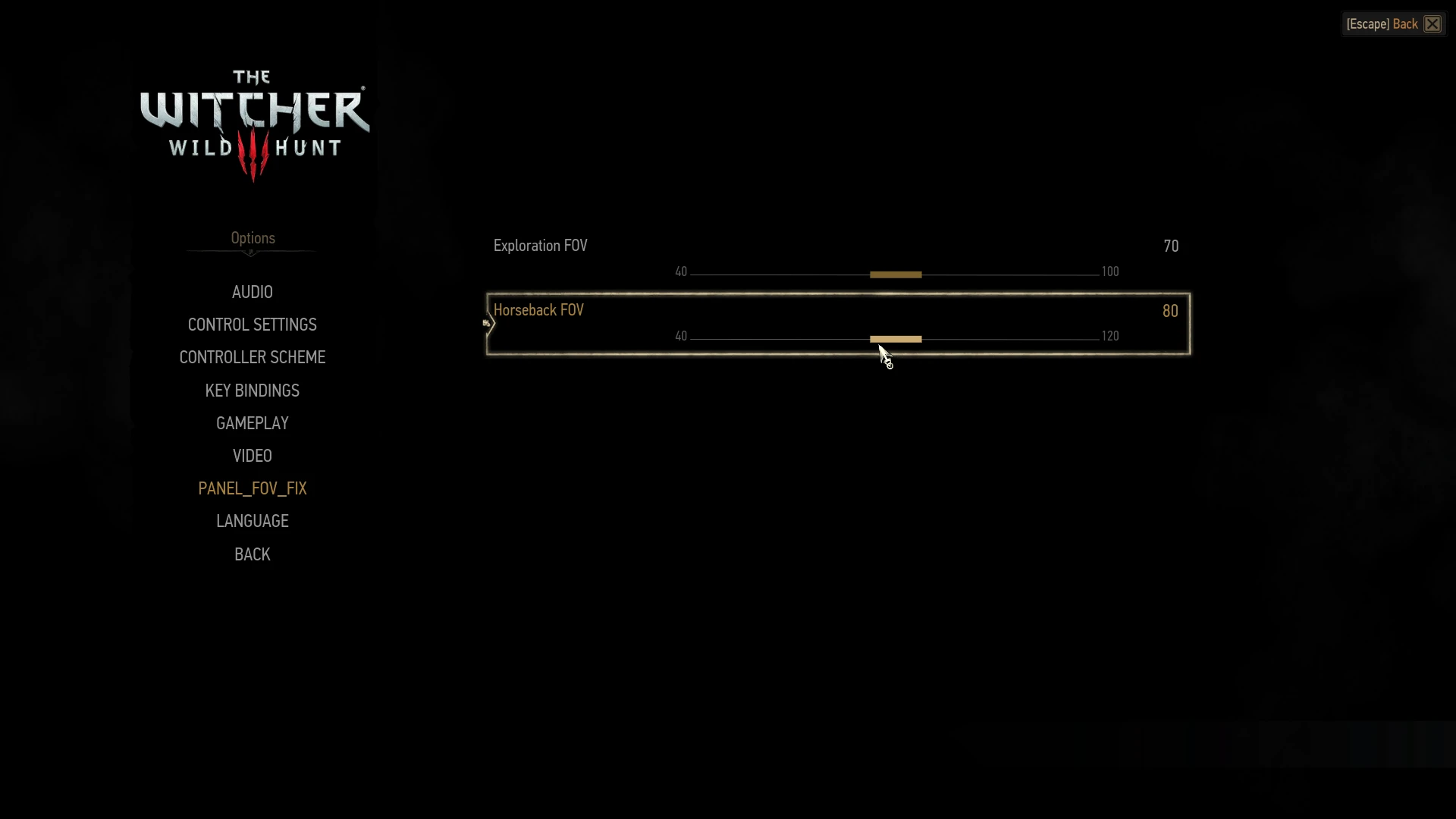
This mod adds a FOV Slider to the Options menu.
Field of View (FOV) Slider
by svaalbard aka insane0hflexDescription:
The Field of View (FOV) Slider mod allows you to change your on foot ("Exploration") and horseback FOV settings by using a slider.
The slider is located in Main Menu -> Options -> Mods -> FOVSlider. (note: for pre 1. 21 witcher versions the Slider fix path might be different)
When you first install the mod, the FOV might be out of whack, therefore I recommend to go to the main menu and set the FOV settings immediately after loading into the game. Also, please make sure you installed the mod correctly so that you see the menu "FOVSlider".
I personally find 70 Exploration FOV and 80 Horseback FOV to be the best for me at 1080p.
The game defaults are 60 for Exploration FOV, and 60 for Horseback FOV.
Please watch the video on a demonstration on how the mod works.
levF0s961Mg Note: I would not advise to go above 90 FOV for exploration - high FOV values degrade game performance and lead to visual glitches.
Installation Instructions:
If you are new to installing Witcher 3 mods, watch my video: Witcher 3 Mod Installation Tutorial I IMPORTANT! In addition to installing the mod as usual, there are two extra steps:
1. You need to copy the bin folder and paste it into your base Witcher 3's game path. If you are asked to write over localization.ini, press "Yes". The base directory for Witcher 3 for Steam users it something like: C:\Program Files (x86)\Steam\steamapps\common\The Witcher 3\
2. You will also need to download and install this mod: Custom Localization Fix
3. When you first start the game with the mod installed, you will need to set the FOV immediately in the Options menu. It defaults to 0, so you need to use the slider to adjust it. The vanilla game defaults are 60 Exploration FOV and 60 Horseback FOV.
Uninstallation Procedure: Set Exploration FOV to 60 and Horseback FOV to 60. These are the vanilla game defaults. In addition to deleting the mod in the /mods/ folder, delete the fovslider.xml file as well which is located in a folder (for steam users) here:
C:\Program Files (x86)\Steam\steamapps\common\The Witcher 3\bin\config\r4game\user_config_matrix\pc
Compatibility: Any other mods that alter r4player.ws or horseRiding.ws will need to be merged with this mod.
This mod is for Witcher 3 v1. 21+, and supersedes my old mod that had only static value fixes (FOV Fix/Tweak).
📊 Mod Details
- Game
- Witcher3 Mods
- Author
- svaalbard
- Version
- v122
- Downloads
- 78,307
- Endorsements
- 2,299
- Category
- Camera
- Created
- 10/11/2015
- Updated
- 6/19/2016
🔧 How to Install The Witcher 3 Mods
Download from Nexus Mods.
📖 Full step-by-step install guide for The Witcher 3 →
Visit the official mod page for specific installation instructions for this mod.
🎮 Need cheat codes or console commands? Check ur gaming wiki for The Witcher 3 commands, item IDs, and more.
Keep browsing — more The Witcher 3 mods await