Comfortable Button Layout for 1.31
⚪ Last updated 2017Preview
🔍 Analysis
- 👍 4.2% endorsement rate — high engagement, a strong quality signal
- 🏆 #31 of 35 Controller Button Layout mods in this game by downloads
📋 About This Mod
Decided to share this after countless hours of tweaking and trying out different mods. I couldn't find any mod which was fully working for 1.31 without annoying bugs (e.g potions swapping randomly, geralt jumping when exiting menu), so I
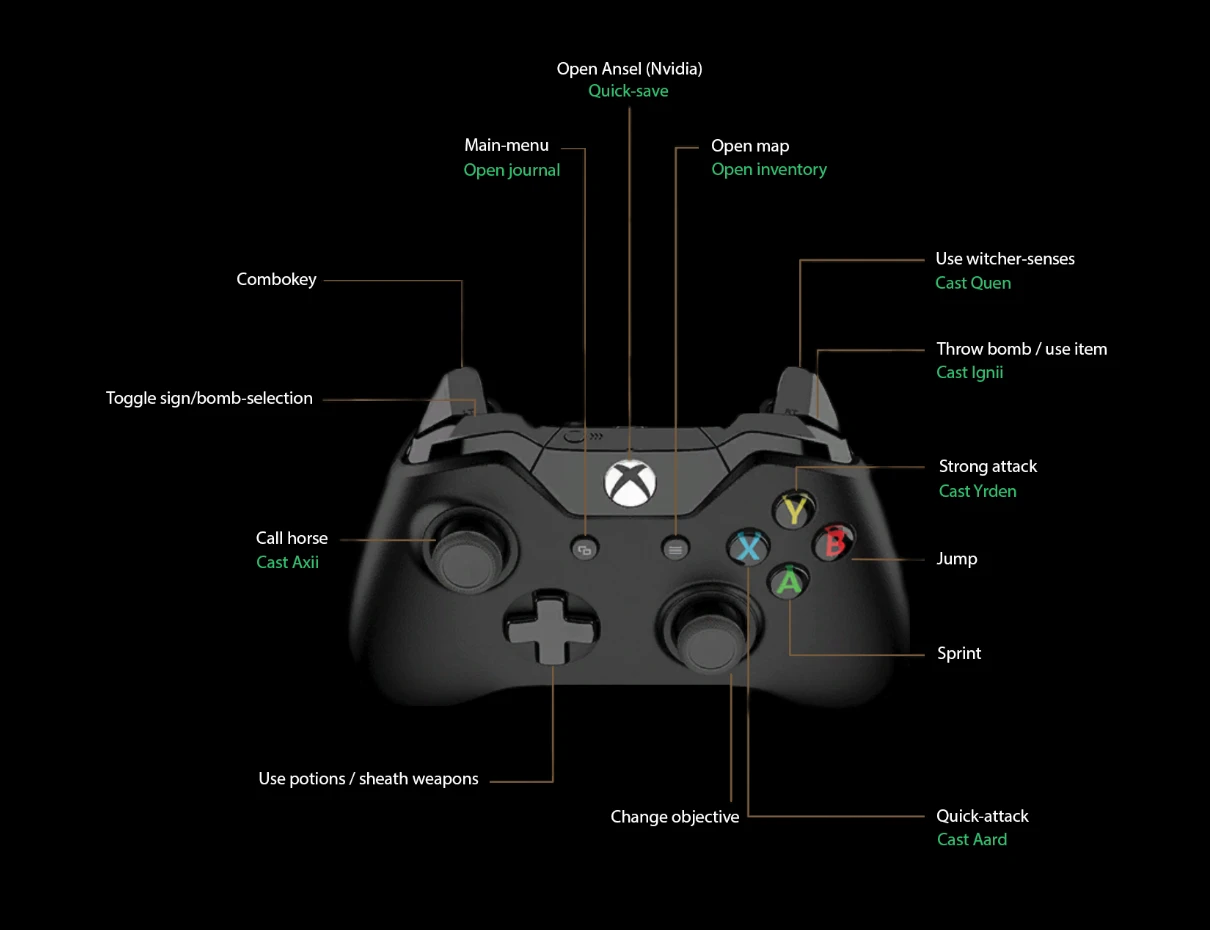
Comfortable Button Layout for 1. 31 I decided to share my personal controller layout with the community after countless hours of tweaking and fixing different bugs known with other controller-schemes. The main-purpose of this mod was to create a comfortable scheme where you don't have to ever touch the keyboard/mouse.
Some features of the mod are as follows:
- []Nvidia Ansel-support (quick-bind to open the Ansel-menu in-game to create beautiful screenshots) []Instant sign-casting []Exiting menus doesn't make Geralt jump as seen in many other mods []Potions randomly swapping is fixed. This was a major issue with all the controller-layouts using AntiMicro or Xpadder ever since patch 1. 10 []All actions which you would normally have to use your keyboard for are accounted for
- []Download the files in the files-section []Extract the content of the "Mods"-folder into your Mods folder located inside your Witcher 3 directory []Install AntiMicro (newest version works just fine): https://github.com/AntiMicro/antimicro/releases []Load the file called "custom" when AntiMicro is running []Done!
- []Make sure you're running AntiMicro as administrator []Set "LockControlScheme" to 1 or 2 inside your Hidden.ini
- Make sure both the Hidden.ini and the Input.settings are set to "Read only" in the properties (before you launch the game)
- Go to device manager, find the Xbox 360 section towards the bottom. Enter the properties and go to the "Drivers"-tab. Browse for a new driver and pick the option to "Select from a list". Select the oldest driver listed and reboot your PC. It should now detect the guide-button being pressed in AntiMicro.
If you have any issues getting this mod to run, let me know in the comments below.
I also want to thank all other creators of controller-button-layouts, as they inspired many of the keybindings I've chosen.
Update 2017-05-28(v. 1. 1):
- Changed bind for casting Axii when mounted to left bumper
- Made casting Ignii and throwing items more comfortable by locking them to unique binds, and should not be able to overlap now. This means that you won't accidentally throw
📊 Mod Details
- Game
- Witcher3 Mods
- Author
- CojL
- Version
- 1.0
- Downloads
- 848
- Endorsements
- 36
- Category
- Controller Button Layout
- Created
- 5/26/2017
- Updated
- 5/28/2017
🔧 How to Install The Witcher 3 Mods
Download from Nexus Mods.
📖 Full step-by-step install guide for The Witcher 3 →
Visit the official mod page for specific installation instructions for this mod.
🎮 Need cheat codes or console commands? Check ur gaming wiki for The Witcher 3 commands, item IDs, and more.
Keep browsing — more The Witcher 3 mods await