Witcher 3 Witcher Sense Color Customizer
⚪ Last updated 2015⚠️ Install Order · 2 steps
Install in this order, then this mod last — most mods fail to load without their framework and dependencies in place.
Preview
🔍 Analysis
- 👍 6.1% endorsement rate — high engagement, a strong quality signal
- 🏆 #228 of 264 Visuals and Graphics mods in this game by downloads
📋 About This Mod
This mod is now updated to work with The WItcher 3 v1. 07+.
Version 1. 04 is now fully compatible with "Color Blind Witcher Senses" (Under Options->Gameplay in The Witcher 3). Your customized colors will be used for interactables and quest objects, smell clouds will be the default "Colorblind Mode" blue. If you disable colorblind mode then the clouds will return to their original red color and your custom colors will remain active.
Version 1. 03/1. 04 is compatible with game version 1. 07+, any version prior to 1. 03 will not work with game version 1. 07+ Additionally 1. 03/1. 04 WILL NOT WORK with any game version prior to 1. 07 As of 1. 03 this mod does not explode with "Colorblind Mode".
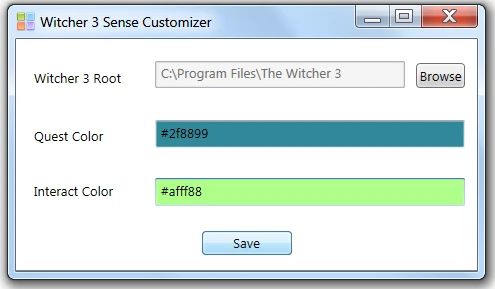
Created for some folks over at Reddit.com/witcher this mods usage is very simple:
1) Browse for the ROOT install of your Witcher 3 folder. 2) Type a color code in each of the boxes (e.g. #ff0033) 3) Enter an opacity for each color (between 0. 0 and 1. 0) where 1. 0 is fully opaque. 4) Hit save
Features: - Allows you to change the colors of both quest objects and interact-able objects. - Allows you change the opacity of both quest objects and interact-able objects. - Creates a backup of the modified Startup.bundle so you shouldn't risk any loss. Located in: The Witcher 3\content\content0\bundles - Only conflicts with mods that serve this EXACT same purpose (changes a very specific file). - Can now uninstall the mod via the UI resetting the game to it's default behavior. - Works with colorblind mode (in game setting) allowing you to set your "smell clouds" to red or blue.
A simple visual customization mod for The Witcher 3 that lets you change the default orange/red colors of Witcher Sense to any color you prefer. With 399 endorsements and over 6,500 downloads, it's a popular choice for players wanting to personalize their gameplay experience.
✨ Key Features
📊 Pros & Cons
✅ Pros
- Community favorite with 399 endorsements and 6,571 downloads.
- Simple and effective – does exactly what it says without bloat.
- Great for accessibility or just personal preference – you can finally ditch that orange glow.
⚠️ Cons
- Last updated in 2015 – may not work with the latest game patches or expansions.
- No detailed instructions or screenshots provided, so you're on your own for installation.
- Only affects Witcher Sense colors – if you wanted more visual tweaks, this isn't it.
For Witcher 3 players who want to personalize their HUD and reduce eye strain from the default orange tint. Also great for those who want a fresh look without overhauling the game's visuals. Skip if you're looking for broader graphical enhancements – this is purely a color tweak.
💡 Beginner Tips
- Make sure to back up your original game files before replacing anything, just in case.
- Check the mod's comments section for any user-reported compatibility issues with your game version.
- If you're using a mod manager, follow its specific instructions for manual mods like this one.
📊 Mod Details
- Game
- Witcher 3 Mods
- Author
- Tomwa Lee Ivory
- Version
- 1.04
- Downloads
- 6,571
- Endorsements
- 399
- Category
- Visuals and Graphics
- Created
- 6/4/2015
- Updated
- 8/11/2015
🔧 How to Install Witcher 3 Mods
Download from Nexus.
📖 Full step-by-step install guide for Witcher 3 →
Visit the official mod page for specific installation instructions for this mod.
🎮 Need cheat codes or console commands? Check ur gaming wiki for Witcher 3 commands, item IDs, and more.
Keep browsing — more Witcher 3 mods await