The Witcher 3 Configuration for more FPS (At the low-end computer and the middle class computer)
⚪ Last updated 2016⚠️ Install Order · 2 steps
Install in this order, then this mod last — most mods fail to load without their framework and dependencies in place.
Preview
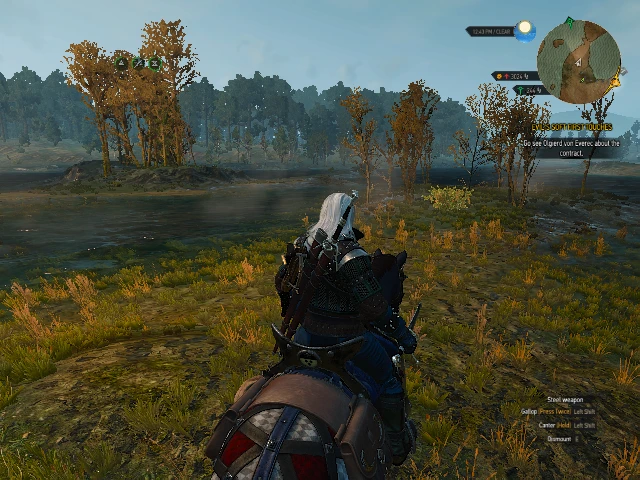
🔍 Analysis
- 👍 2.8% endorsement rate — high engagement, a strong quality signal
- 🏆 #101 of 264 Visuals and Graphics mods in this game by downloads
📋 About This Mod
Configuring the graphics created by me that makes The Witcher 3 runs smoother and the graphics do not deteriorate too much. Ideal if you want to have a smoother game and not lose much on the quality of game graphics.
Installation: File "User" to replace my documents folder The Witcher 3. The rest of the files located in The Witcher 3 Wild Hunt> Bin> Config> Base
PS: Please back up your files
Konfiguracja graficzna stworzona przeze mnie która sprawia że Wiedźmin 3 działa płynniej i także grafika się zbytnio nie pogarsza. Idealna jeśli chcemy mieć płynniejszą grę i nie stracić wiele na jakości grafiki gry.
Instalacja: Plik "User" podmienić w moich dokumentach w folderze The Witcher 3. Reszta plików znajduje się w The Witcher 3 Wild Hunt>Bin>Config>Base
PS:Proszę wykonać kopię zapasową plików
Moja specyfikacja komputera na teraz: 4GB Ram 1600MHz GTX 820M 2 Gb VRam I3 4005U Ilość FPS przy użyciu tej konfiguracji: Stabilne 20-30( czasami jest powyżej 30 FPS znaczy maksymalnie około 45)
Jeśli chcemy grać w niższej rozdzielczości niż 1024x768 trzeba wejść w dokumenty i poszukać folder Wiedźmin 3 a w nim plik "User" bez końcówki (BAT). W nim poszukać linijek: Resolution="1024x768" FullScreenMode=2 Zamienić koniecznie FullScreenMode=2 lub 1 na 0. A w linijce "Resolution="1024x768" " zmienić rozdzielczość na jaką chcemy np: 800x600,640x480,512x476 i inne. I ustawić plik "User" na "Tylko do odczytu" wchodząc w właściwości. Następnie ustawić rozdzielczość pulpitu taką jaką ustawiliśmy w pliku "User".
Jeśli komuś nie odpowiada rozdzielczość lub inne ustawienie konfiguracji można śmiało zmienić z łatwością w W3HC jak i ręcznie w pliku "User".
My Computer specification for now: 4GB 1600MHz Ram GTX 820M 2 GB VRAM I3 4005U FPS with this configuration: Stable 20-30 (sometimes in excess of 30 FPS i.e. up to about 45)
If you want to play at a lower resolution than 1024x768 you need to enter the documents folder and look for The Witcher 3 and the file "User" without tip (BAT). In the search lines: Resolution = "1024x768" FullScreenMode = 2 Replace necessarily FullScreenMode = 2 or 1 to 0. A line in the "Resolution =" 1024x768 "" change the resolution on which we eg 800x600,640x480,512x47
This mod provides a custom graphics configuration for The Witcher 3, aiming to improve FPS on low-end and mid-range computers while minimizing visual quality loss. It's a simple drop-in replacement for the game's config files, with 902 endorsements and over 32,000 downloads, though it hasn't been updated since 2016.
✨ Key Features
📊 Pros & Cons
✅ Pros
- Proven by the community (902 endorsements, 32k downloads) — many players trust it
- Simple install: just replace the config files, no mod manager needed
- Targets the exact pain point: smoother gameplay without ugly graphics
⚠️ Cons
- Last updated in 2016 — may not work with current game patches or DLC
- No detailed changelog or settings breakdown, so you don't know exactly what's tweaked
- One-size-fits-all config might not suit your specific hardware or preferences
For Witcher 3 players on older or budget PCs who want a quick FPS boost without fiddling with individual settings. Also for those who prefer a community-tested config over manual tweaking. Skip if you're on a high-end rig or want full control over every graphics option.
💡 Beginner Tips
- Back up your original config files before replacing them, so you can revert if needed.
- If you have the Game of the Year Edition, test the mod after installing — it may need adjustments due to later patches.
- After installing, launch the game and check your FPS in a busy area like Novigrad to see the improvement.
📊 Mod Details
- Game
- Witcher 3 Mods
- Author
- Dawid Dragan
- Version
- 1.30
- Downloads
- 32,483
- Endorsements
- 902
- Category
- Visuals and Graphics
- Created
- 10/15/2016
- Updated
- 10/15/2016
🔧 How to Install Witcher 3 Mods
Download from Nexus.
📖 Full step-by-step install guide for Witcher 3 →
Visit the official mod page for specific installation instructions for this mod.
🎮 Need cheat codes or console commands? Check ur gaming wiki for Witcher 3 commands, item IDs, and more.
Keep browsing — more Witcher 3 mods await