Speo's Ultra Natural ReShade
⚪ Last updated 2020⚠️ Install Order · 3 steps
Install in this order, then this mod last — most mods fail to load without their framework and dependencies in place.
Preview
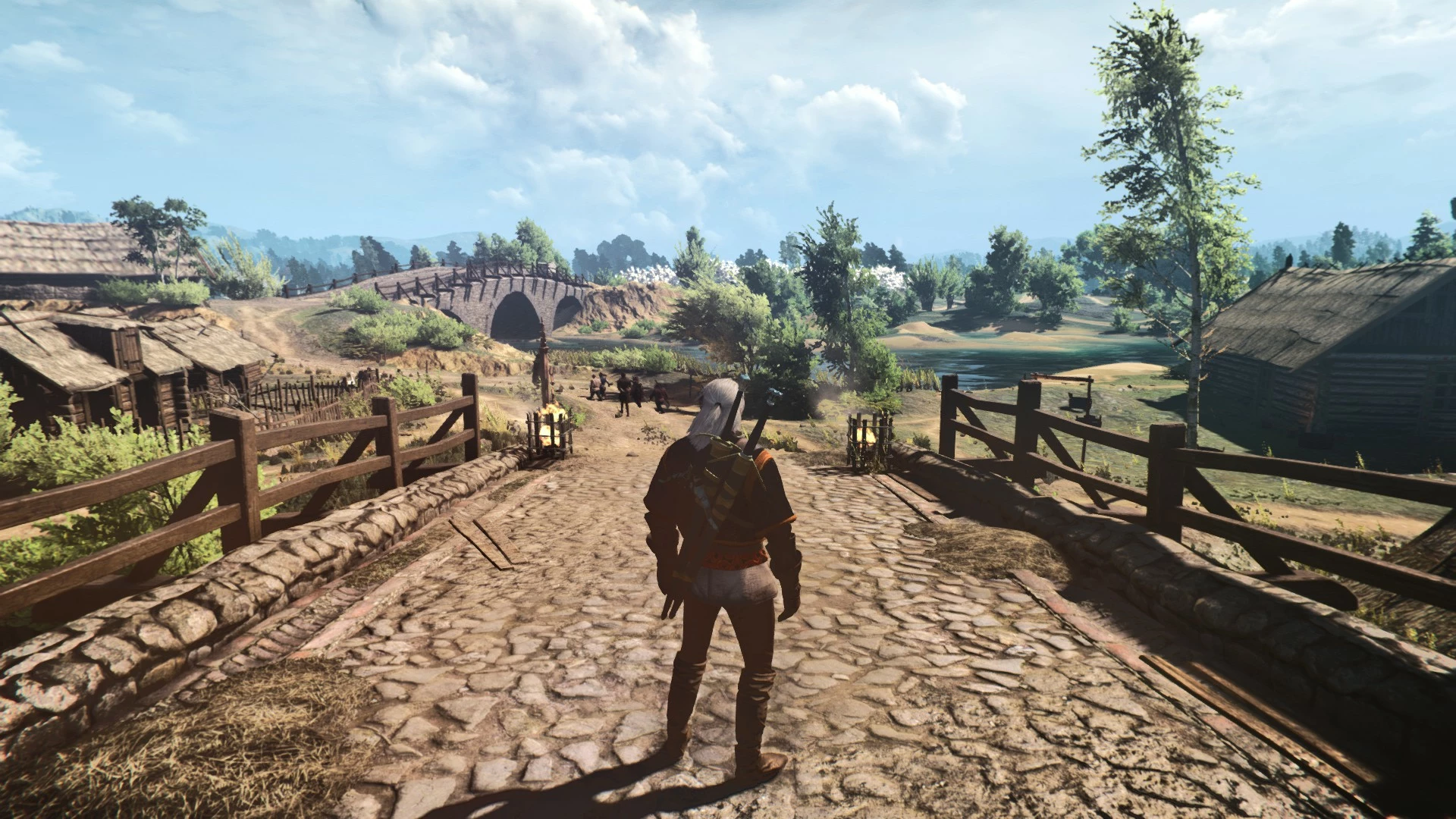
🔍 Analysis
- 👍 4.8% endorsement rate — high engagement, a strong quality signal
- 🏆 #44 of 74 ReShade Preset mods in this game by downloads
📋 About This Mod
I thought the original world of witcher 3 looked awfully dull and boring, even on ultra. This ReShade preset aims to make the world look as realistic as possible without sacrificing too much of the vibrant fantasy colours we love.
Speo's Ultra Natural ReShade is a ReShade preset for The Witcher 3 that enhances the game's visuals to look more realistic while preserving the vibrant fantasy colors. With 336 endorsements and 7,015 downloads, it's a community favorite for players seeking a natural visual overhaul.
✨ Key Features
📊 Pros & Cons
✅ Pros
- Community-approved with 336 endorsements and over 7,000 downloads
- Strikes a balance between realism and the game's fantasy aesthetic
- Simple to install—just drop the preset into your ReShade folder
⚠️ Cons
- Last updated in January 2020—may not be compatible with the latest game patches or ReShade versions
- No screenshots or detailed installation instructions provided in the description
- Requires ReShade to be installed separately, which isn't included
For Witcher 3 players who find the vanilla visuals dull and want a more realistic look without losing the game's colorful charm. Perfect for those who enjoy tweaking visuals with ReShade and want a preset that's ready to go. Skip if you prefer heavy fantasy filters or don't want to deal with ReShade setup.
💡 Beginner Tips
- Make sure you have ReShade installed and set up for The Witcher 3 before adding this preset.
- After installing, use the ReShade in-game overlay to adjust the preset's intensity to your liking.
- If the game updates, check for ReShade updates to ensure compatibility.
📊 Mod Details
- Game
- Witcher 3 Mods
- Author
- Speo
- Version
- 1
- Downloads
- 7,015
- Endorsements
- 336
- Category
- ReShade Preset
- Created
- 1/5/2020
- Updated
- 1/5/2020
🔧 How to Install Witcher 3 Mods
Download from Nexus.
📖 Full step-by-step install guide for Witcher 3 →
Visit the official mod page for specific installation instructions for this mod.
🎮 Need cheat codes or console commands? Check ur gaming wiki for Witcher 3 commands, item IDs, and more.
Keep browsing — more Witcher 3 mods await