sortedInventoryTabs
⚪ Last updated 2016⚠️ Install Order · 2 steps
Install in this order, then this mod last — most mods fail to load without their framework and dependencies in place.
Preview
🔍 Analysis
- 👍 5.6% endorsement rate — high engagement, a strong quality signal
- 🏆 #4 of 16 Inventory mods in this game by downloads
📋 About This Mod
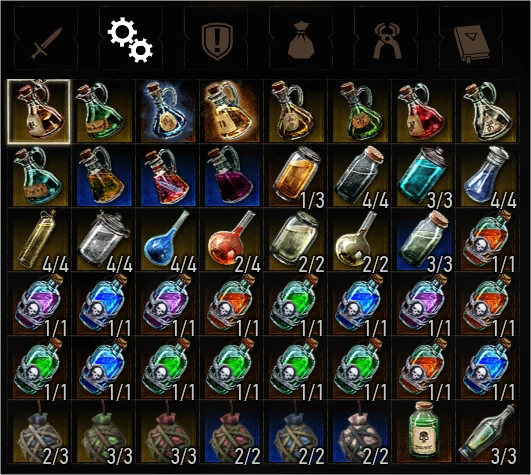
A mod sorting the inventory tabs content by "usage". Inventory opens on the most useful tab (potion or quest when exploring, depending on merchant kind when dealing with NPC). Updated for game 1.12
This simple mod aims to ease the use of the inventory menu.
Items inside tabs are sorted by "usage". The usefulness being a subjective notion, I made it quite simple to tweak should you favor different kinds of items than I do. Starting from version 1. 2. 0, the inventory menu should open on the most useful tab. Again this is rather subjective, but I think it will fit most players.
I think there is still room for improvement, and any contribution is appreciated (whether this is an advice, request or actual development). Studying: looking for a way to configure SIT from ingame menu to change sort order, comparison algorithms without editing scripts.
About Blood and Wine extension
Please pay attention that Blood and Wine will probably bring changes to the inventory management system.
At the current time, I cannot guarantee that this mod will be compliant with Blood and Wine. Also, I will probably not be able to update it before mid-June.
I strongly advise mod user to disable SIT when installing Blood and Wine for the time being.
Default tab when opening the menu (versions 1. 2.x and greater):
If you have at least one new (starred) item which is an unread document (letter, parchment, book ...) in your quest tab, when you open the inventory menu, you will be directed on the quest tab directly. Otherwise, it will be the usable (a.k.a potion, oil ...) tab that will be displayed when opening the menu.
New: When dealing with a merchant, the default tab to open is the one matching the merchant kind (blacksmith/armorer = weapon, innkeeper = usable, herbalist/alchemist = alchemy, general = other, bookseller = book).
Default order inside tabs (all versions):
Sorting is made by creating temporary categories inside the tab. Each category can be reordered by modifying an enumeration in the script file (Sorter.ws). Swap indexes to affect the way subcategories are ordered in the tab.
Default order is based on my own experience of the game (how often I have to open the inventory to access stuff):
[]usable: steel oils > silver oils > potions > decoctions > bombs > other items > quest items (single use during playtime like pop mold...) []quest/book: unread documents > already read documents > other items []ingredients: alcohols (used during meditation) > alchemy ingredients > common mutagens > monster mutagens > crafting ingredients > other items []others: currencies > other items > junk items []New: weapons: runes > glyphs > weapon tools &g
📊 Mod Details
- Game
- Witcher 3 Mods
- Author
- Pierre
- Version
- 1.3.2
- Downloads
- 2,950
- Endorsements
- 165
- Category
- Inventory
- Created
- 10/6/2015
- Updated
- 4/26/2016
🔧 How to Install Witcher 3 Mods
Download from Nexus.
📖 Full step-by-step install guide for Witcher 3 →
Visit the official mod page for specific installation instructions for this mod.
🎮 Need cheat codes or console commands? Check ur gaming wiki for Witcher 3 commands, item IDs, and more.
Keep browsing — more Witcher 3 mods await