Quick Radial Selection
⚪ Last updated 2016⚠️ Install Order · 2 steps
Install in this order, then this mod last — most mods fail to load without their framework and dependencies in place.
Preview
🔍 Analysis
- 👍 3.8% endorsement rate — high engagement, a strong quality signal
- 🏆 #2 of 16 Inventory mods in this game by downloads
📋 About This Mod
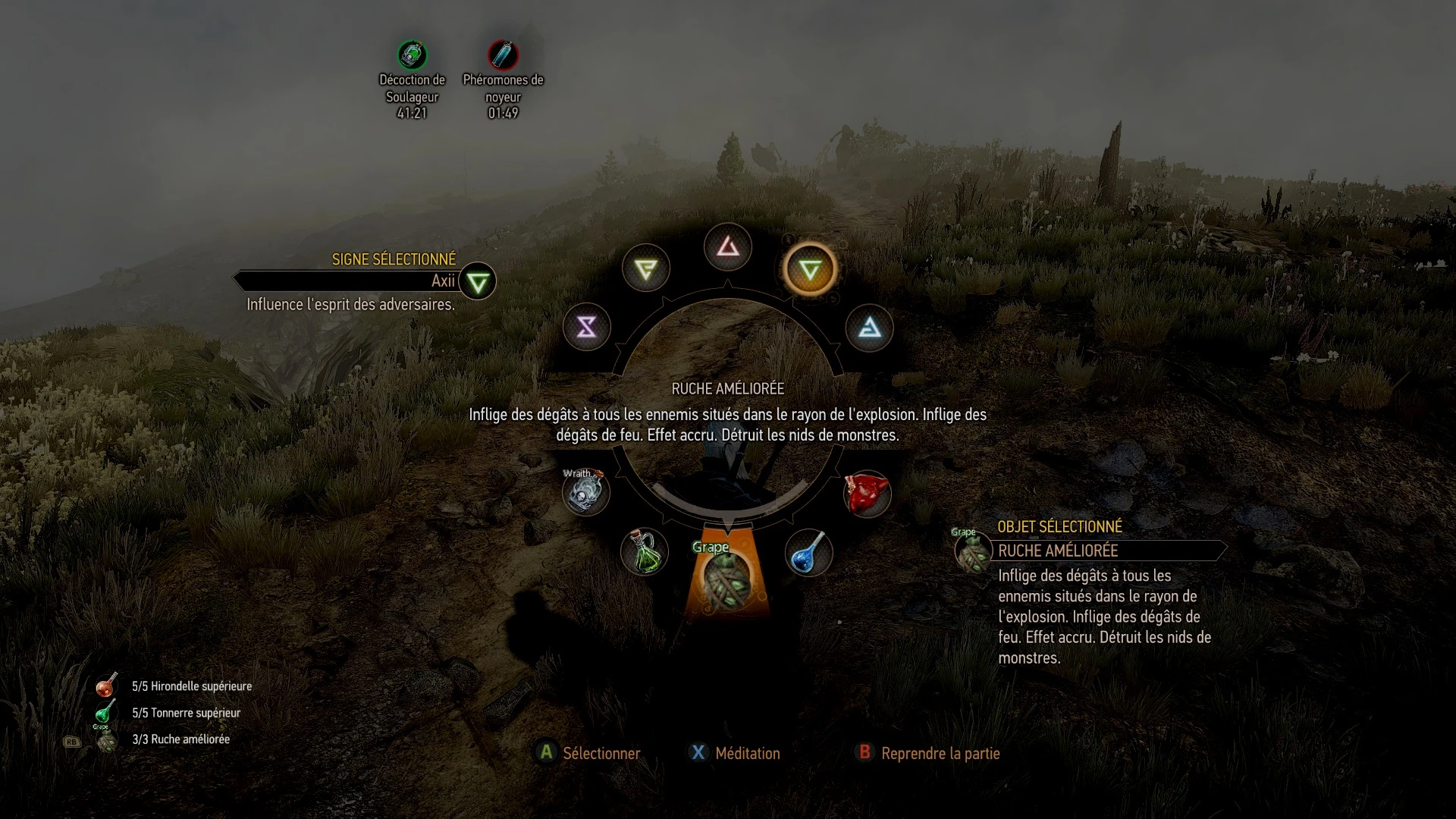
This mod reworks the bottom icons of the radial menu to allow quick item selection and consumption.
Mod updated for game V1. 30 / FriendlyHUD 11. 0 / More Quick Slots 1. 30 Merged mod with MoreQuickSlots still in work, it takes a bit more rework.
- --------------------------------
- As you have certainly noticed, the radial menu has been totally redesigned.
- As a consequence, the version 1. 9 if this mod has been highly modified to fit the new menu.
- Please be aware that due to that modification, version 1. 9 should be considered a beta. I haven't played long enough to test it in all situations, problems may arise. Feel free to share them in the comments.
ozz61 has been working on an alternative, closer to the previous version of the mod. It will be shared as soon as possible.
Installation instructions are similar, but several things have changed anyway. Those modifications are highlighted below. If you have already installed the previous version, no modification is necessary.
--------------------------------------------------------------------------------------------
First, an introduction:
I developed this mod to rework the way the radial menu works. The idea was to provide a way to handle potions and oils easily while in that menu. The idea came from the mod FriendlyHUD, which already does that, and from which I took some parts. This can be considered an alternative way, using one or the other is really just a matter of personal preference. I actually provide a version destined to be used with FriendlyHUD if you don't want to lose its other features. See further for installation instructions.
So, what does the mod do:
It redefines the bottom 3 icons of the radial menu to allow a easier usage with controller.
Instead of an icon for each quick slot, you will now have (as featured in screenshots): - 1 icon displaying your food items / oil items - 1 icon displaying your potion items / mutagen items - 1 icon displaying the equipped item (crossbow/quick slot 1/quick slot 2/bombs)
By selecting one of the icons, you will have the following possibilities: - Scroll through the items - Change the item type using Y on controller, right click on keyboard (only for middle icon: crossbow/quick slot 1/quick slot 2/bombs) - Drink/consume/apply the selected item using A on controller, left click on keyboard
The mod also lets you put the selected item (if possible) in any of the 4 slots: - By small press of DigitUp/DigitDown button, the item will be set to the foreground slots - By long press of DigitUp/DigitDown button, the item will be set to the background slots - By pushing R/F/T/Y (for a QWERTY/AZERTY keyboard), the item wi
📊 Mod Details
- Game
- Witcher 3 Mods
- Author
- Germ1nal
- Version
- 2.0.1
- Downloads
- 3,801
- Endorsements
- 146
- Category
- Inventory
- Created
- 9/26/2015
- Updated
- 9/14/2016
🔧 How to Install Witcher 3 Mods
Download from Nexus.
📖 Full step-by-step install guide for Witcher 3 →
Visit the official mod page for specific installation instructions for this mod.
🎮 Need cheat codes or console commands? Check ur gaming wiki for Witcher 3 commands, item IDs, and more.
Keep browsing — more Witcher 3 mods await