Snark's E3 Reshade for Super Turbo Lighting Mod
⚪ Last updated 2016⚠️ Install Order · 3 steps
Install in this order, then this mod last — most mods fail to load without their framework and dependencies in place.
Preview
🔍 Analysis
- 👍 2.9% endorsement rate — high engagement, a strong quality signal
- 🏆 #16 of 74 ReShade Preset mods in this game by downloads
📋 About This Mod
-
[]
Mod Information
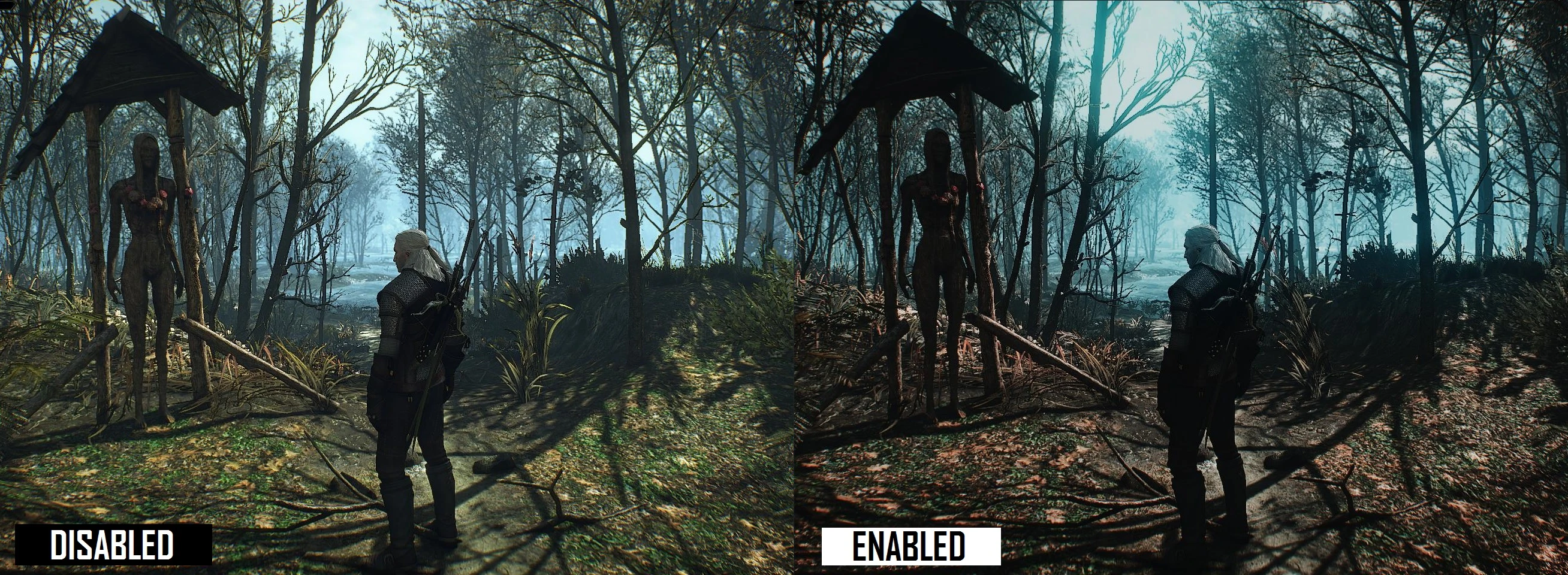
This reshade is made to capture the E3 look and atmosphere of the game even closer.
It's specially made for the Super Turbo Lighting Mod.
(Possible to use without the Super Turbo Lighting Mod, but it will look different than on the screenshots. Results may vary)
There are 2 versions now, the original one and the new LITE version.
The LITE version is using 75% of the Reshade filter on the game and mixing it with 25% of the in-game color scheme.
It's for people who find the original too dark or the colors unnatural.
-
[]
Installation
Extract the downloaded archive to ... The Witcher 3\bin\x64
Snark's E3 Reshade is a ReShade preset for Super Turbo Lighting Mod, designed to replicate the E3 demo look and atmosphere. With 802 endorsements and 27,515 downloads, it's a popular choice for players seeking a specific visual style. Last updated in 2016, it may require tweaking for modern setups.
✨ Key Features
📊 Pros & Cons
✅ Pros
- Community favorite with 802 endorsements and over 27k downloads
- Delivers that E3 demo vibe, making the game look closer to the original showcase
- Lightweight preset—just drop it in and tweak to your liking
⚠️ Cons
- Last updated in 2016—might not play nice with newer ReShade versions or game patches
- Requires Super Turbo Lighting Mod as a base, so it's not a standalone visual overhaul
For Skyrim players who already use Super Turbo Lighting Mod and want that E3 demo look. If you're chasing that specific atmospheric vibe from the trailers, this is for you. Skip if you're not using STLM or prefer a more modern reshade with active updates.
💡 Beginner Tips
- Make sure you have Super Turbo Lighting Mod installed first, as this preset builds on it.
- If the preset doesn't show up, check that ReShade is properly installed and the preset file is in the right folder.
- Adjust the in-game brightness and contrast after applying the preset to match your monitor.
📊 Mod Details
- Game
- Witcher 3 Mods
- Author
- Snark
- Version
- 1.1
- Downloads
- 27,515
- Endorsements
- 802
- Category
- ReShade Preset
- Created
- 1/13/2016
- Updated
- 1/14/2016
🔧 How to Install Witcher 3 Mods
Download from Nexus.
📖 Full step-by-step install guide for Witcher 3 →
Visit the official mod page for specific installation instructions for this mod.
🎮 Need cheat codes or console commands? Check ur gaming wiki for Witcher 3 commands, item IDs, and more.
Keep browsing — more Witcher 3 mods await