Original Witcher Armor sets colors
⚪ Last updated 2017⚠️ Install Order · 2 steps
Install in this order, then this mod last — most mods fail to load without their framework and dependencies in place.
Preview
🔍 Analysis
- 👍 3.0% endorsement rate — high engagement, a strong quality signal
- 🏆 #19 of 163 Armour mods in this game by downloads
📋 About This Mod
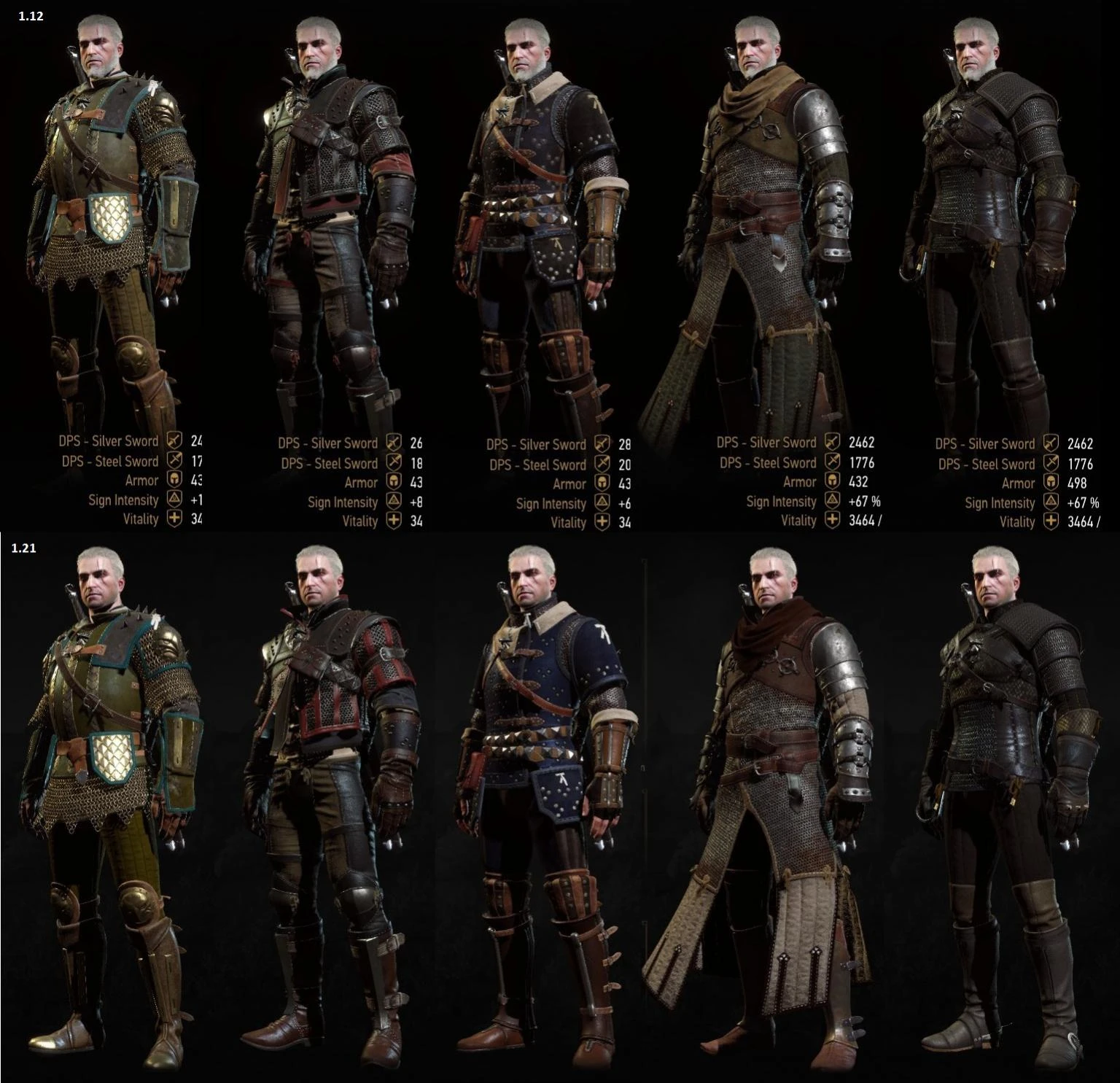
In patch 1. 21, CDPR has changed the colors for the Witchers sets in order to make way for their new dye system introduced in Blood and Wine. The change in color is of very questionable taste, so I brought the old colors back from the old files.
F. A. Q:
1. Which sets does the update change?
It affects the Wolf, Bear, Cat, Feline, Griffin, Kaer Morhen and Viper sets.
2. Does this mod reverts all four tiers of armors or just the mastercrafted version?
It reverts all four tiers to their original state (pre-1. 21).
3. What about the Grandmaster version?
The grandmaster version wasn't in the previous versions of the game and was designed for Blood and Wine, therefore there is no original pre-patch version. If you use AMM and the grandmaster armors happen to be bright red, you can use this to prevent that.
4. Is this compatible with other pre-patch reskins?
Texture mods are most likely going to work as long the reskin you want has higher priority than this mod.
5. I prefer the new colors.
That's nice, but having the option to choose the one you like the most is even nicer :)
Installation:
1. Download the file;
2. Extract it using the unpacker of your choosing (eg. winzip/winrar/7zip);
3. Place the extracted folder in your "/The Witcher 3/Mods/" folder (if it doens't exist, create it);
4. Play the game.
Simply remove the mod from the Mods folder to uninstall.
CD Projekt Red
This mod reverts the color of the witcher armor sets to their pre-1.21 appearance, addressing a change made in a game update. It is a simple cosmetic fix for players who prefer the original color scheme. With 2,340 endorsements and 77,479 downloads, it has proven popular among the community.
✨ Key Features
📊 Pros & Cons
✅ Pros
- Community-approved fix (2,340 endorsements) – clearly a lot of players wanted this
- Does exactly what it says – no bloat, just restores the classic look
- Huge download count (77k) shows it's trusted and widely used
⚠️ Cons
- Last updated in 2017 – may not work with the latest game version
- Only affects color – if you're looking for more armor changes, this isn't it
For Witcher 3 players who miss the original armor colors and want to undo the 1.21 change. Perfect for lore purists and those who prefer the classic aesthetic. Skip if you're fine with the updated colors or want more extensive armor modifications.
💡 Beginner Tips
- Make sure to place the mod files in the 'Mods' folder in your Witcher 3 directory
- If you're using other armor mods, check for conflicts – this mod changes the same textures
- Since it's from 2017, test it with your current game version – it may need compatibility patches
📊 Mod Details
- Game
- Witcher 3 Mods
- Author
- Scoutbr0
- Version
- 1.02
- Downloads
- 77,479
- Endorsements
- 2,340
- Category
- Armour
- Created
- 5/30/2016
- Updated
- 1/10/2017
🔧 How to Install Witcher 3 Mods
Download from Nexus.
📖 Full step-by-step install guide for Witcher 3 →
Visit the official mod page for specific installation instructions for this mod.
🎮 Need cheat codes or console commands? Check ur gaming wiki for Witcher 3 commands, item IDs, and more.
Keep browsing — more Witcher 3 mods await