No Artificial Player Light
⚪ Last updated 2018⚠️ Install Order · 2 steps
Install in this order, then this mod last — most mods fail to load without their framework and dependencies in place.
Preview
🔍 Analysis
- 👍 3.5% endorsement rate — high engagement, a strong quality signal
- 🏆 #96 of 264 Visuals and Graphics mods in this game by downloads
📋 About This Mod
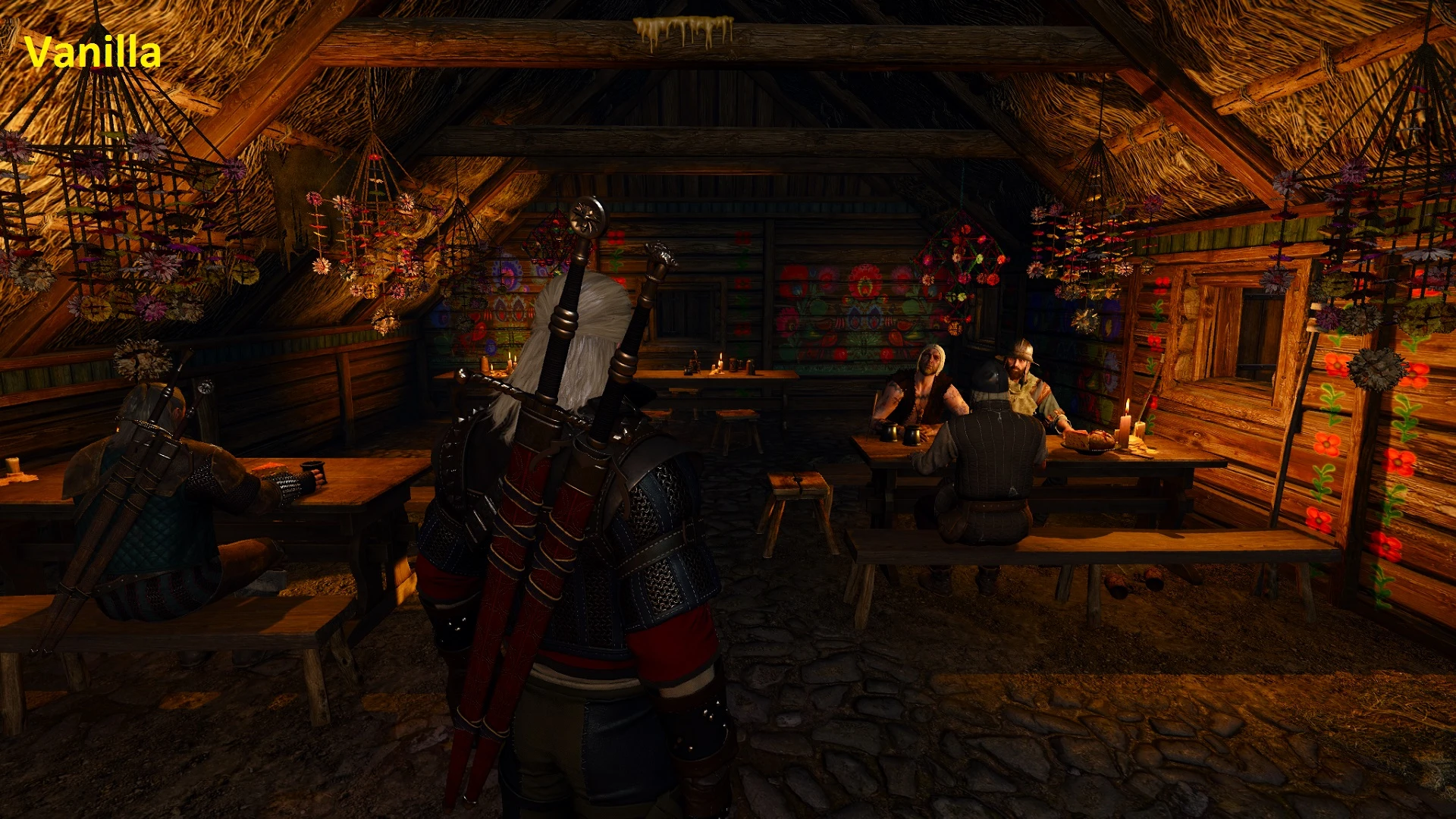
Did you ever notice that there is a light source that follows Geralt around, removing any darkness around him and making the light feel very artificial? This mod completely removes that annoying light while leaving cutscenes unchanged, so the atmosphere remains preserved. If removed from the cutscenes too, character's faces would be too dark for dialogue, however there is an optional file for it if you're interested. This should make the character be in true darkness and not fake lighting, making the Cat potion and Torches more useful.
I've added an exception for cave lighting, due to how important it is to have it in caves, from a gameplay and artistical standpoint. This changes only the player light. This is also compatible with the "No Cutscene Lighting" mod by Karull. I suggest opening the images in the image section on different tabs and comparing them. For version 1. 31 of the game.
There are 3 files:
A. No Player Light - Removes all of the lights from across all env's while leaving cutscene dialogues unchanged;
A. No Player Light (Script) - Removes player light while dialogue remains unchanged via script (Compatible with other lighting mods);
B. No Player Light except on caves - Removes all of the lights from across all env's while leaving cutscene dialogue and cave lighting unchanged;
C. No Player and Cutscene Light - Complete removal of all lightsources that are spawned behind the player and during dialogues (not recommended);
C. No Player and Cutscene Light (Script) - Complete removal of all lightsources that are spawned behind the player and during dialogues (not recommended) via script (compatible with other lighting mods).
Is this compatible with other lighting mods? Yes, as long as the lighting mod you are using takes precedence over this one (by default it should go to the bottom in the Mods folder) OR if you use the new script version, which edits r4Player.ws (doesn't support with cave lighting).
Installation:
1. Download the file; 2. Extract the modz_noplayerlight folder to /The Witcher 3/Mods/ folder; 3. Launch the game.
Uninstallation:
1. Remove the installed mod from /The Witcher 3/Mods/ folder;
v1. 01 - Added a few env's that were previously missed. v1. 02 - Bugfix.
No Artificial Player Light removes the light source that follows the player character in Skyrim, while leaving cutscene dialogue lighting unchanged. A simple visual fix for players who want more realistic lighting and immersion. With 1,288 endorsements and 37,145 downloads, it's a popular quality-of-life mod.
✨ Key Features
📊 Pros & Cons
✅ Pros
- Community favorite with 1,288 endorsements and 37k downloads.
- Does exactly what it says—no extra fluff, just removes the player light.
- Keeps dialogue scenes intact, so no weird dark conversations.
⚠️ Cons
- Last updated in 2018—might not play nice with newer Skyrim versions or mods that alter lighting.
- Purely cosmetic—if you're looking for gameplay changes, this isn't it.
For Skyrim players who want more immersive lighting and hate the floating light that follows you around. Perfect for those who use ENB or other lighting mods and want to eliminate that artificial glow. Skip if you don't notice or care about the player light—this is a subtle tweak.
💡 Beginner Tips
- Make sure to load this mod after any lighting overhaul mods to ensure it takes effect.
- If you use a mod manager, install it like any other mod—no special setup needed.
- Test in a dark cave or at night to see the difference immediately.
📊 Mod Details
- Game
- Witcher 3 Mods
- Author
- ScoutBr0
- Version
- 1.02
- Downloads
- 37,145
- Endorsements
- 1,288
- Category
- Visuals and Graphics
- Created
- 5/7/2017
- Updated
- 1/12/2018
🔧 How to Install Witcher 3 Mods
Download from Nexus.
📖 Full step-by-step install guide for Witcher 3 →
Visit the official mod page for specific installation instructions for this mod.
🎮 Need cheat codes or console commands? Check ur gaming wiki for Witcher 3 commands, item IDs, and more.
Keep browsing — more Witcher 3 mods await