ModSoundEditor 1.0 GUI
⚪ Last updated 2020⚠️ Install Order · 2 steps
Install in this order, then this mod last — most mods fail to load without their framework and dependencies in place.
Preview
🔍 Analysis
- 🏆 #26 of 45 Audio mods in this game by downloads
📋 About This Mod
The mod allows you to speed up the work associated with changing the soundtrack in The Witcher 3
My portfolio
Mod Sound Editor 1. 0 allows you to reduce the working time at changing the soundtrack in The Witcher 3.
The ModSoundEditor 1. 0 application was written in C# in Windows Forms in Visual Studio 2019.
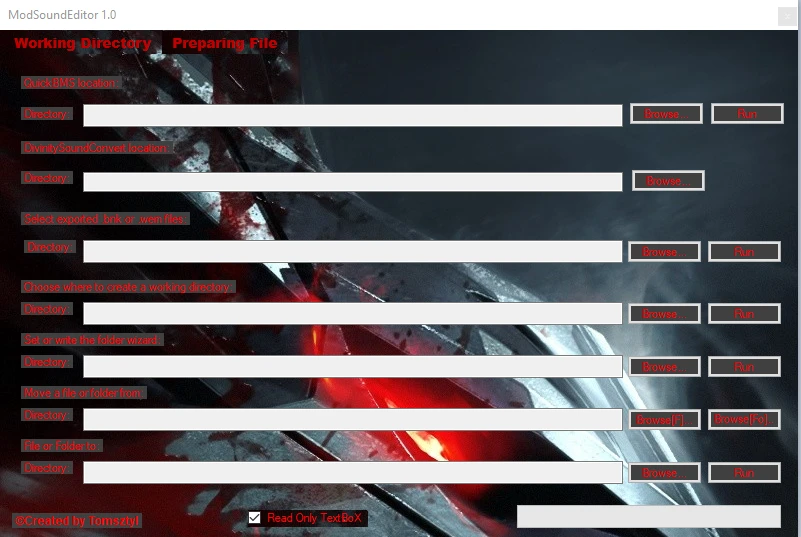
The application has two windows "Working Directory" and "Preparing File".
When you turn off the application, the path status is saved.
Application scripts
In the "Working Directory" window you can:
1) locate QuickBMS by entering the folder path and launch
2) Locate DivinitySoundConvert
3) Indicate the original files and copy them to the folder witch Divinity SoundConverter
4) Indicate the path where the working directory is to be created
5) Create folders in a convenient way specifying the path
6,7) Point to and move the file and folder to the indicated place
8) You can indicate whether you enter or select the path through the interface
In the "Preparing File" window you can:
1) Locate the prepare_wave.py script, set looping and convert
2) Indicate the .wav file needed for the prepare_wave.py script
3) Locate the compare_wem.py script and convert the file
4) Indicate the original file needed for compare_wem.py
5) Indicate the converted .wem file needed for compare_wem.py
6) Locate the create_sounds_cache.py script and create soundspc.cache NOTE! the file is created next to the ModSoundEditor1. 0 application
7) Indicate the folder with .wem files with the example path C: \WorkingDirectory\modded \merged
8) You can indicate whether you enter or select the path through the interface
My portfolio
ModSoundEditor 1. 0 pozwala skrócić czas pracy przy zmianie soundtracku w The Witcher3.
Aplikacja ModSoundEditor 1. 0 została napisana w języku C# w Windows Forms w Visual Studio 2019.
Aplikacja posiada dwa okna "Working Directory" i "Preparing File".
Po wyłączeniu aplikacji stan ścieżek zostaje zapisany.
Skrypty aplikacji
W oknie "Working Directory" można :
1) zlokalizować QuickBMS przez podanie ścieżki folderu oraz uruchomić
2)lokalizować DivinitySoundConvert
3)wskazać pliki orginalne oraz przekopiować je do folderu z DivinitySoundConvert
4)wskazać scieżke gdzie ma być stworzony katalog roboczy
5)tworzyć foldery w wygodny sposób podając ścieżkę
6,7)wskazać oraz przenieść plik oraz folder do wskazanego miejsca
8)można wskazać czy ścieżkę wpisujemy czy wybieramy przez interfejs
W oknie "Preparing File" można :
1)zlokalizować skrypt prepare_wave.py ustawić loopowanie oraz przekonwertować
2)wskazać plik .wav potrzebny do skryptu prepare_wave.py
3)zlokalizować skrypt compare_wem.py oraz przekonwertować plik
4)wskazać plik oryginalny potrzebny do comp
📊 Mod Details
- Game
- Witcher 3 Mods
- Author
- Tomsztyl
- Version
- 1.0
- Downloads
- 214
- Endorsements
- 13
- Category
- Audio
- Created
- 2/5/2020
- Updated
- 2/5/2020
🔧 How to Install Witcher 3 Mods
Download from Nexus.
📖 Full step-by-step install guide for Witcher 3 →
Visit the official mod page for specific installation instructions for this mod.
🎮 Need cheat codes or console commands? Check ur gaming wiki for Witcher 3 commands, item IDs, and more.
Keep browsing — more Witcher 3 mods await