Hugs's preset for Toussaint
⚪ Last updated 2020⚠️ Install Order · 2 steps
Install in this order, then this mod last — most mods fail to load without their framework and dependencies in place.
Preview
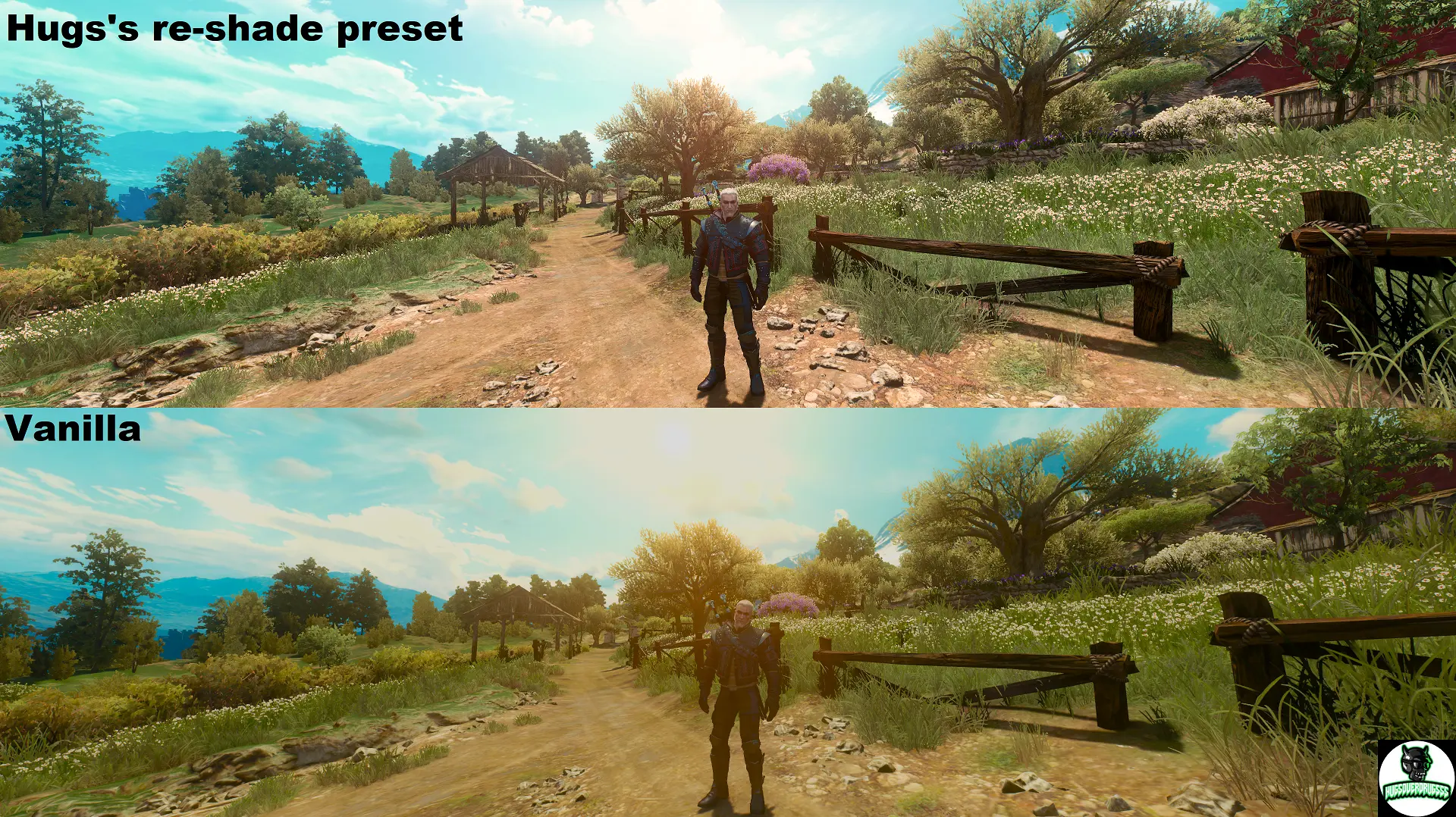
🔍 Analysis
- 👍 3.6% endorsement rate — high engagement, a strong quality signal
- 🏆 #66 of 74 ReShade Preset mods in this game by downloads
📋 About This Mod
Requirements:
Newest Re-ShadeImmersive Lighting
No Dirty Lens Effect
Clear Toussaint Lighting
HD Reworked Project by Halk Hogan
Optional:
(these are the other mods I have along with the required mods)
Beautiful Rocks light
It is made for Immersive Lighting but works with STLM, Wiedzmin and Phoenix lighting mods aswell but you might not get the same results as you see on the pictures.
You should expect around 5-10 fps drop depending on your system.
Installation:
1. Install the newest version of re-shade
2. Download the other required mods and move them to your Witcher 3 mods folder
3. Install Halk Hogan's HD Reworked Project
4. Download my preset and move the bin folder to your main Witcher 3 folder overwrite all if asked
5. Select my preset by pressing the Home button in the game and then press the little arrow in the Re-shade menu
To all the other mods authors: Halk Hogan, MrR0x, RumenWest, chuckcash, Boostin4kix
And to the team behind Re-shade!
And lastly me who made the preset.
!!!If you encounter any bugs/errors or incompatibility with any other mods please let me know so I can invastigate it and hopefully solve it. If not then at least list the mods that are incompatible with my preset!!!
If you like it please endorse. <3
A ReShade preset for The Witcher 3 that recolors Toussaint, replacing the default mustard yellow and green tones with a custom palette. Created by Hugs0verDrugs for players who find the original area colors unappealing. With 188 endorsements and 5,193 downloads, it's a niche but appreciated visual tweak.
✨ Key Features
📊 Pros & Cons
✅ Pros
- Community-approved with 188 endorsements and over 5,000 downloads
- Solves a specific visual gripe—no more ugly yellow-green tint in Toussaint
- Simple to install: just drop the preset into your ReShade folder
⚠️ Cons
- Last updated in February 2020—may not be compatible with the latest ReShade versions
- Only affects Toussaint, so other areas remain unchanged
- No screenshots or detailed settings provided, so you'll have to test it yourself
For Witcher 3 players who love Toussaint's architecture but hate its default color grading. If you're tired of the mustard-yellow look and want a fresh take without overhauling the whole game, this preset is for you. Skip if you're happy with the original colors or want a full-game reshade.
💡 Beginner Tips
- Make sure you have ReShade installed and set to load presets from the game folder
- After installing, use the ReShade in-game menu to toggle the preset and compare with the original
- If the preset doesn't show up, check that the file is in the correct directory (usually the game's exe folder)
📊 Mod Details
- Game
- Witcher 3 Mods
- Author
- Hugs0verDrugs
- Version
- 1.0.0
- Downloads
- 5,193
- Endorsements
- 188
- Category
- ReShade Preset
- Created
- 2/7/2020
- Updated
- 2/7/2020
🔧 How to Install Witcher 3 Mods
Download from Nexus.
📖 Full step-by-step install guide for Witcher 3 →
Visit the official mod page for specific installation instructions for this mod.
🎮 Need cheat codes or console commands? Check ur gaming wiki for Witcher 3 commands, item IDs, and more.
Keep browsing — more Witcher 3 mods await