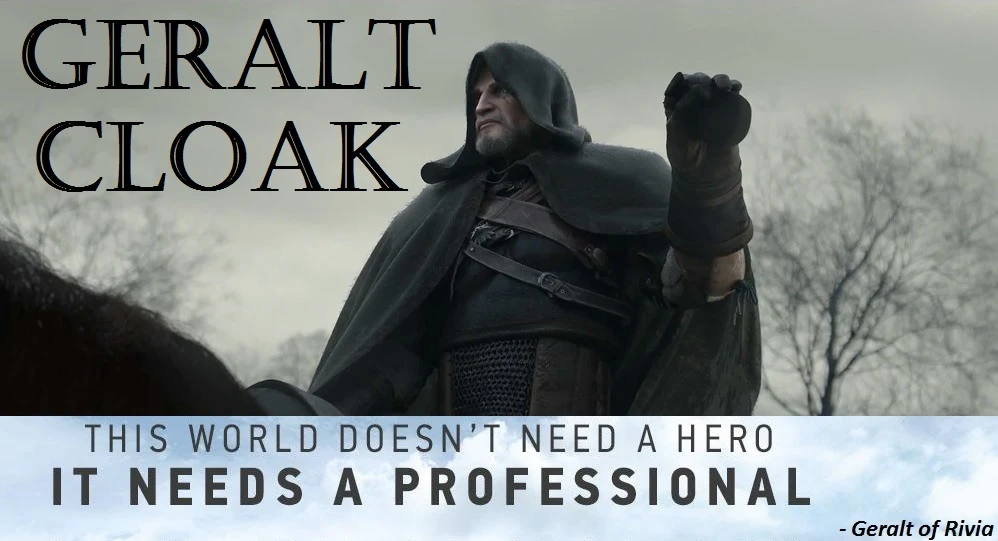
Geralt Cloak
⚪ Last updated 2017⚠️ Install Order · 2 steps
Install in this order, then this mod last — most mods fail to load without their framework and dependencies in place.
Preview
🔍 Analysis
- 👍 1.7% endorsement rate — high engagement, a strong quality signal
- 🏆 #1 of 151 Immersion mods in this game by downloads
📋 About This Mod
Description:
Give a cloak to Geralt that looks like in a cinematic trailers & storybooks. This mod serves to make the game more immersive. Now, you can cover Geralt from rain, cold, & his identity as a witcher.
How to Use: Press 8 to wear & unwear the hood. Press 9 to wear & unwear the cape. You can change the buttons in Options/Key Bindings
Features: 1. Compatible with the latest update (1. 30-1. 31) (GOTY/Non-GOTY) 2. Cloak Toggleable on Foot, Horse, Boat, Swim, Dive, and Cutscene 3. Added Cloak Toggle Buttons in Options/Key Bindings 4. Added Alternative Model for Geralt Cloak 5. Added 3 Cloak Recolor files for Original Geralt Cloak (Brown Cloak, Dark Black Cloak, & Light Gray Cloak) 6. Added animation when toggling Geralt Cloak (only on foot)
Bug Fixes: 1. Fixed (Geralt hair back to Default after toggling the hood) 2. Fixed (Cape & Hood don't change colors after installing recoloring file) 3. Fixed (Cloak disappear after loading a save game) 4. Fixed (Cloak disappear after traveling between regions) 5. Fixed (Compatibility with Complete Animation mod) 6. Recolored 2 neck circles on Original Geralt Cloak
(Skip this step if you don't have custom keys from other mods)
"Key Bindings Options" Manual Install:
1. Copy the lines below:
<!-- Geralt Cloak -->
<Var builder="Input" id="ToggleHood" displayName="GC_ToggleHood" displayType="INPUTPC" actions="HoodToggle" />
<Var builder="Input" id="ToggleCape" displayName="GC_ToggleCape" displayType="INPUTPC" actions="CapeToggle" />
This mod gives Geralt a cloak that matches the look from cinematic trailers and storybooks, enhancing immersion. With 16,854 endorsements and nearly a million downloads, it's a highly popular cosmetic addition for The Witcher 3. Last updated in 2017, it remains a community favorite for players seeking a more cinematic appearance.
✨ Key Features
📊 Pros & Cons
✅ Pros
- Huge community approval (16,854 endorsements) — this is a must-have for many players.
- Nearly a million downloads (997,576) shows it's been tried and loved.
- Simple cosmetic addition that boosts immersion without changing gameplay.
⚠️ Cons
- Last updated in 2017 — might have compatibility issues with newer game patches or DLC.
- Cosmetic only — if you're looking for gameplay changes, this isn't it.
For Witcher 3 players who want Geralt to look more like his cinematic counterpart and enjoy immersive visual tweaks. If you're a lore enthusiast or screenshot lover, this is a great addition. Skip if you want gameplay alterations.
💡 Beginner Tips
- Since it's a simple mod, just drop the files into your 'Mods' folder in the game directory.
- If you use other mods that alter Geralt's appearance, check for conflicts and load order.
- Make sure to back up your save files before installing any mod, just in case.
📊 Mod Details
- Game
- Witcher 3 Mods
- Author
- anakmonyet - stefan3372
- Version
- 2.1
- Downloads
- 997,576
- Endorsements
- 16,854
- Category
- Immersion
- Created
- 9/14/2017
- Updated
- 9/25/2017
🔗 Required By 1 Mod
These mods list this mod as a dependency.
🔧 How to Install Witcher 3 Mods
Download from Nexus.
📖 Full step-by-step install guide for Witcher 3 →
Visit the official mod page for specific installation instructions for this mod.
🎮 Need cheat codes or console commands? Check ur gaming wiki for Witcher 3 commands, item IDs, and more.
Keep browsing — more Witcher 3 mods await