Fake Hairworks
⚪ Last updated 2022⚠️ Install Order · 2 steps
Install in this order, then this mod last — most mods fail to load without their framework and dependencies in place.
Preview
🔍 Analysis
- 👍 3.5% endorsement rate — high engagement, a strong quality signal
- 🏆 #88 of 91 Hair and Face mods in this game by downloads
📋 About This Mod
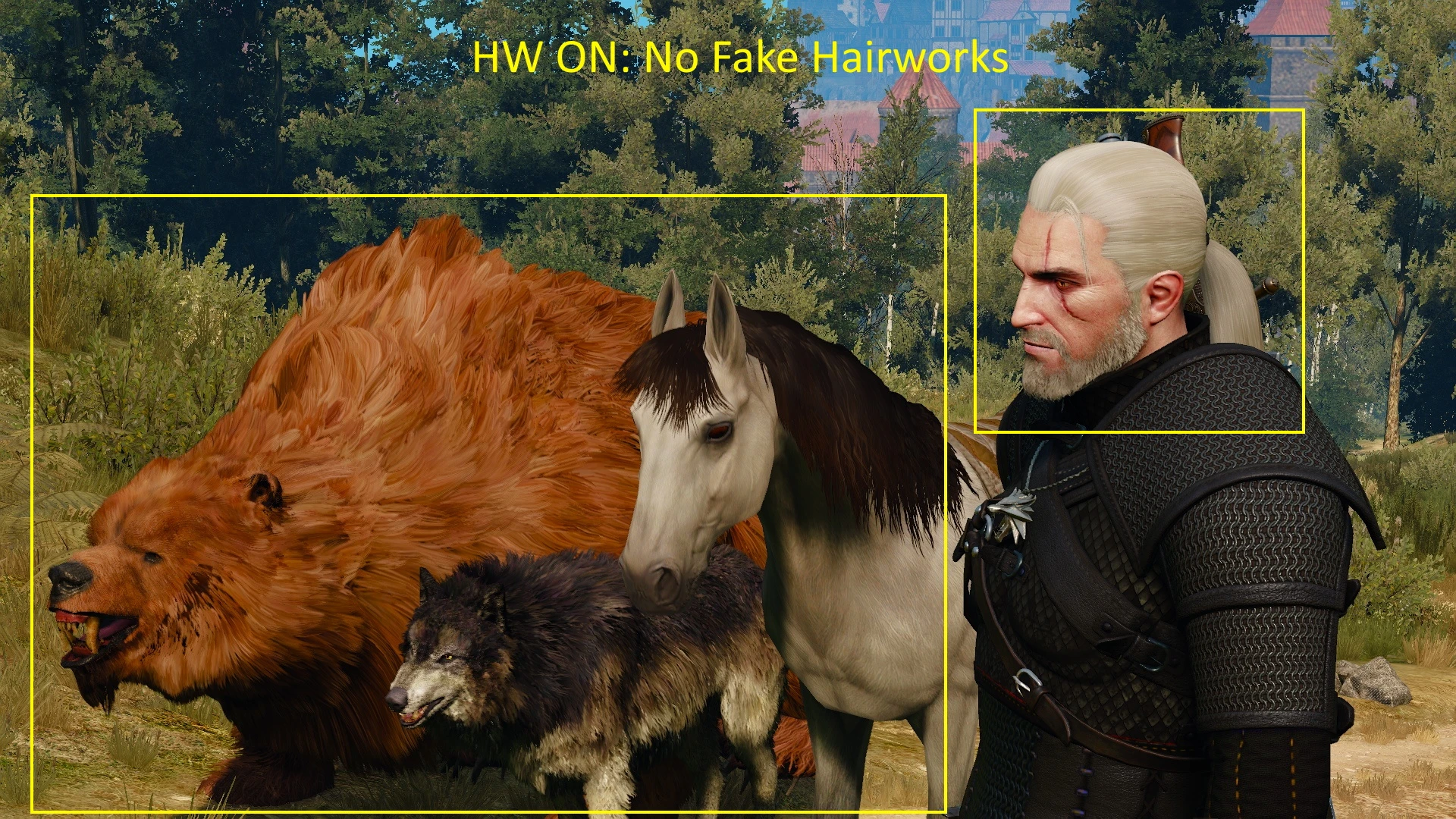
Technically: changes all .w2ent (entity) files which contains CFurComponent chunk, changing furMesh handle to invalid path, what forces the game to load "usual" (non-HW) mesh even if Hairworks is ON.
Here is the list of all edited entities. And the list of all entities with edited .w2ent paths.
EDIT: For some unknown reason some entities with fur component were not replaced correctly, what led to invisible entities. So in v2. 0 I added entity parts with fur in DLC, and changed paths to them in all entities, which use these parts. That's why mod contains DLC folder (and works without problems now).
EDIT2: Geralt custom hair/beard with hairworks from New Hairstyles and Beards For Geralt (DLC2 Improved) are also included in the mod since v2. 0.
What for:
It is aimed to save some fps for people, who need to have Hairworks ON for some mod correct/complete work (The Stable - Horse Customization Mod), but don't want to lose several FPS because of Geralt's beard/hair (which looks quite bad with low HW AA) and other entities (succubus, horses, wolves etc) containing Hairworks meshes.
It also may be useful if you do like hairworks on Geralt only/Animals only (then you should use version "For Geralt only" or "For Animals only").
Check mod images to see the difference.
Installation:
Download needed .zip file and unpack. Put Mods and DLC folders into <your game> folder.
If you experience any launch issues, make sure you have Mod Limit Fix installed.
Uninstallation:
Remove modFakeHairworks_ForGeralt/modFakeHairworks_ForAnimals folder from <your game>/Mods.
Remove dlcFakeHairworks folder from <your game>/DLC.
Fake Hairworks lets you keep Hairworks enabled in The Witcher 3 while using non-Hairworks models for Geralt, animals, or everyone. This is a performance-friendly tweak for players who want the option without the visual overhead. With 184 endorsements and 5,250 downloads, it's a niche but appreciated utility.
✨ Key Features
📊 Pros & Cons
✅ Pros
- Gives you control over who gets Hairworks—Geralt, animals, or everyone—so you can balance looks and performance
- Lets you keep Hairworks ON for the option menu while avoiding its heavy GPU cost on certain characters
- Solid community trust with 184 endorsements and over 5,000 downloads
⚠️ Cons
- Last updated in 2022, so it may not be compatible with the latest game patches or DLC
- Only affects hair models; doesn't change other Hairworks features like fur or cloth
For Witcher 3 players who want to enable Hairworks for the visual effect but need to reduce the performance hit on certain characters. Also for those who prefer the original hair models but still want the option toggled on. Skip if you're fine with all-or-nothing Hairworks or don't care about hair physics.
💡 Beginner Tips
- Back up your original game files before replacing any hair models, just in case you want to revert.
- Check the mod's file structure—if it includes a 'mods' folder, place it in your Witcher 3 'Mods' directory.
- If you use Script Merger, run it after installing to avoid conflicts with other mods that modify hair or character models.
📊 Mod Details
- Game
- Witcher 3 Mods
- Author
- nikich340
- Version
- 2.0
- Downloads
- 5,250
- Endorsements
- 184
- Category
- Hair and Face
- Created
- 5/1/2022
- Updated
- 5/7/2022
🔧 How to Install Witcher 3 Mods
Download from Nexus.
📖 Full step-by-step install guide for Witcher 3 →
Visit the official mod page for specific installation instructions for this mod.
🎮 Need cheat codes or console commands? Check ur gaming wiki for Witcher 3 commands, item IDs, and more.
Keep browsing — more Witcher 3 mods await