DLSSTweaks
⚪ Last updated 2023⚠️ Install Order · 2 steps
Install in this order, then this mod last — most mods fail to load without their framework and dependencies in place.
Preview
🔍 Analysis
- 👍 2.6% endorsement rate — high engagement, a strong quality signal
- 🏆 #174 of 264 Visuals and Graphics mods in this game by downloads
📋 About This Mod
DLSSTweaks
https://github.com/emoose/DLSSTweaks
Wrapper DLL that can force DLAA onto DLSS-supported titles, along with tweaking scaling ratios & DLSS 3. 1 presets.
Most titles that support DLSS2+ should hopefully work fine with this, but if you find any that don't, or have any other issues, feel free to post in the github issue tracker, or make a post on this NexusMods page.
This has been tested with Nvidia driver series 528 & 531 - earlier drivers may have issues, recommend updating if DLSSTweaks doesn't seem to apply to any games for you.
Many hours have gone into development/research/testing, along with debugging issues with different games.
If the tweaks help improve your experience, please consider buying a coffee!
-
[]Download the "1. DLSSTweaks for Witcher 3" pack from the files section of the mod page.
[
]Extract the contents of that ZIP file into your Witcher 3 install folder.[]Ensure that the dxgi.dll and dlsstweaks.ini files are located in the same folder as Witcher3.exe, this is necessary for DLSSTweaks to load in & any tweaks enabled in the INI file to take effect.
[]If you just want to force DLAA, look for the "ForceDLAA = false" line in the dlsstweaks.ini file and change "false" to "true". Save the file, and on next launch all DLSS modes will now act as DLAA instead. (note that this will have a performance impact if you were previously using DLSS, since the game will now render at full-res for every mode)
- Many other tweaks are also available inside the INI for those interested, the Usage section below gives some examples for them (eg. enabling the "UltraQuality" setting)
The default dlsstweaks.ini won't make any tweaks & must be edited first - descriptions of each tweak are available in the INI.
If you just want to force DLAA, enabling the ForceDLAA option can make all DLSS levels act as DLAA instead, rendering at full-resolution with DLSS applied to it.
(note that this will have a performance impact if you're currently using DLSS, should have about the same performance as playing without DLSS enabled, but with the bonus of applying the awesome DLAA anti-aliasing on top of it)
The game might be changing mip bias depending on DLSS level too, so feel free to experiment with them.
If the performance hit from ForceDLAA is too high for you, you can also tweak the scaling ratios of the existing DLSS levels to allow getting a slight quality increase, without the full perf hit of using DLAA.
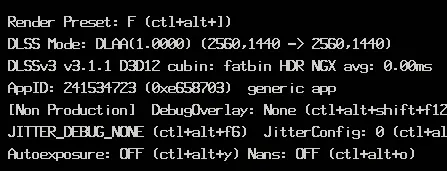
To verify whether the tweaks are active you can set OverrideDlssHud to 1 in the dlsstweaks.ini to make
DLSSTweaks is a utility mod for games supporting DLSS, enabling DLAA anti-aliasing, custom DLSS scaling ratios, and selection of DLSS 3.1 presets. It has 326 endorsements and 12,589 downloads, last updated in April 2023.
✨ Key Features
📊 Pros & Cons
✅ Pros
- Solid community trust with 326 endorsements and over 12k downloads.
- Gives you fine-tuned control over DLSS quality and performance.
- Unlocks DLAA for sharper image quality without extra performance cost.
⚠️ Cons
- Last updated in April 2023 — may not support the latest DLSS versions or games.
- Requires manual configuration to get the most out of it, which can be intimidating.
- No detailed documentation provided, so you'll need to experiment or search for guides.
For PC gamers who want to squeeze every bit of visual quality out of DLSS-supported titles, especially those who value image clarity over raw performance. Skip if you're happy with default DLSS settings or prefer a plug-and-play experience.
💡 Beginner Tips
- Make sure your game and GPU drivers support DLSS 3.1 before installing.
- Start with DLAA to see if the performance hit is acceptable for your setup.
- Check the mod's forum or comments for user-shared preset recommendations.
📊 Mod Details
- Game
- Witcher 3 Mods
- Author
- emoose
- Version
- 0.200.6
- Downloads
- 12,589
- Endorsements
- 326
- Category
- Visuals and Graphics
- Created
- 2/14/2023
- Updated
- 4/12/2023
🔧 How to Install Witcher 3 Mods
Download from Nexus.
📖 Full step-by-step install guide for Witcher 3 →
Visit the official mod page for specific installation instructions for this mod.
🎮 Need cheat codes or console commands? Check ur gaming wiki for Witcher 3 commands, item IDs, and more.
Keep browsing — more Witcher 3 mods await