Different SFX or ReShade Presets For Each Location
⚪ Last updated 2016⚠️ Install Order · 2 steps
Install in this order, then this mod last — most mods fail to load without their framework and dependencies in place.
Preview
🔍 Analysis
- 👍 3.3% endorsement rate — high engagement, a strong quality signal
- 🏆 #16 of 43 Utilities mods in this game by downloads
📋 About This Mod
SweetFX/ReShade with 6 different presets that will change depending on location, you don't need to find compromises anymore, just create presets for specific locations. For patch 1. 22 and 1. 24 and 1. 30. (can be easily modified for other version though)
Currently supported locations:
- White Orchard
- Velen/Novigrad/Oxenfurt
- Kaer Morhen
- Skellige
- Toussaint
- Vizima CastleUpdate:
- Mod updated for GOTY patch 1. 30.
- Update 1. 3:
- Fixed bug with presets being reloaded after hiding HUD etc.
- Reload key is removed, related to said bug.
- Reduced changes in scripts. Now it's only 5 lines in one file - easier merging with other mods.
See instalation below even if you're updating. Installation 1. If you used old version, delete old scripts (mods/modSFXPresets folder in game folder) 2. Install utility:
1. Download and install ReShade or SweetFX. 2. Unpack the downloaded archive. 3. Place "bin" and "mods" folders in game folder. 4. Run vcredist.bat to install vc redist packages.
3. Make sure there are no conflicts with mods. This utility uses scripts - if you're using any mods, use Script Merger. In case of problems with Script Merger, see merging.txt.
4. Run the game, and load any save. Then close it. (For first install, skip this if you're updating)
5. (Only for preset creators) Configure presets: 1. Download DefaultLocationPresets. 2. Unpack it and place LocationPresets folder in "<game folder>\bin\x64\". 2. Open each preset and configure it how you like, they are "clear" by default - every effect is disabled.
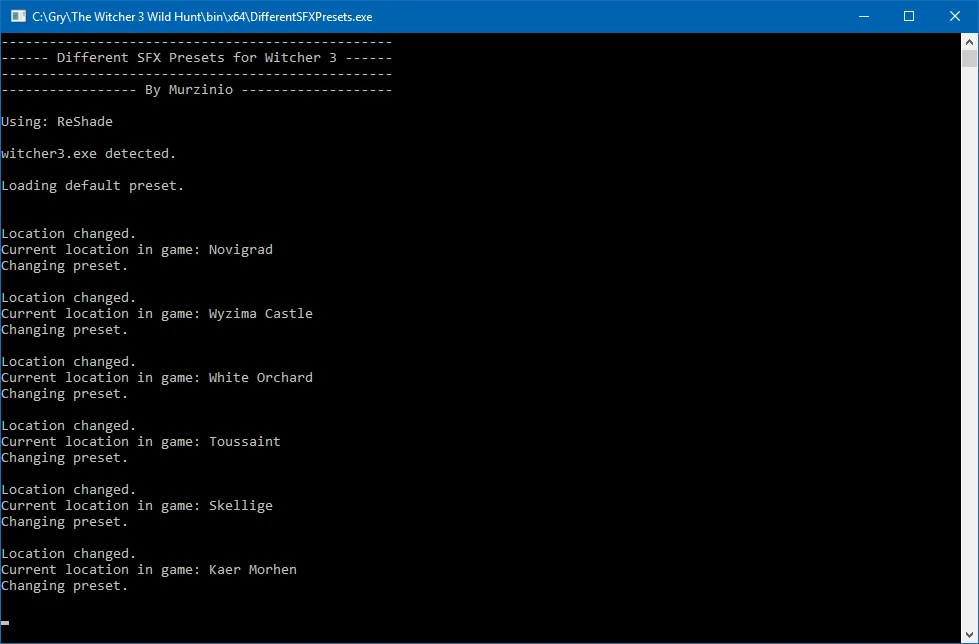
How to use it 1. Start DifferentSFXPresets.exe from <game folder>\bin\x64\ (i suggest making shortcut to it on desktop for convenience because you need to start it each time before starting the game, or after starting the game, but before loading a save/starting new game)
On start DifferentSFXPresets.exe detects if you're using ReShade or SweetFX, loads SweetFX_default.txt/default from ReShade as current preset, then on save load/location change, it loads one of the 6 location presets, if you're in location not supported (yet), it will again load SweetFX_default.txt/default from ReShade.
2. Start [size=3
This utility for The Witcher 3 lets you use six different SweetFX/ReShade presets that automatically change based on your location, eliminating the need for a single compromise preset. It supports patches 1.22, 1.24, and 1.30, and can be easily modified for other versions. With over 1,600 endorsements, it's a popular choice for players wanting tailored visuals.
✨ Key Features
📊 Pros & Cons
✅ Pros
- Community favorite with 1,623 endorsements and nearly 50k downloads.
- Solves the 'one preset fits all' problem by giving each location its own look.
- Simple concept that works—just drop in presets and go.
⚠️ Cons
- Last updated in 2016—may not work with the current game version without tweaks.
- Requires SweetFX/ReShade setup, which can be finicky for newcomers.
- Only six presets—you might want more variety for all the game's regions.
For Witcher 3 players who love tweaking visuals and want each area to feel distinct without manually switching presets. Perfect if you're already using ReShade and want more dynamic looks. Skip if you're on the latest patch and don't want to fiddle with compatibility.
💡 Beginner Tips
- Make sure your game version matches one of the supported patches (1.22, 1.24, 1.30) or be ready to modify the files.
- Back up your original SweetFX/ReShade settings before overwriting, so you can revert if needed.
- Test each preset in different locations to see the effect—some may be more dramatic than others.
📊 Mod Details
- Game
- Witcher 3 Mods
- Author
- Murzinio
- Version
- 1.3
- Downloads
- 49,266
- Endorsements
- 1,623
- Category
- Utilities
- Created
- 7/18/2016
- Updated
- 8/30/2016
🔧 How to Install Witcher 3 Mods
Download from Nexus.
📖 Full step-by-step install guide for Witcher 3 →
Visit the official mod page for specific installation instructions for this mod.
🎮 Need cheat codes or console commands? Check ur gaming wiki for Witcher 3 commands, item IDs, and more.
Keep browsing — more Witcher 3 mods await