Blue Hearts of Stone Burning Mark
🟠 Updated over a year ago⚠️ Install Order · 2 steps
Install in this order, then this mod last — most mods fail to load without their framework and dependencies in place.
Preview
🔍 Analysis
- 👍 1.1% endorsement rate — high engagement, a strong quality signal
- 🏆 #5 of 91 Hair and Face mods in this game by downloads
📋 About This Mod
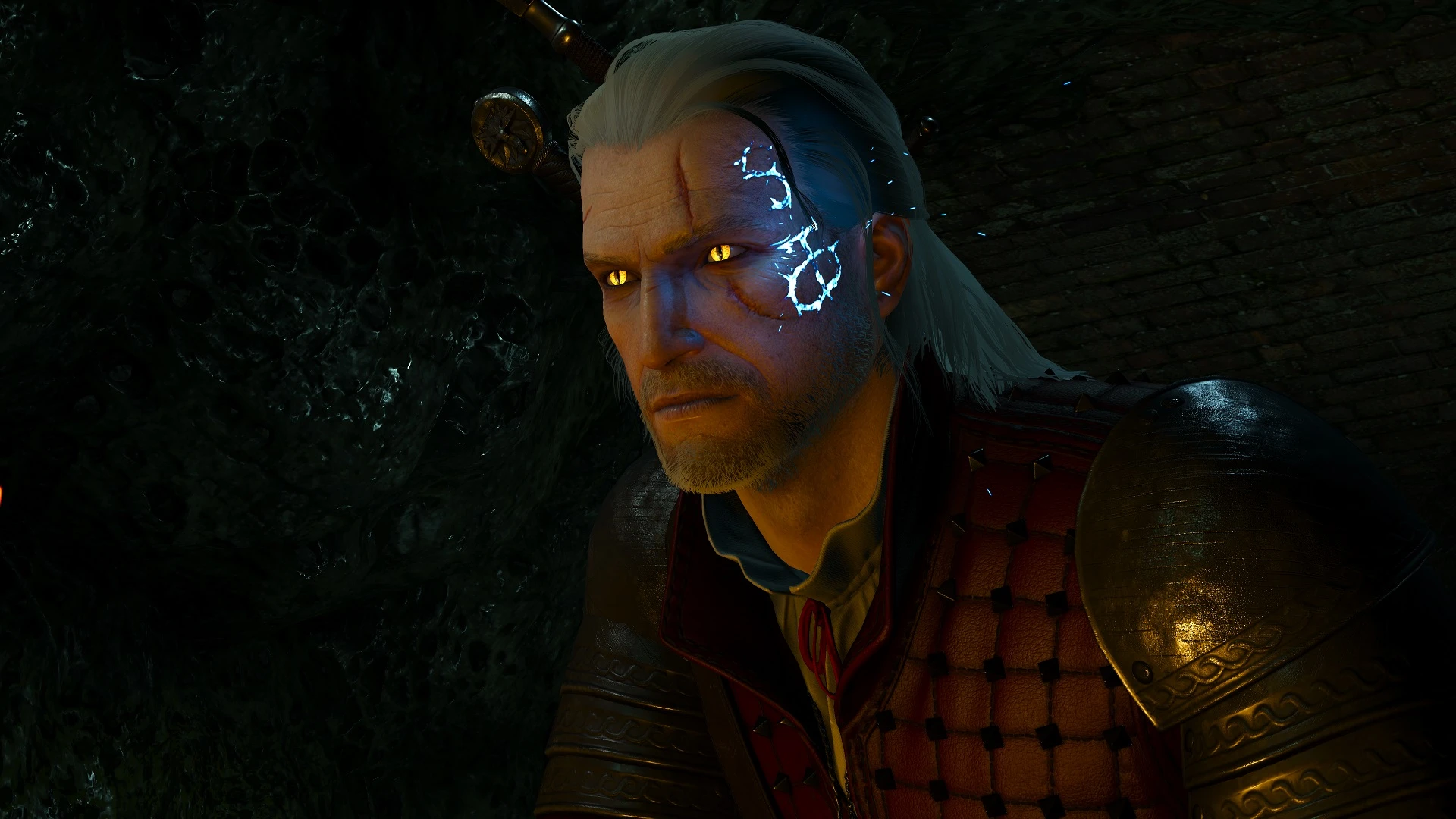
This makes the mark/branding from Hearts of Stone glow blue and burn permanently for as long as you have it, so it should make your Hearts of Stone playthrough much more interesting than the one that is barely noticeable. Should be compatible with other texture mods as long as they don't remove the mark.
The Concept Artwork/Renders shows the mark as Blue, which is curious because its the only place where its depicted as blue, and I honestly think it looks cooler that way, more magical and mysterious rather than just a red fiery one. Optionally has a version with blue embers coming out of it constantly. Other than the color, it behaves identically to the Hearts of Stone Burning Mark mod.
Installation:
1. Download the file;
2. Extract the modHoSBlueBurningMark folder to /The Witcher 3/Mods/ folder;
3. Launch the game.
Uninstallation:
1. Remove modHoSBlueBurningMark from /The Witcher 3/Mods/ folder;
CD Projekt Red
Hyadum for the material advice
A compact cosmetic mod for The Witcher 3 that changes the Hearts of Stone mark to burn permanently blue, matching the artwork renders. With 1,045 endorsements and 95,842 downloads, it's a popular visual tweak for players who want a lore-friendly aesthetic change.
✨ Key Features
📊 Pros & Cons
✅ Pros
- Community favorite with 1,045 endorsements and nearly 96k downloads
- Faithful to the game's official artwork—great for lore buffs
- Lightweight and easy to install, no extra bells and whistles
⚠️ Cons
- Only affects the mark's color—no other visual or gameplay tweaks
- No screenshots or detailed install guide in the description
- Last updated in August 2025—might not be compatible with future patches
For Witcher 3 players who want a subtle, lore-accurate change to Geralt's appearance. If you're after bigger overhauls or gameplay effects, this isn't it—it's purely cosmetic.
💡 Beginner Tips
- Drop the mod files into your 'mods' folder in the game directory—no mod manager needed.
- If you're using other visual mods, check load order to avoid conflicts with texture overrides.
- Verify the mod works by loading a save with the mark active—it should appear blue immediately.
📊 Mod Details
- Game
- Witcher 3 Mods
- Author
- ScoutBr0
- Version
- 1.07
- Downloads
- 95,842
- Endorsements
- 1,045
- Category
- Hair and Face
- Created
- 2/19/2020
- Updated
- 8/31/2025
🧩 Commonly Used Together
Users add these mods to the same collections — a real compatibility signal, not an AI guess.
🔧 How to Install Witcher 3 Mods
Download from Nexus.
📖 Full step-by-step install guide for Witcher 3 →
Visit the official mod page for specific installation instructions for this mod.
🎮 Need cheat codes or console commands? Check ur gaming wiki for Witcher 3 commands, item IDs, and more.
Keep browsing — more Witcher 3 mods await