Ashen FX
⚪ Last updated 2015⚠️ Install Order · 2 steps
Install in this order, then this mod last — most mods fail to load without their framework and dependencies in place.
Preview
🔍 Analysis
- 👍 4.5% endorsement rate — high engagement, a strong quality signal
- 🏆 #43 of 74 ReShade Preset mods in this game by downloads
📋 About This Mod
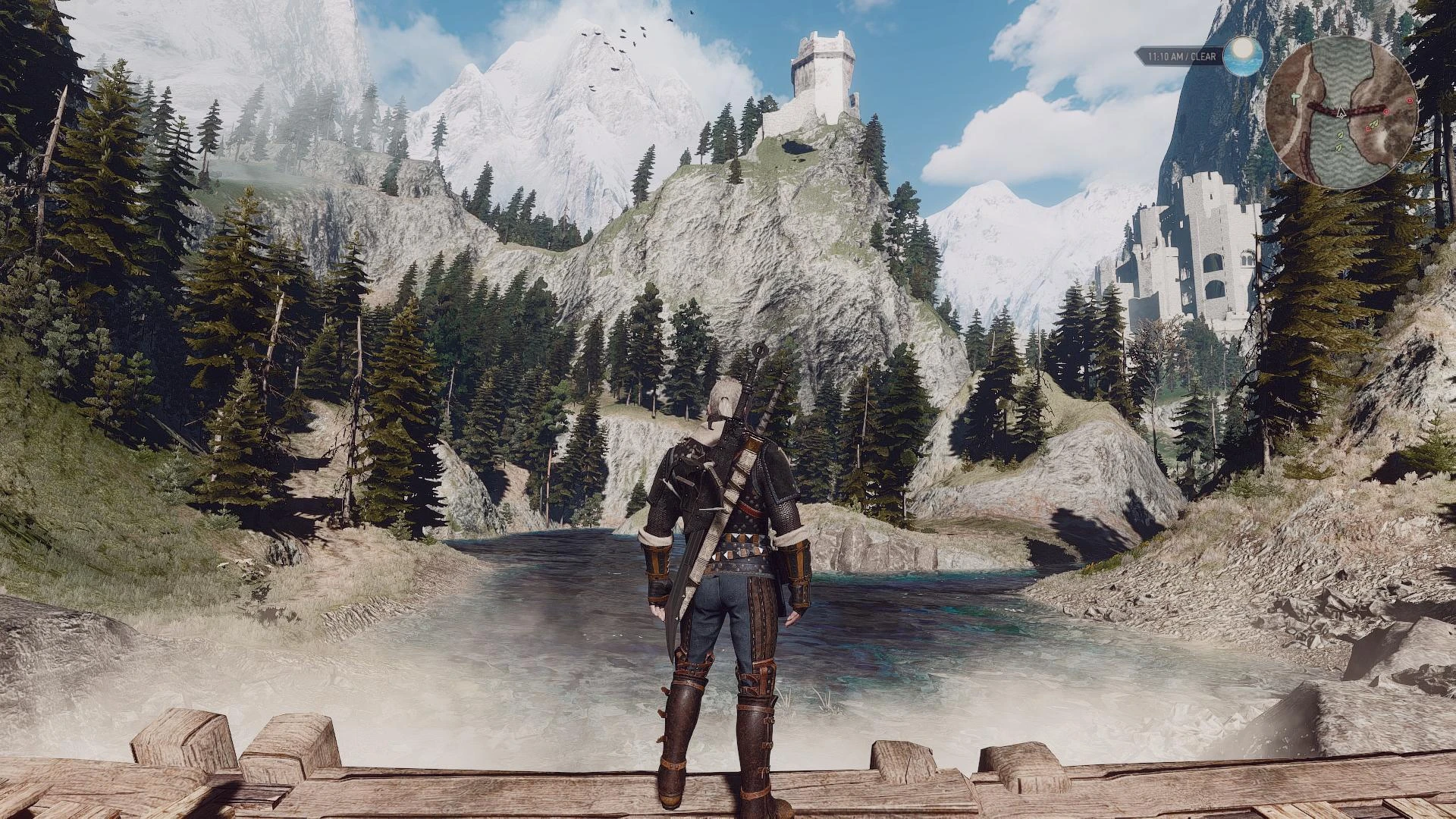
This is my first preset and one that I worked meticulously on in order to achieve a more "bland" or pallid appearance during my in-game adventures for The Witcher 3.
To briefly describe the atmospheric enhancement that I've created, I'd start by referring to the color palette as, "washed out." This project was initially a hybrid of multiple presets all seeking to achieve the same "VGX 2013" stylized, heavily post-processed aesthetics. Therefore, everything will appear to be slightly "cooler," yet brighter due to the imagery being considerably toned down in the saturation department.
White shades actually have depth and can be differentiated. Black shades appear darker for shadows & textures, but will continue to look "slightly bluish" for in-game menus. The sky-lighting will definitely prove to be brighter and in certain situations "overpowering." However, when it's clear in-game, the normally darker (Navy Blue) sky will appear a more naturally-enhanced lighter shade of Blue.
Installation Process:
-
[]Unzip the folder with 7zip or a similar program.
[
]Copy all of the contents. []Navigate to (your game's location) . []Paste everything into the "x64" folder (where your .exe for the game is located). []Launch the game.
[ Performance may vary, dependent upon your hardware. However, a 5-8 FPS decrease is to be expected. ]Recommended In-Game Settings:
]Motion Blur: (Personal Choice)
[]Blur: (Personal Choice)
[]Sharpening: (or OFF)
[]AA:
[]Vignetting:
[]Chromatic Aberration:
[]Bloom:
[]Gamma: Neutral (or 0. 85 - 0. 90)
(Keyboard Commands: "PRT SC" - Print Screen = Screenshot | "SCR LK" - Scroll Lock = Enable/Disable SweetFX.)
Active Effects: []SMAA [*][s
Ashen FX is a ReShade preset for The Witcher 3 that creates a washed-out, cooler color palette with brighter skies and deeper blacks. It blends multiple presets to achieve a VGX 2013 stylized look, reducing saturation while enhancing contrast. This preset is for players seeking a cinematic, post-processed aesthetic.
✨ Key Features
📊 Pros & Cons
✅ Pros
- Community-trusted with 323 endorsements and over 7,000 downloads
- Achieves a unique 'washed out' aesthetic that stands out from typical vibrant presets
- Includes SMAA and Lumash for improved image quality
⚠️ Cons
- Last updated in 2015, so it may not be compatible with newer game versions or ReShade releases
- Sky lighting can be overpowering in certain situations, which might not suit everyone
- Requires manual installation and potential renaming of dxgi.dll to d3d11.dll, which could confuse less technical users
For The Witcher 3 players who want a cinematic, desaturated look with enhanced contrast and brighter skies. Ideal for those who enjoy heavily post-processed aesthetics like VGX 2013 style. Skip if you prefer vibrant, colorful visuals or want a preset that's actively maintained.
💡 Beginner Tips
- If the game crashes on launch, rename dxgi.dll to d3d11.dll as described in the description.
- Use the Scroll Lock key to toggle SweetFX on/off in-game to compare the effect.
- Adjust the recommended in-game settings, especially gamma, to fine-tune the brightness to your preference.
📊 Mod Details
- Game
- Witcher 3 Mods
- Author
- Bruzur
- Version
- RC1
- Downloads
- 7,172
- Endorsements
- 323
- Category
- ReShade Preset
- Created
- 6/15/2015
- Updated
- 6/15/2015
🔧 How to Install Witcher 3 Mods
Download from Nexus.
📖 Full step-by-step install guide for Witcher 3 →
Visit the official mod page for specific installation instructions for this mod.
🎮 Need cheat codes or console commands? Check ur gaming wiki for Witcher 3 commands, item IDs, and more.
Keep browsing — more Witcher 3 mods await