ValheimFaveServers
⚪ Last updated 2021⚠️ Install Order · 2 steps
Install in this order, then this mod last — most mods fail to load without their framework and dependencies in place.
Preview
🔍 Analysis
- 👍 5.5% endorsement rate — high engagement, a strong quality signal
- 🏆 #39 of 144 Miscellaneous mods in this game by downloads
📋 About This Mod
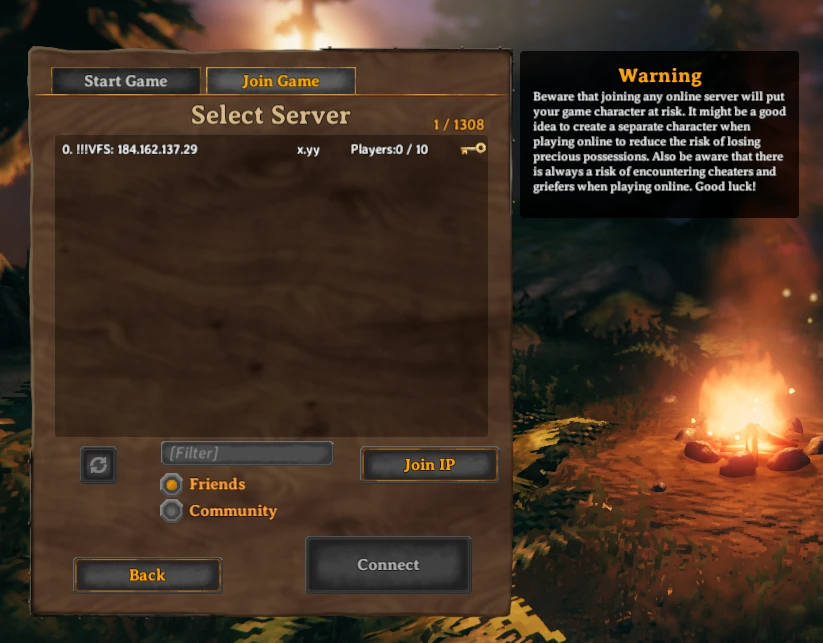
This mod makes getting to your friends servers faster. It lets you specify custom servers to show up at the top of the server browser, and optionally can prefill passwords too.
This mod requires Bepinex installed in your copy of Valheim for it to work. See instructions here: https://valheim.thunderstore.io/package/denikson/BepInExPack_Valheim/
In the instructions below, {valheim install} refers to a location on your hard drive, likely "C:\Program Files (x86)\Steam\steamapps\common\Valheim" if you are on windows and installed to default location.
INSTALL
ValheimFaveServers is just a .dll file that you drop into your {valheim install}/Bepinex/plugins directory (like other bepinex mods).
CONFIGURATION
Launch Valheim and exit. You will get a new config file at:
{valheim install}/Bepinex/config
Called "net.l41rx.valheimfaveservers.cfg".
It will contain a couple general options and then server info.
It comes with an example configuration for a fake server "Comradely Conquest".
You can add more servers by:
1. Appending a new server key (lowercase, no spaces) to the config entry ""
2. Copying the Comradely Conquest example config blocks (host, name, password, port) (or relaunching/quitting, see notes) and filling in the appropriate information
You can remove a server by:
1. Removing its key
2. Removing its server blocks
If you launch the game with a new server key, but haven't created the blocks for the server properties, the new server property blocks will be automatically generated for you with the correct key, and default values. This can be faster/safer than copying the example.
LIMITATIONS
I'm not sure how to query Valheim servers for their version or player counts, so:
Player counts are hardcoded to 0
Server version shows as '?'
Also, if you specify the wrong prefill password, you cant change it in game, you have to quit and change the config. I could fix this so you can backspace and put the right one it, but it would take me time and I dont think thats very useful anyway.
SUPPORT
If the mod isnt working like you think it should or theres something I can add you can message me on Twitter:https://twitter.com/L41rx
I hope someone else finds it useful! The source can be found at Github: https://github.com/L41rx/ValheimFaveServers
ValheimFaveServers is a BepInEx framework mod that saves server hosts and passwords in a config file, loading them into the in-game server list to eliminate repeated copy-pasting. It has 122 endorsements and 2,221 downloads, last updated in March 2021.
✨ Key Features
📊 Pros & Cons
✅ Pros
- Saves time for players who frequently join the same servers
- Config file approach is straightforward and reliable
- Decent community adoption with 122 endorsements
⚠️ Cons
- Last updated in March 2021 — may not work with the latest Valheim patches
- Requires BepInEx, which adds an extra setup step
- No support for server grouping or sorting, just a flat list
For Valheim players who regularly join a handful of dedicated servers and are tired of typing IPs and passwords. Skip if you only play on official or single-player worlds.
💡 Beginner Tips
- Make sure BepInEx is installed first, then drop the mod into the BepInEx/plugins folder.
- Edit the generated config file to add your server details before launching the game.
- If the mod doesn't appear in-game, verify your Valheim version matches the mod's compatibility.
📊 Mod Details
- Game
- Valheim Mods
- Author
- L41rx
- Version
- 1.0.1
- Downloads
- 2,221
- Endorsements
- 122
- Category
- Miscellaneous
- Created
- 3/2/2021
- Updated
- 3/7/2021
🔧 How to Install Valheim Mods
Download from Nexus.
📖 Full step-by-step install guide for Valheim →
Visit the official mod page for specific installation instructions for this mod.
🎮 Need cheat codes or console commands? Check ur gaming wiki for Valheim commands, item IDs, and more.
Keep browsing — more Valheim mods await