Valheim Player Models
⚪ Last updated 2023⚠️ Install Order · 1 step
Install in this order, then this mod last — most mods fail to load without their framework and dependencies in place.
Preview
🔍 Analysis
- 👍 1.9% endorsement rate — high engagement, a strong quality signal
- 🏆 #12 of 104 Character Appearance mods in this game by downloads
📋 About This Mod
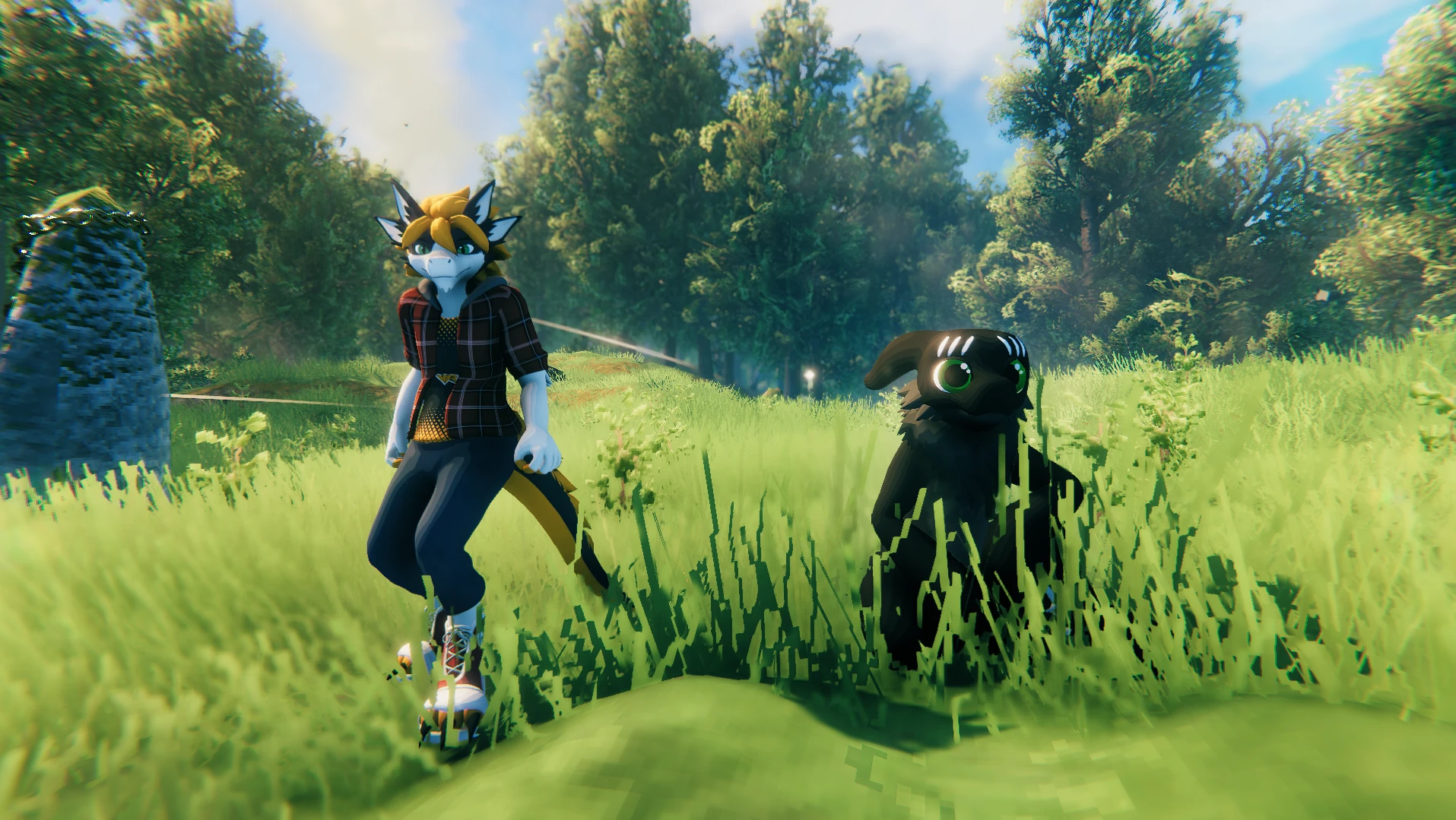
ValheimPlayerModels
Use custom player models in Valheim !
How to install
1. Download and install the BepInEx package
2. Drag and drop ValheimPlayerModels.dll in the "BepInEx/plugin" folder in your game install folder
3. Launch the game
4. Place all your avatars in the newly created "PlayerModels" folder inside your game install folder
5. The mod will load the avatar with the same filename as your character name (you might want to restart the game)
How to create an avatar
1. Install Unity 2019. 4. 31
2. Create a new 3D Project
3. Download the SDK
4. Import the SDK and all your avatar assets
5. Change your avatar model rig to Humanoid
6. Place your avatar model in the scene
7. Add a "Valheim Avatar Descriptor" component on your avatar
8. Clic the "Auto-Setup" Button
9. Move the different equipement previews how you like
10. (optional) change your avatar material shaders to "Valheim/Standard"
11. Click the "Export" button in the Avatar Descriptor
12. Export in the "PlayerModels" folder in your game install folder
Valheim Player Models by Ikeiwa lets you use custom player models in Valheim. With 71 endorsements and 3,739 downloads, it's a niche cosmetic mod for players wanting to personalize their character beyond vanilla options. Last updated in February 2023, it may not be compatible with the latest game version.
✨ Key Features
📊 Pros & Cons
✅ Pros
- Easy way to stand out with a custom look (71 endorsements).
- Lightweight addition—no heavy dependencies mentioned.
- Active download count (3,739) shows real interest.
⚠️ Cons
- Last updated Feb 2023—might break with current Valheim patches.
- No install instructions or dependency info provided by author.
- Limited feature set—just model swapping, no other tweaks.
For Valheim players who want to personalize their character beyond vanilla options and don't mind a bit of tinkering. Skip if you're on the latest patch and want guaranteed compatibility—this mod hasn't been updated in a while.
💡 Beginner Tips
- Check the mod's page for any required dependencies before installing.
- If you're using a mod manager, install through it to keep track of updates.
- Test the mod on a single-player world first to ensure it works with your game version.
📊 Mod Details
- Game
- Valheim Mods
- Author
- Ikeiwa
- Version
- 1.2.0
- Downloads
- 3,739
- Endorsements
- 71
- Category
- Character Appearance
- Created
- 2/14/2022
- Updated
- 2/5/2023
🔧 How to Install Valheim Mods
Download from Nexus.
📖 Full step-by-step install guide for Valheim →
Visit the official mod page for specific installation instructions for this mod.
🎮 Need cheat codes or console commands? Check ur gaming wiki for Valheim commands, item IDs, and more.
Keep browsing — more Valheim mods await