Valheim Map Combiner
⚪ Last updated 2021⚠️ Install Order · 1 step
Install in this order, then this mod last — most mods fail to load without their framework and dependencies in place.
Preview
🔍 Analysis
- 👍 3.7% endorsement rate — high engagement, a strong quality signal
- 🏆 #148 of 263 Utilities mods in this game by downloads
📋 About This Mod
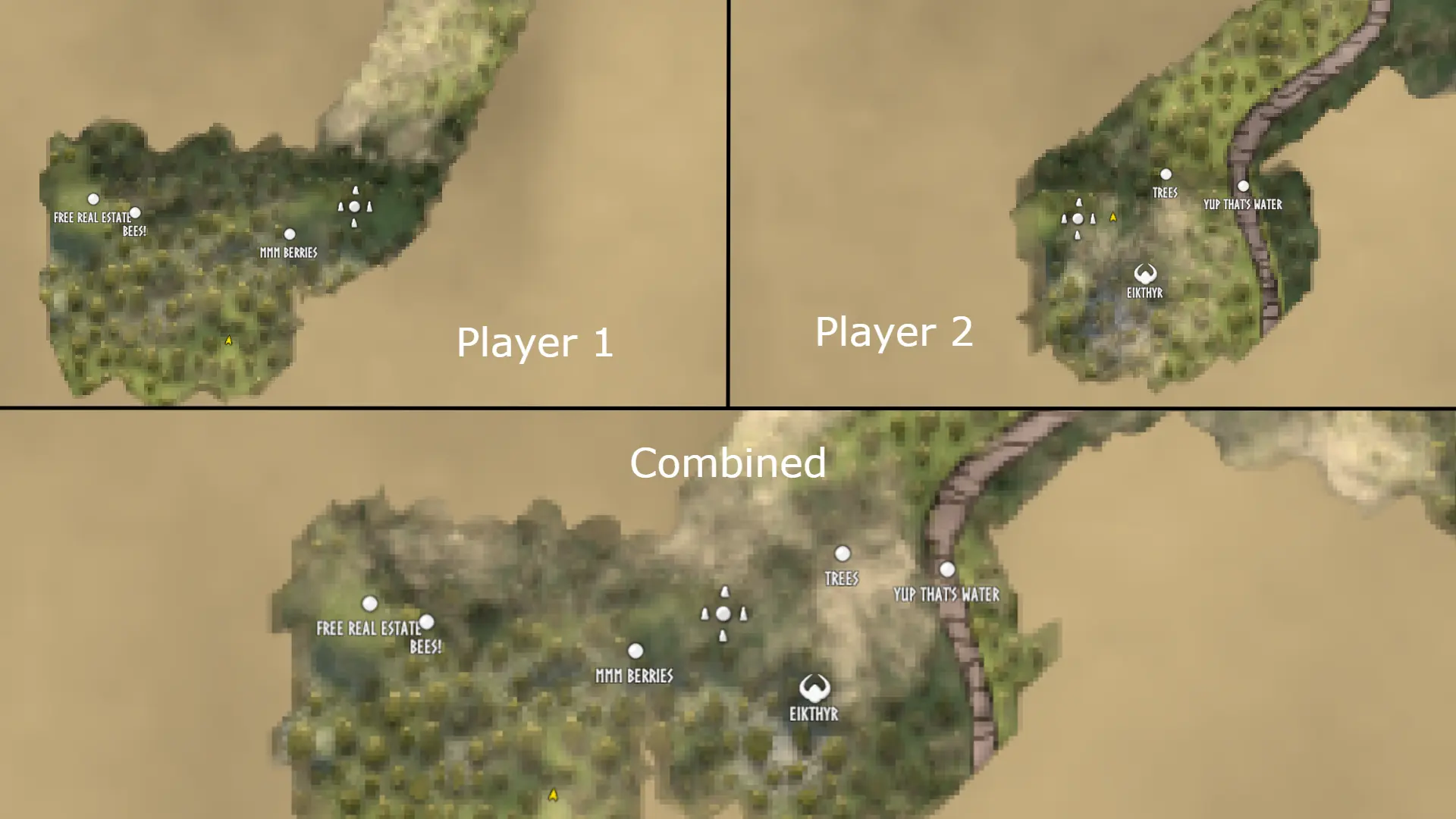
Sync explored areas and map pins across up to ten character saves at a time. Make sure the game is closed before using. Backups of your original save files are made when you hit submit, they will be in the same location as the character files you loaded in.
Options:
.fch File Slots - Pick the .fch save files for all of the characters that you want to sync maps across.
World ID - REQUIRED - Hit the Find Common IDs button to automatically find the worlds that are in common across all selected save files.
Combine Pins - Will read pins across all save files and add them to the map
Remove Overlapping Pins - Removes pins that are touching another pin in order reduce duplicate pins. When two pins are found to be overlapping, the pin from the earliest save file slot is prioritized.
Disabling Steam Cloud saves for Valheim is recommended. I am not responsible for any saves that are corrupted or lost while using this program.
FAQ
Q: When I hit submit the program hangs:
A: The program will take a few seconds to complete. There's over 4 million points on a Valheim map to check. If the program never seems to complete, please submit an issue.
Q: Saving doesn't seem to do anything/When I load the new save nothing has changed:
A: Steam's cloud service may be restoring your save file to it's pre-modified version. Right click Valheim in steam, go to properties, and uncheck "Keep game saves in the Steam Cloud for Valheim"
Does this work with save files that use mods?:
A: Most mods should work fine. If the mod adds any new fields or adds new features to the map/pins there's a chance this program will not be able to load the save file.
Valheim Map Combiner merges explored areas and pins from multiple save files into each save's map. A niche utility for players managing multiple characters or worlds, with 28 endorsements and last updated in April 2021.
✨ Key Features
📊 Pros & Cons
✅ Pros
- Solves a real problem for multi-character players who want a unified map
- Simple concept with a focused purpose
- Lightweight utility with 28 endorsements from a niche audience
⚠️ Cons
- Last updated in April 2021 — may not work with current Valheim versions
- Low endorsement count (28) suggests limited community testing
For Valheim players who run multiple characters or worlds and want to consolidate their exploration progress. Skip if you play a single save or don't care about map sharing.
💡 Beginner Tips
- Back up your save files before running the tool, as it modifies them directly.
- Test on a copy of a save to see how the combined map looks before applying to your main saves.
- Check the mod's page for any compatibility notes with the current Valheim version, since it's from 2021.
📊 Mod Details
- Game
- Valheim Mods
- Author
- SixPraxis
- Version
- v1.0.0
- Downloads
- 747
- Endorsements
- 28
- Category
- Utilities
- Created
- 4/2/2021
- Updated
- 4/2/2021
🔧 How to Install Valheim Mods
Download from Nexus.
📖 Full step-by-step install guide for Valheim →
Visit the official mod page for specific installation instructions for this mod.
🎮 Need cheat codes or console commands? Check ur gaming wiki for Valheim commands, item IDs, and more.
Keep browsing — more Valheim mods await