Time Pause Mod
⚪ Last updated 2023⚠️ Install Order · 1 step
Install in this order, then this mod last — most mods fail to load without their framework and dependencies in place.
Preview
🔍 Analysis
- 👍 4.4% endorsement rate — high engagement, a strong quality signal
- 🏆 #52 of 836 Gameplay mods in this game by downloads
📋 About This Mod
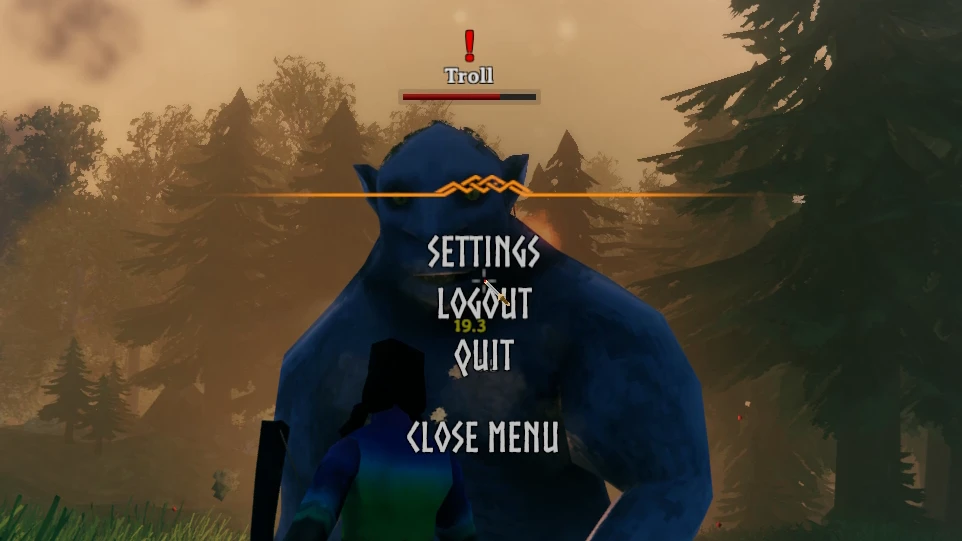
This mod is primarily for single-player games, to allow you to pause, slow down and speed up the game.
You can either press a hotkey to pause, or pause by opening the menu.
The mod does not check whether you are in a single or multiplayer game, so use with discretion.
c7-iQ_Xwoiw
By default the mod will pause the game on opening the menu but this can be disabled in the config.
Default hotkeys are:
-
[]"PauseKey", "pause"
[
]"SpeedUpKey", "="[]"SlowDownKey", "-"
[]"ResetKey", "\"
Other settings:
PauseOnMenu = true - pauses when you open the main menu (menu entries won't animate when paused, but are still selectable)
StopRenderingOnMenuPause = true - this is wizardry that turns off the game camera when pausing via the menu and shows a snapshot of the game instead
StopRenderingOnKeyPause = false - this is wizardry that turns off the game camera when pausing via hotkey and shows a snapshot of the game instead
ShowMessages = false - set to true to show hud messages when you press hotkeys
SpeedChangeStep = 0. 1 - how much to increase or decrease time speed when pressing hotkeys
EnableSpeedChangeStepMult = true - if true, hold down Shift to increment by 10x
To change the settings, edit the file BepInEx/config/aedenthorn. TimeMod.cfg (created after running the game once with this mod) using a text editor.
You can adjust the config values in-game using the Config Manager.
If you want to disable a hotkey, just remove the hotkey value, leaving, for example:
SlowDownKey =
To reload the config in game, type timemod reset in the console (F5).
Technical
To install this mod, the easiest way is to just use Vortex, the Nexus Mods mod manager. It should take care of all dependencies.
To install manually, place the dll file in the BepInEx/plugins folder. You will need BepInEx.
Code is at https://github.com/aedenthorn/ValheimMods.
If you want to complain or ask for help or help me test my mods, you can visit my Discord server.
Click here for a list of all my mods for Valheim.
Time Pause Mod lets you pause the game when opening the menu and adjust time speed with hotkeys. It's a simple utility for players who want more control over game pacing, with 1,780 endorsements and 40,117 downloads.
✨ Key Features
📊 Pros & Cons
✅ Pros
- Community-approved with 1,780 endorsements and 40k downloads.
- Simple hotkey-based time control—great for screenshotting or taking breaks.
- Menu pause is a godsend for single-player sessions when you need to step away.
⚠️ Cons
- No detailed instructions on hotkey customization or default keys.
- Last updated in 2023—may not work with the latest game patches.
- Potential conflicts with other mods that alter time or menu behavior.
For players who want to freeze the game when opening menus or need fine-tuned time control for screenshots or strategic planning. Skip if you prefer vanilla time mechanics or rarely use menus.
💡 Beginner Tips
- Check the mod page for any hotkey configuration files or in-game settings.
- Test the mod with your current game version to ensure compatibility.
- If you use other time-related mods, load this one last to avoid conflicts.
📊 Mod Details
- Game
- Valheim Mods
- Author
- aedenthorn
- Version
- 0.8.0
- Downloads
- 40,117
- Endorsements
- 1,780
- Category
- Gameplay
- Created
- 2/21/2021
- Updated
- 8/28/2023
🔧 How to Install Valheim Mods
Download from Nexus.
📖 Full step-by-step install guide for Valheim →
Visit the official mod page for specific installation instructions for this mod.
🎮 Need cheat codes or console commands? Check ur gaming wiki for Valheim commands, item IDs, and more.
Keep browsing — more Valheim mods await