Show Container Contents
🟠 Updated over a year ago⚠️ Install Order · 1 step
Install in this order, then this mod last — most mods fail to load without their framework and dependencies in place.
Preview
🔍 Analysis
- 👍 2.9% endorsement rate — high engagement, a strong quality signal
- 🏆 #14 of 173 User Interface mods in this game by downloads
📋 About This Mod
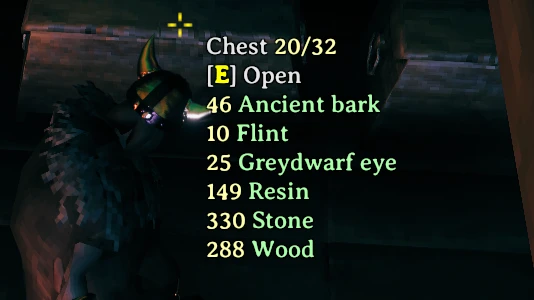
This is a simple quality of life mod that lets you see the contents of a container, as well as its remaining capacity in the interact hover text.
You can configure the following:
-
[]Maximum entries to show - default -1, meaning unlimited
[
]Sort type - Name, Value, or Weight - default Value[]Sort ascending - default false
[]Entry text - default <color=#AAAAAAFF>{0} {1}</color> ({0} is replaced by the amount and {1} is replaced by the item name)
[]Overflow text - if more items than max entries - default <color=#AAAAAAFF>...</color>
[]Capacity text - default <color=#FFFFAAFF> {0}/{1}</color> ({0} is replaced by the slots used and {1} is replaced by total slots)
Colors are RRGGBBAA hexadecimal (Alpha doesn't seem to do anything). For example, to get the colors in the first screenshot:
EntryText = <color=#FFFFAAFF>{0}</color> <color=#AAFFAAFF>{1}</color>
Apparently if you use BetterUI, you need to set the following in the BetterUI config file:
chestHasRoomStyle = 0
Config
A config file BepInEx/config/aedenthorn. ShowContainerContents.cfg is created after running the game once with this mod).
You can adjust the config values by editing this file using a text editor or in-game using the Config Manager.
To reload the config from the config file, type showcontainercontents reset into the game's console (F5).
Technical
To install this mod, the easiest way is to just use Vortex, the Nexus Mods mod manager. It should take care of all dependencies.
To install manually, place the dll file in the BepInEx/plugins folder. You will need BepInEx.
Code is at https://github.com/aedenthorn/ValheimMods.
If you want to complain or ask for help or help me test my mods, you can visit my Discord server.
Click here for a list of all my mods for Valheim.
Show Container Contents is a lightweight UI mod for Valheim that displays container contents and capacity directly in the hover tooltip. It's perfect for players who want to quickly check what's inside chests and carts without opening them. With over 1,000 endorsements and recent updates, it's a reliable quality-of-life addition.
✨ Key Features
📊 Pros & Cons
✅ Pros
- Huge community trust (1,084 endorsements) — this is a must-have for inventory hoarders.
- Saves time by letting you see what's in a container without opening it.
- Simple and clean — does exactly what it says, no bloat.
⚠️ Cons
- No configuration options mentioned — you get what you get.
- Only shows contents in hover text, not a full inventory view.
- Requires BepInEx (not stated but typical for Valheim mods) — check compatibility.
For Valheim players who hate opening every chest to find that one item. If you're a builder or explorer with tons of storage, this mod is a no-brainer. Skip if you want more complex inventory management — this is purely a convenience tool.
💡 Beginner Tips
- Make sure you have BepInEx installed — most Valheim mods need it, and this one is no exception.
- After installing, hover over any chest or cart to see its contents and capacity.
- If you use other UI mods, check for conflicts — this mod modifies hover text.
📊 Mod Details
- Game
- Valheim Mods
- Author
- aedenthorn
- Version
- 0.5.0
- Downloads
- 37,477
- Endorsements
- 1,084
- Category
- User Interface
- Created
- 3/31/2021
- Updated
- 2/17/2025
🧩 Commonly Used Together
Users add these mods to the same collections — a real compatibility signal, not an AI guess.
🔧 How to Install Valheim Mods
Download from Nexus.
📖 Full step-by-step install guide for Valheim →
Visit the official mod page for specific installation instructions for this mod.
🎮 Need cheat codes or console commands? Check ur gaming wiki for Valheim commands, item IDs, and more.
Keep browsing — more Valheim mods await