Hearth and Home Old Food Stats
⚪ Last updated 2024⚠️ Install Order · 1 step
Install in this order, then this mod last — most mods fail to load without their framework and dependencies in place.
Preview
🔍 Analysis
- 👍 3.2% endorsement rate — high engagement, a strong quality signal
- 🏆 #17 of 144 Miscellaneous mods in this game by downloads
📋 About This Mod
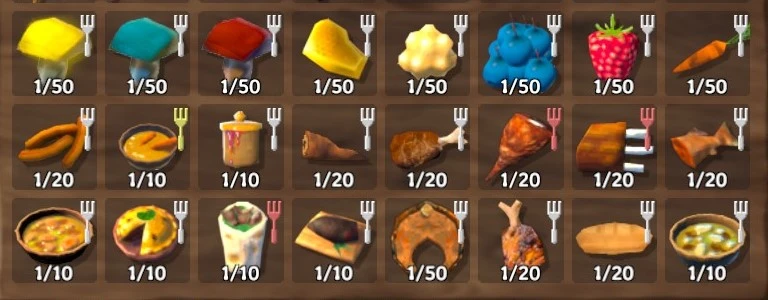
Mod to Revert Hearth and Home Food Changes and Balance
Information:
- []Reversion of Food Stats to Pre-Hearth & Home Update:
-
[]
Rebalanced Hearth & Home Foods:
-
[]
Toggle the New Fork Icon:
- []Customize Your Own Stats:
- []Automated Food Configuration:
- []Dynamic Food Configuration Management:
- Enhanced Code Quality and Performance:
Utilize the Configuration Manager mod to toggle the fork icon on food items. A "Save" button is available to apply changes to the .json files while in-game.
Json configurations are stored in the "Huntard. OldFoodStats.json" file in your BepInEx/config folder, offering granular control over food item stats.
Example Config for SerpentStew:
"FoodPrefabName" : "SerpentStew",
Restores pre-Hearth & Home food stats and rebalances new foods for a consistent experience. Includes customization options for all food items. A quality-of-life mod for Valheim players who prefer the old food system.
✨ Key Features
📊 Pros & Cons
✅ Pros
- Community trusted with 216 endorsements and 6,677 downloads
- Brings back the classic food balance that many players miss
- Customizable stats mean you can tweak to your exact preference
⚠️ Cons
- Last updated in February 2024 — may not be compatible with the latest Valheim patches
- Customization options might require editing config files, which could be a hurdle for casual players
For Valheim veterans who preferred the original food stats and want that classic balance back. Also for players who enjoy fine-tuning their gameplay with customizable food values. Skip if you're happy with the current Hearth & Home food system or want a mod that adds new content rather than changing existing stats.
💡 Beginner Tips
- Make sure to back up your world and character files before installing any mod, just in case.
- If you're using a mod manager like Thunderstore Mod Manager, installation is a breeze — just search for the mod and click install.
- Check the mod's page for any config files after installation to see if you can adjust the food stats to your liking.
📊 Mod Details
- Game
- Valheim Mods
- Author
- Huntardy
- Version
- 3.0.0
- Downloads
- 6,677
- Endorsements
- 216
- Category
- Miscellaneous
- Created
- 9/17/2021
- Updated
- 2/4/2024
🔧 How to Install Valheim Mods
Download from Nexus.
📖 Full step-by-step install guide for Valheim →
Visit the official mod page for specific installation instructions for this mod.
🎮 Need cheat codes or console commands? Check ur gaming wiki for Valheim commands, item IDs, and more.
Keep browsing — more Valheim mods await