Compass
🟠 Updated over a year ago⚠️ Install Order · 1 step
Install in this order, then this mod last — most mods fail to load without their framework and dependencies in place.
Preview
🔍 Analysis
- 👍 2.7% endorsement rate — high engagement, a strong quality signal
- 🏆 #9 of 173 User Interface mods in this game by downloads
📋 About This Mod
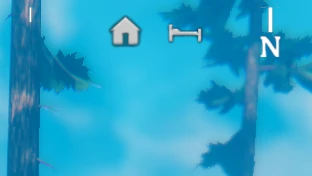
This mod adds a rotating compass to the HUD that shows nearby map markers.
You can customize:
-
[]The png file used to display the compass (there's a GIMP xcf file included that you can use as a template)
[
]The png file use to mask the compass (determines how wide to display the compass)[]The png file use to show the center marker (a line showing the center of the screen)
[]Whether to show the center marker
[]The color and transparency of the compass
[]The color and transparency of the center marker
[]The color and transparency of the map markers
[]The maximum distance to show map markers
[]The size of the compass
[]the offset from the top of the screen
Ignore Lists
In the config, there is a list of marker names to ignore and a list of marker types to ignore.
The default value for marker names to ignore is Silver,Obsidian,Copper,Tin which are the names of markers added by AutoMapPins. You can also use prefixes appended with an asterisk (), e.g. Dungeon for ignoring any marker staring with Dungeon.
The list of possible types to ignore is included in the config comment.
Config
A config file BepInEx/config/aedenthorn. Compass.cfg is created after running the game once with this mod).
You can adjust the config values by editing this file using a text editor or in-game using the Config Manager.
To reload the config from the config file, type compass reset into the game's console (F5).
Technical
To install, place the zip file contents in the BepInEx/plugins folder. You will need BepInEx.
Code is at https://github.com/aedenthorn/ValheimMods.
If you want to complain or ask for help or help me test my mods, you can visit my Discord server.
Click here for a list of all my mods for Valheim.
Adds a customizable compass to the HUD that displays directions to nearby map markers. With 2,190 endorsements and over 81,000 downloads, it's a popular UI enhancement for players who want better navigation without opening the map constantly.
✨ Key Features
📊 Pros & Cons
✅ Pros
- Huge community trust (2,190 endorsements, 81k downloads)
- Solves the 'where am I going' problem without pausing the game
- Lightweight UI mod that doesn't overhaul your whole interface
⚠️ Cons
- Last updated March 2025 — may need checking for latest game patches
For players who hate constantly opening the map to check marker directions. If you're exploring and want a quick glance at where to head, this is for you. Skip if you prefer a minimal HUD or rely on waypoint mods that already do this.
💡 Beginner Tips
- Check if your game version is compatible with the mod's last update date.
- If you use other UI mods, test for conflicts by enabling this one last.
- Look for a config file in the mod folder to tweak compass position and style.
📊 Mod Details
- Game
- Valheim Mods
- Author
- aedenthorn
- Version
- 1.4.3
- Downloads
- 81,553
- Endorsements
- 2,190
- Category
- User Interface
- Created
- 4/2/2021
- Updated
- 3/18/2025
🔗 Required By 2 Mods
These mods list this mod as a dependency.
🧩 Commonly Used Together
Users add these mods to the same collections — a real compatibility signal, not an AI guess.
🔧 How to Install Valheim Mods
Download from Nexus.
📖 Full step-by-step install guide for Valheim →
Visit the official mod page for specific installation instructions for this mod.
🎮 Need cheat codes or console commands? Check ur gaming wiki for Valheim commands, item IDs, and more.
Keep browsing — more Valheim mods await