Disable Crosshair SN (BepInEx)
⚪ Last updated 2023⚠️ Install Order · 3 steps
Install in this order, then this mod last — most mods fail to load without their framework and dependencies in place.
Preview
🔍 Analysis
- 👍 4.1% endorsement rate — high engagement, a strong quality signal
- 🏆 #62 of 191 User Interface mods in this game by downloads
📋 About This Mod
Disables the crosshair when certain conditions are met.
I wrote this because I wanted to get rid of the reticle in front of my face during VR play. At that time I couldn't find another solution for that. But it seems that frigitpenguin already wrote a similar mod which can be found here.
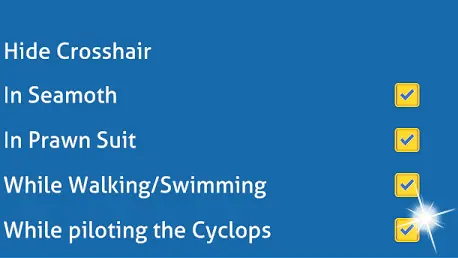
Adds a section "Hide Crosshair" to the "General" tab of the Subnautica options menu:
-
[]"In Seamoth"
[
]"In Prawn Suit"[]"While Walking/Swimming"
[]"While piloting the Cyclops"
Requirements:
- BepInEx
Installation:
Extract the folder to your Subnautica BepInEx plugins subfolder (...steamapps\common\Subnautica\BepInEx\plugins).
A lightweight BepInEx mod that lets players disable the crosshair in specific situations. With 116 endorsements and 2,834 downloads, it's a niche utility for gamers who want a cleaner HUD. Last updated January 2023, so it may need checking for current game compatibility.
✨ Key Features
📊 Pros & Cons
✅ Pros
- Simple solution for a common annoyance—no more crosshair clutter when you don't need it.
- Lightweight and focused; does one thing and does it well.
- Community-tested with 116 endorsements and 2,834 downloads.
⚠️ Cons
- Last updated in January 2023—might not work with the latest game patches.
- No detailed instructions or compatibility notes from the author.
- Requires BepInEx, so you'll need to set that up first if you haven't already.
For players who want a cleaner HUD and find the crosshair distracting in certain moments. If you're into immersion or screenshotting, this is a handy little tool. Skip if you're fine with the default crosshair or want more extensive UI customization.
💡 Beginner Tips
- Make sure BepInEx is installed correctly before adding this mod—check the BepInEx folder structure.
- After installing, launch the game once to generate config files, then tweak the settings to your liking.
- If the mod doesn't work, verify your game version matches the mod's last update (January 2023).
📊 Mod Details
- Game
- Subnautica Mods
- Author
- berbac
- Version
- 1.5.0
- Downloads
- 2,834
- Endorsements
- 116
- Category
- User Interface
- Created
- 9/5/2021
- Updated
- 1/22/2023
🔧 How to Install Subnautica Mods
Download from Nexus.
📖 Full step-by-step install guide for Subnautica →
Visit the official mod page for specific installation instructions for this mod.
🎮 Need cheat codes or console commands? Check ur gaming wiki for Subnautica commands, item IDs, and more.
Keep browsing — more Subnautica mods await