CyclopsEnhancement_Sonar
🟡 Updated this year⚠️ Install Order · 2 steps
Install in this order, then this mod last — most mods fail to load without their framework and dependencies in place.
Preview
🔍 Analysis
- 👍 0.6% endorsement rate
- ✅ Updated 219 days after the latest game patch — actively maintained
- 🏆 #15 of 125 Vehicles and Upgrades mods in this game by downloads
📋 About This Mod
Description
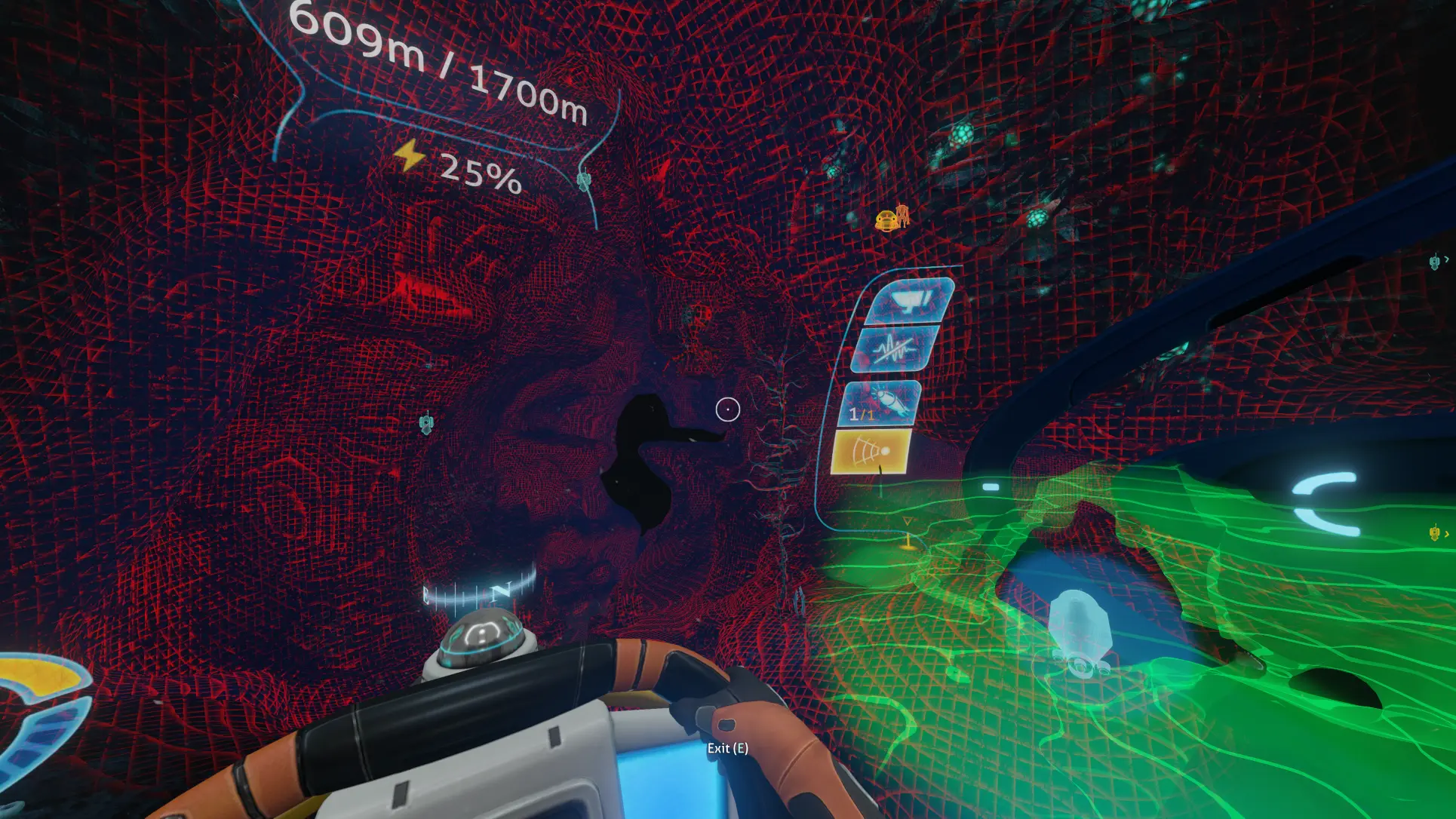
This is an enhancement related to the Sonar for the Cyclops.
Features
-
[] Configurable settings for sonar speed and duration, with the ability for it to remain active instead of continuously fading in and out.
[
] Add a hologram map for the Cyclops Sonar.Configurable Settings
(Menu -> Options -> Mods)-
[]Enable Sonar Stay Active: If enabled, the Sonar Effect will remain active on the screen instead of fading in and out. The energy consumption is unaffected and will remain the same.
[
]Speed Multiplier: Adjust the multiplier to make the sonar go faster than the vanilla default (1 for vanilla).[]Duration Multiplier: Modify the multiplier to extend the sonar's duration, allowing it to stay active for a longer period of time (1 for vanilla is 5s, A longer duration will result in lower overall energy consumption.)
[]Enable Hologram Map?: The hologram map shows up when sonar is activated.
[]Enable Player Ping Line?: The line at the center of the hologram indicates the player's position. Use this to identify the actual player position.
[]Disable Noise Sphere Indicator?: By default, the game displays a noise sphere (faded blue sphere) around the mini Cyclops model on the sonar, which could obstruct the view on the hologram map. By enabling this option, it will be turned off when the Hologram map is active.
[]Map Offset Position: Adjust offset position for the hologram map.
[]Map Rotation: Adjust the rotation of the map along with the mini cyclops model to better align with your perspective while piloting.
[]Map Zoom: A larger value means it's more zoomed in. A different value will cause the alignment of the Hologram map with the Cyclops to be incorrect. You will need to enable the `Player Ping Line` and adjust the offset accordingly, trying to adjust it so that the dot of the player ping line is at the helm of the Cyclops.
[]Map Fade Radius: A larger value means that more of the map will be displayed. Adjust this based on how much of the map you want to see. If you find it obstructs your view, you can tone it down.
[]Map Color: RGB value of map color. Alpha is for intensity, if it's too bright, you can lower it.
Use Cases
-
[] This can be helpful in navigating the Cyclops in dark or confined spaces.
Known Issues / Limitations / Untested
[*]By turning the sonar speed multiplier to 1, it will go as fast as vanilla. However, after the sonar reaches its maximum distance, it will still freeze
-
[] This can be helpful in navigating the Cyclops in dark or confined spaces.
-
[]Enable Sonar Stay Active: If enabled, the Sonar Effect will remain active on the screen instead of fading in and out. The energy consumption is unaffected and will remain the same.
Enhances the Cyclops Sonar and hologram map in Subnautica, offering improved functionality for vehicle enthusiasts. With 405 endorsements and 62,912 downloads, it's a popular quality-of-life mod that stands out for its focused improvements to the Cyclops submarine's navigation tools.
✨ Key Features
📊 Pros & Cons
✅ Pros
- Solid community backing with 405 endorsements
- Over 62k downloads shows real demand
- Tackles a niche but useful feature for Cyclops pilots
⚠️ Cons
- Description is bare-bones – no details on what exactly changes
- Last updated May 2026 – may not be compatible with future game patches
For Subnautica players who spend a lot of time in the Cyclops and want better sonar and map feedback. Skip if you're looking for broad gameplay overhauls – this is a focused enhancement mod.
💡 Beginner Tips
- Make sure you have the Cyclops sonar upgrade installed in-game before testing the mod.
- Check the mod's page for any required dependencies like QModManager or BepInEx.
- If the hologram map looks off, try toggling the sonar on and off to refresh the display.
📊 Mod Details
- Game
- Subnautica Mods
- Author
- me
- Version
- 0.1
- Downloads
- 62,912
- Endorsements
- 405
- Category
- Vehicles and Upgrades
- Created
- 9/5/2023
- Updated
- 5/11/2026
🔧 How to Install Subnautica Mods
Download from Nexus.
📖 Full step-by-step install guide for Subnautica →
Visit the official mod page for specific installation instructions for this mod.
🎮 Need cheat codes or console commands? Check ur gaming wiki for Subnautica commands, item IDs, and more.
Keep browsing — more Subnautica mods await