Base Clocks
⚪ Last updated 2021⚠️ Install Order · 2 steps
Install in this order, then this mod last — most mods fail to load without their framework and dependencies in place.
Preview
🔍 Analysis
- 👍 4.0% endorsement rate — high engagement, a strong quality signal
- 🏆 #5 of 137 Buildables mods in this game by downloads
📋 About This Mod
13/12/19 - Reinstall QMods and the Modding helper after updating to fix missing clocks
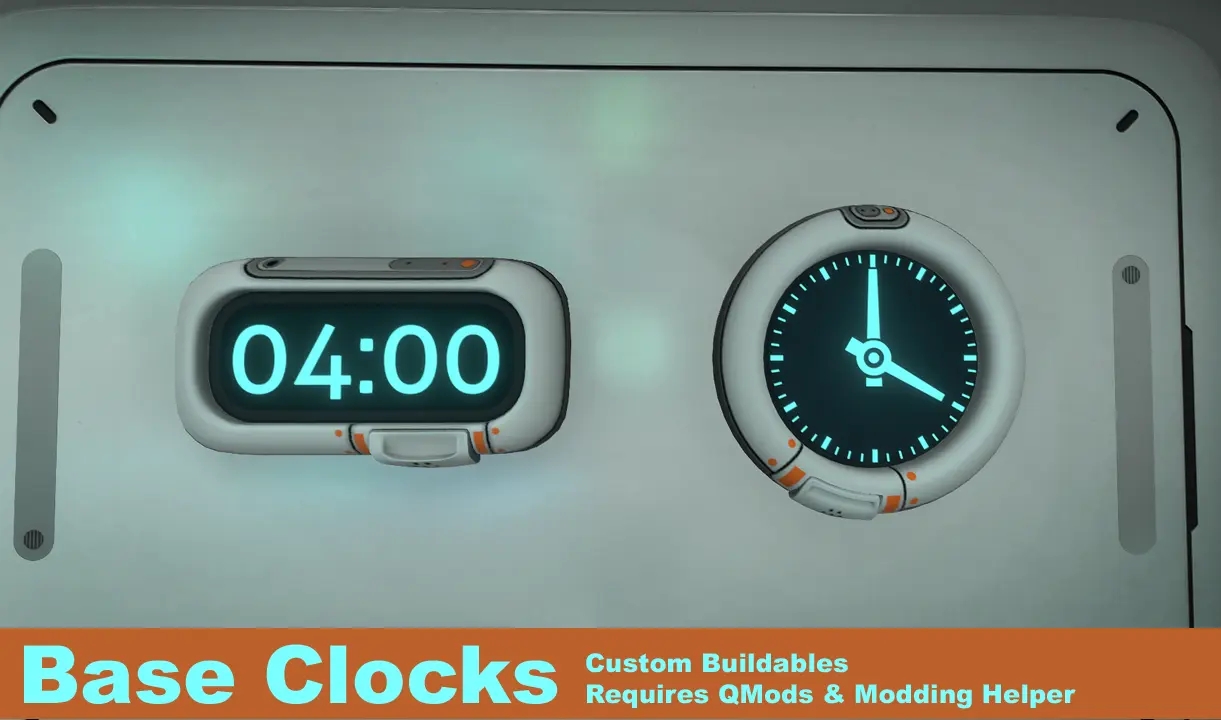
Adds two new buildables to the habitat builder. In normal time mode a clock will display the ingame time, and in system time mode it will display your current system time.
Installation:
-
[]Download and install QMods
[
]Download and install the QMods Modding Helper.[]Download the zip file.
[]Extract the zip file to your root Subnautica directory ie(Steam\SteamApps\common\Subnautica\).
[]Run the game.
Usage:
-
[]Click on a clock to switch it from normal time to system time.
[]Click on a clock again to switch it from system time to normal time.
Configuration:
As of 1. 4. 0 configuration has moved to the mod tab in the options menu-
[]If you have a valid old config file; when you next load Subnautica the file will be used to set the options menu and then deleted.
[]Save data will also be ported when you next save your game for that slot.
Troubleshooting:
-
[]Make sure both QMods and the Modding Helper are installed; up to date, and working.
[]If an error occurs in the digital clock, it may display Er:rr instead of a time. If this occurs, please comment with the time you were expecting to see. For example if you see 23:58->Er:rr->00:00 than comment 23:59.
[]Make sure you are running the latest version of Subnautica
Known Issues:
-
[]A reinstall of QMods and SMLHelper may be neccesary after large updates
[
]This mod has compatibility issues with the Base Light Switch; Warp Cannon, and Moreingots mods. A fix has been for newly built items is now in the Modding Helper, however items constructed before installing modding helper 1. 5. 1 will remain affected. Rebuild these items to fix.[]A system time clock will update during pause.
[]Material specularity is not visible.
[]If you have saved your game after the Big Little Update but before installing v1. 3. 0+; any built clocks will be lost
Changelog:
[]1. 0 - Initial release
[]1. 1 - Clock state is now saved between sessions, Added LODs.
[]1. 2 - Added configurable digital formatting and colour properties.
[]1. 3 - Big Little Update Fix: Ported to SMLHelper V2 and moved the clocks into the miscellaneous section
[]1. 3. 1 - Updated version of 1. 3. 0 with my save data and config file removed. I also removed the warning that occurs when a user has no config file as that is what should be the case when first using the mod
[*]14. 0 - Data And Options update
-
[]Make sure both QMods and the Modding Helper are installed; up to date, and working.
Adds two custom clocks to the habitat builder in Subnautica. A simple, popular buildable mod with over 6,600 endorsements, last updated in 2021. Ideal for players who want to track time in style.
✨ Key Features
📊 Pros & Cons
✅ Pros
- Community favorite with 6,698 endorsements — clearly a hit.
- Simple, focused addition: two clocks for your base.
- Huge download count (167k) shows it's widely used.
⚠️ Cons
- Last updated in 2021 — may not work with the latest game version.
- Only two clocks — limited variety if you want more options.
- No install instructions or dependencies listed, so you're on your own.
For Subnautica base builders who want a functional clock to track day/night cycles. Perfect if you like clean, minimal mods that don't overhaul the game. Skip if you need more than two clock styles or want active updates.
💡 Beginner Tips
- Place the clock on a wall in your base to see the in-game time at a glance.
- Check the mod's comments section for any compatibility notes with recent updates.
- If you use Vortex or another mod manager, you can install it with a click.
📊 Mod Details
- Game
- Subnautica Mods
- Author
- Fenolpthalien
- Version
- 1.4.0
- Downloads
- 167,883
- Endorsements
- 6,698
- Category
- Buildables
- Created
- 4/7/2018
- Updated
- 2/20/2021
🧩 Commonly Used Together
Users add these mods to the same collections — a real compatibility signal, not an AI guess.
🔧 How to Install Subnautica Mods
Download from Nexus.
📖 Full step-by-step install guide for Subnautica →
Visit the official mod page for specific installation instructions for this mod.
🎮 Need cheat codes or console commands? Check ur gaming wiki for Subnautica commands, item IDs, and more.
Keep browsing — more Subnautica mods await