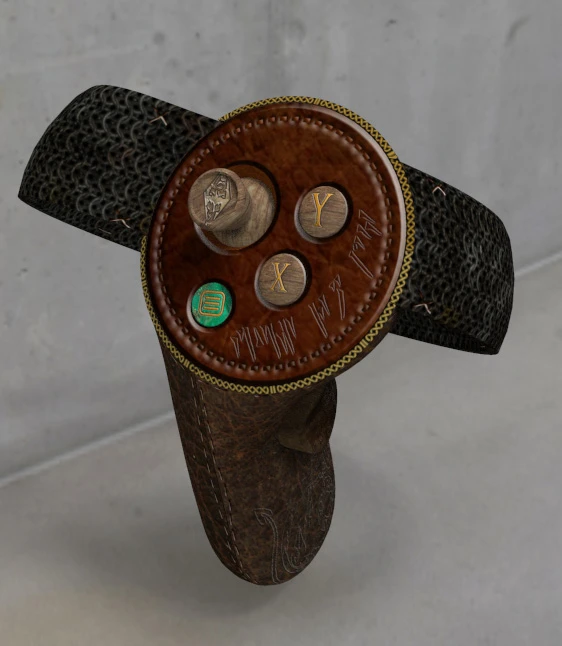
Oculus Touch Skin Replacement - OTSR - Chainmail
⚪ Last updated 2018⚠️ Install Order · 5 steps
Install in this order, then this mod last — most mods fail to load without their framework and dependencies in place.
Preview
🔍 Analysis
- 👍 2.8% endorsement rate — high engagement, a strong quality signal
- 🏆 #3 of 9 VR mods in this game by downloads
📋 About This Mod
A texture replacer for the plastic Oculus Touch meshes in game for a little more immersion.
Firstly, Uncompress (7zip,Winrar etc) the file to a directory of your choice.
Then navigate to the SteamVR folder which holds the skins for controllers.
C:\Program Files (x86)\Steam\steamapps\common\SteamVR\resources\rendermodels
(This may differ depending on your install but the above is usual. Mine is under D: )
Open folder, oculus_cv1_controller_left
Look for the file external_controller01_col.png
Rename the existing file there to external_controller01_col.png.xxx (always advisable to back up existing files in case you wish to revert to the original)
Copy the downloaded uncompressed file to this folder.
Open folder, oculus_cv1_controller_right
Look for the file external_controller01_col.png
Rename the existing file there to external_controller01_col.png.xxx (always advisable to back up existing files in case you wish to revert to the original)
Copy the downloaded uncompressed file to this folder.
The same download goes into each folder as it holds the data for both controllers.
When you first Load up Skyrim VR, they may appear to be very dark, this is because in the start "void" scene there are no major light sources, once into the "cave" you'll see them clearly.
📊 Mod Details
- Game
- Skyrim Mods
- Author
- OrLoK
- Version
- 1.0
- Downloads
- 3,297
- Endorsements
- 93
- Category
- VR
- Created
- 4/14/2018
- Updated
- 4/19/2018
🔧 How to Install Skyrim Mods
Download from Nexus.
📖 Full step-by-step install guide for Skyrim →
Visit the official mod page for specific installation instructions for this mod.
🎮 Need cheat codes or console commands? Check ur gaming wiki for Skyrim commands, item IDs, and more.
Keep browsing — more Skyrim mods await