Avanchnzel Dwemer Piston Sound Hotfix
⚪ Last updated 2020⚠️ Install Order · 5 steps
Install in this order, then this mod last — most mods fail to load without their framework and dependencies in place.
Preview
🔍 Analysis
- 👍 0.3% endorsement rate
- 🏆 #78 of 124 Bug Fixes mods in this game by downloads
📋 About This Mod
This hotfix will be included in a later version of Audio Overhaul for Skyrim.
Because the direct cause of the issue cannot be easily worked around, it is possible this issue can be reintroduced with mods that add new locations. Or it could still happen in vanilla (I did not check everywhere)! This mod serves to document the issue and provide a simple fix for this location specifically.
DESCRIPTION
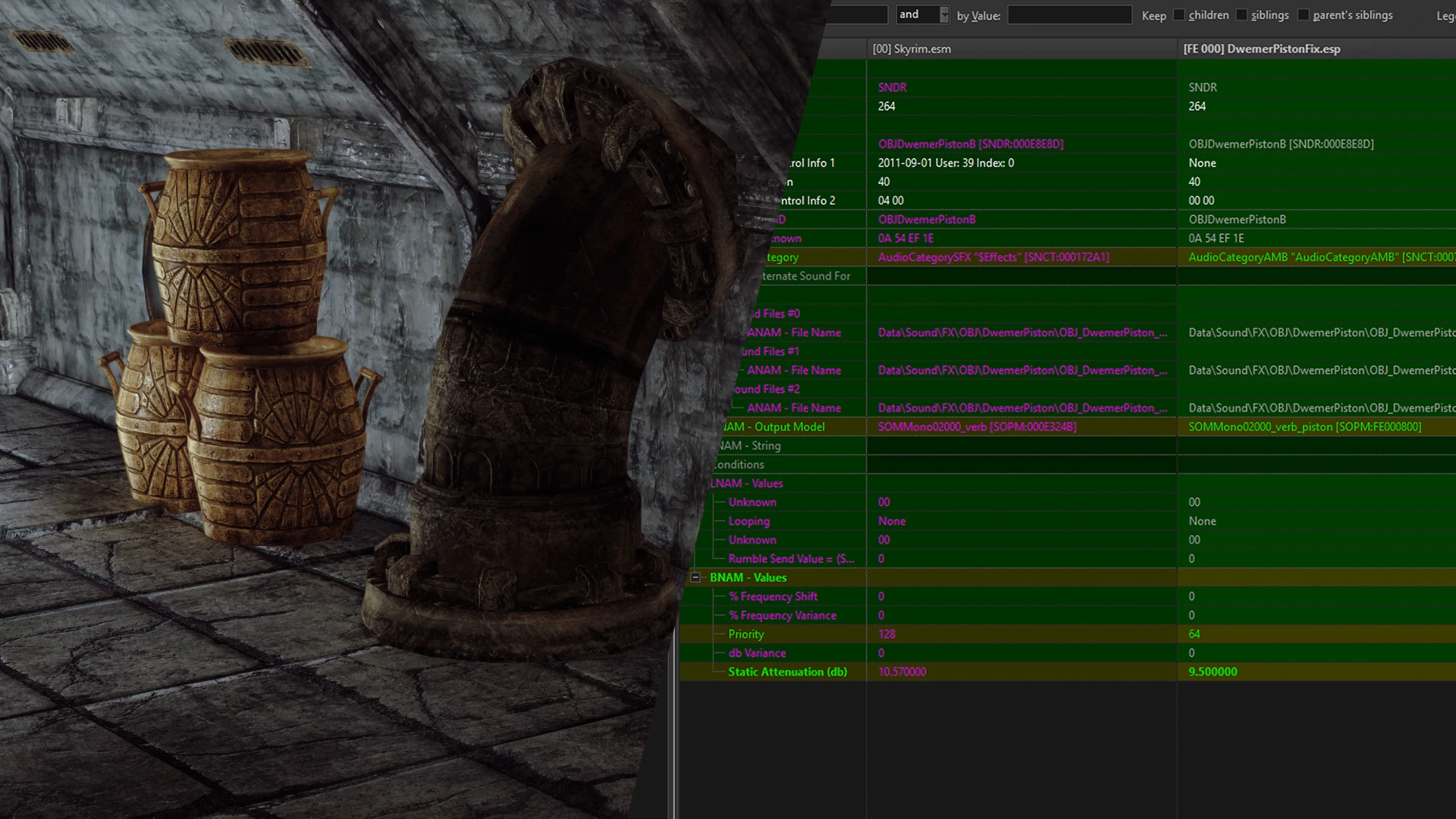
Changes the sound output model of OBJDwemerPistonA and OBJDwemerPistonB to reduce sound attenuation force, lowers priority for high CPU loads, changes the sound category to ambient, and provides an optional plugin to disable the problematic piston in Avanchnzel completely. Your mileage may vary.
ISSUE
In dwepipe1waypiston01.nif there are two keys in the animation to play back sound OBJDwemerPistonA and OBJDwemerPistonB. When walking in a certain hallway in Avanchnzel you will likely hear an obnoxiously looping piston sound. Observation and reason: This piston animation loop in the hallway directly below you breaks after right around an animation key triggers a sound, the sound attenuation reaches at a distance further than the walls and the player hears noise. This issue is exasperated even further with mods that edit acoustic spaces and vanilla sound output models such as Audio Overhaul for Skyrim.
SOLUTION
The cleanest solution with the least compromises and highest degree of compatibility, in my opinion, is to just assign those two sound descriptors their own unique output model, lower the max distance the sound can travel, and assign them lower priority. This comes at the cost of changing every single piston in the game's max sound attenuation, but to no real noticeable difference in vanilla. With mods like Audio Overhaul for Skyrim, you will not hear the pistons as far throughout the ruin, but this might make more logical sense given how the dungeons are laid out and the foundation of the dungeon.
The piston sounds were also routed through the "ambience" category. This has less noticeable difference in Vanilla, because the ambient sound categories link right back to the "Effects" volume slider. The piston sounds will just be ducked during dialogue like most other similar sounds tied to dwemer ruins. Use Audio Overhaul for Skyrim if you want the channel routing fixes.
I've also provided a file to yeet the problematic piston to the end dimension, see you loser. Idiot.
RECOGNITION
Thanks to Ai Elias for helping test certain locations and helping me figure out a working solution to the bug.
Thanks to powerofthree for pointing me in the direction of the animation keys under NiTextExtraData.
This small bug fix mod adjusts the sound output of two Dwemer piston objects in Skyrim, reducing attenuation and reclassifying them as ambient to prevent them from being too loud or intrusive. It also includes an optional plugin to disable the problematic piston entirely. Ideal for players annoyed by the default piston noise.
✨ Key Features
📊 Pros & Cons
✅ Pros
- Community-approved with 851 endorsements — clearly a fix that resonated with many players.
- Simple, targeted fix that addresses a specific annoyance without altering other game sounds.
- Optional plugin gives you the choice to fully remove the piston sound if you prefer silence.
⚠️ Cons
- Last updated in 2020 — may not be compatible with the latest Skyrim version or other sound mods.
- Only affects two specific piston objects; if you're looking for broader sound improvements, this won't help.
For Skyrim players who are tired of the loud, grating Dwemer piston sounds in ruins. If you're a modder or sound enthusiast, this is a quick fix to improve immersion. Skip if you don't mind the default sounds or want more comprehensive audio overhauls.
💡 Beginner Tips
- If you're using a mod manager like Vortex or MO2, just download and install — it will handle the file placement automatically.
- If you install manually, drop the plugin into your Data folder and make sure it's enabled in your load order.
- The optional plugin to disable the piston is separate — only install it if you want to completely remove the sound.
📊 Mod Details
- Game
- Skyrim Mods
- Author
- Dylan James
- Version
- 1.0.0
- Downloads
- 309,087
- Endorsements
- 851
- Category
- Bug Fixes
- Created
- 6/24/2020
- Updated
- 6/24/2020
🔧 How to Install Skyrim Mods
Download from Nexus.
📖 Full step-by-step install guide for Skyrim →
Visit the official mod page for specific installation instructions for this mod.
🎮 Need cheat codes or console commands? Check ur gaming wiki for Skyrim commands, item IDs, and more.
Keep browsing — more Skyrim mods await