Which quest's item - Show quest item owner (SKSE)
⚪ Last updated 2017⚠️ Install Order · 4 steps
Install in this order, then this mod last — most mods fail to load without their framework and dependencies in place.
Preview
🔍 Analysis
- 👍 5.6% endorsement rate — high engagement, a strong quality signal
- 🏆 #21 of 55 User Interface mods in this game by downloads
📋 About This Mod
Update to 1. 3: Added two more options (disabled by default): (1) Replace the notification with a message box. (2) Randomly select one of multiple message texts (e.g. for immersion). Also adds more {patterns}.
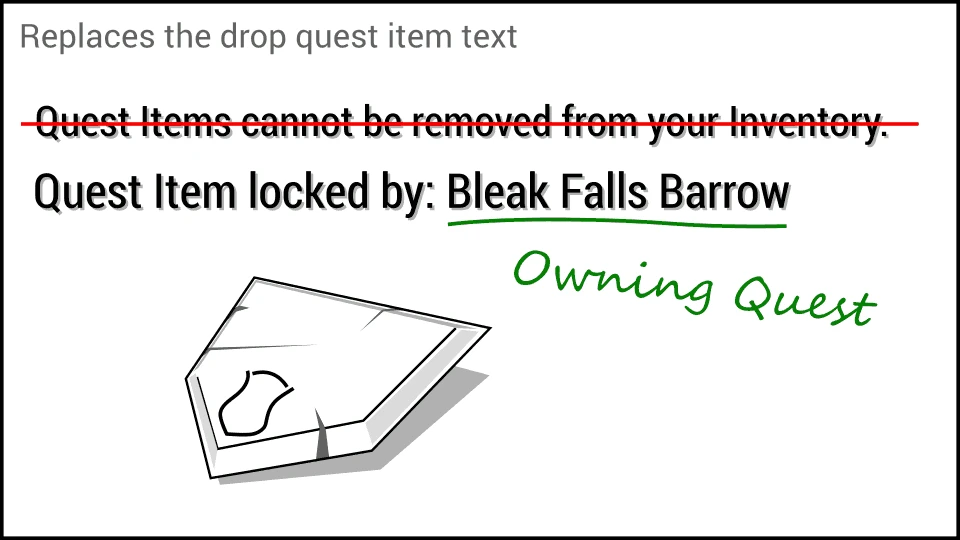
Modifies the drop quest item message to tell you which quest the item belongs to. Can be configured to allow you to drop quest items.
Example: Attempting to drop an Amulet of Talos while the quest Return to Grace is active.
Old: Quest Items cannot be removed from your Inventory.
New: Amulet of Talos locked by: Return to Grace
When you try to drop or store a quest item the game will tell you that quest items can not be removed. With this mod installed the message will tell you which quest marks the item as quest item. The exact wording can be customized in the accompanying ini file. Modded quests are recognized. The mod modifies the game code with SKSE. No esp file. No scripts. Safe to remove at any time.
Compatibility
Partially incompatible with "SkyrimSouls - Unpaused Game Menus": When used together this mod's message is only displayed when you attempt to store a quest item into a container but not when you attempt to drop it.
Requirements
Skyrim Script Extender (SKSE)
Configuration
The mod can be configured in the file Skyrim\Data\SKSE\Plugins\which_quests_item.ini. For full details see the comments in that file.
Message = {item name} locked by: {quest name} The new drop quest item message. The mod fills in {item name} and {quest name}.
ShowMessageBox = 0 Change to 1 to display the message in a message box instead of a corner notification (since 1. 3).
QuestItemOverrideKey = 0 While this key is held down you can store or drop quest items. USE AT YOUR OWN RISK. MSDN: Virtual-Key Codes.
PickRandomMessage = 0 Set to 1 to have the mod randomly pick a message from the section (since 1. 3; see comments in the ini file).
Installation
Use your mod manager or unpack the archive into your Skyrim\Data folder. It is save to (un)install the mod at any time.
Skyrim Special Edition
I plan to start porting this and my other mods to SSE when SKSE64 leaves the alpha stadium.
Permissions
You are free to use the mod and i
This SKSE plugin for Skyrim displays the quest that owns quest items when you attempt to drop or store them. It's a lightweight utility for players who want to know which quest an item belongs to before discarding it. With over 2,000 endorsements, it's a proven quality-of-life improvement.
✨ Key Features
📊 Pros & Cons
✅ Pros
- Community-approved with 2,172 endorsements and 39,023 downloads.
- Solves a common annoyance by showing quest ownership before you drop or store items.
- Simple and focused—does one thing and does it well.
⚠️ Cons
- Last updated in 2017—may not be compatible with the latest Skyrim Special Edition or Anniversary Edition versions.
- Requires SKSE, which adds an extra setup step for players unfamiliar with modding.
- No detailed documentation or troubleshooting provided by the author.
For Skyrim players who hoard quest items and hate accidentally dropping or storing something important. Also great for completionists who want to know which quest an item belongs to before they stash it. Skip if you're playing on console or don't want to bother with SKSE.
💡 Beginner Tips
- Make sure you have SKSE installed and launch the game through skse_loader.exe, not the default launcher.
- If you're using a mod manager like Vortex or Mod Organizer 2, install the plugin through the manager to keep your Data folder clean.
- Test the mod by trying to drop a quest item (like a dragon claw) to see the quest name pop up.
📊 Mod Details
- Game
- Skyrim LE Mods
- Author
- underthesky
- Version
- 1.3
- Downloads
- 39,023
- Endorsements
- 2,172
- Category
- User Interface
- Created
- 11/22/2017
- Updated
- 11/24/2017
🔧 How to Install Skyrim LE Mods
Download from Nexus.
📖 Full step-by-step install guide for Skyrim LE →
Visit the official mod page for specific installation instructions for this mod.
🎮 Need cheat codes or console commands? Check ur gaming wiki for Skyrim LE commands, item IDs, and more.
Keep browsing — more Skyrim LE mods await