The Elder Scrolls General Loadscreen Replacer
⚪ Last updated 2014⚠️ Install Order · 3 steps
Install in this order, then this mod last — most mods fail to load without their framework and dependencies in place.
Preview
🔍 Analysis
- 👍 5.2% endorsement rate — high engagement, a strong quality signal
- 🏆 #8 of 55 User Interface mods in this game by downloads
📋 About This Mod
This mod is free The way is should be This mod is free And will always be~
--- The Elder Scrolls General Loadscreen Replacer ---
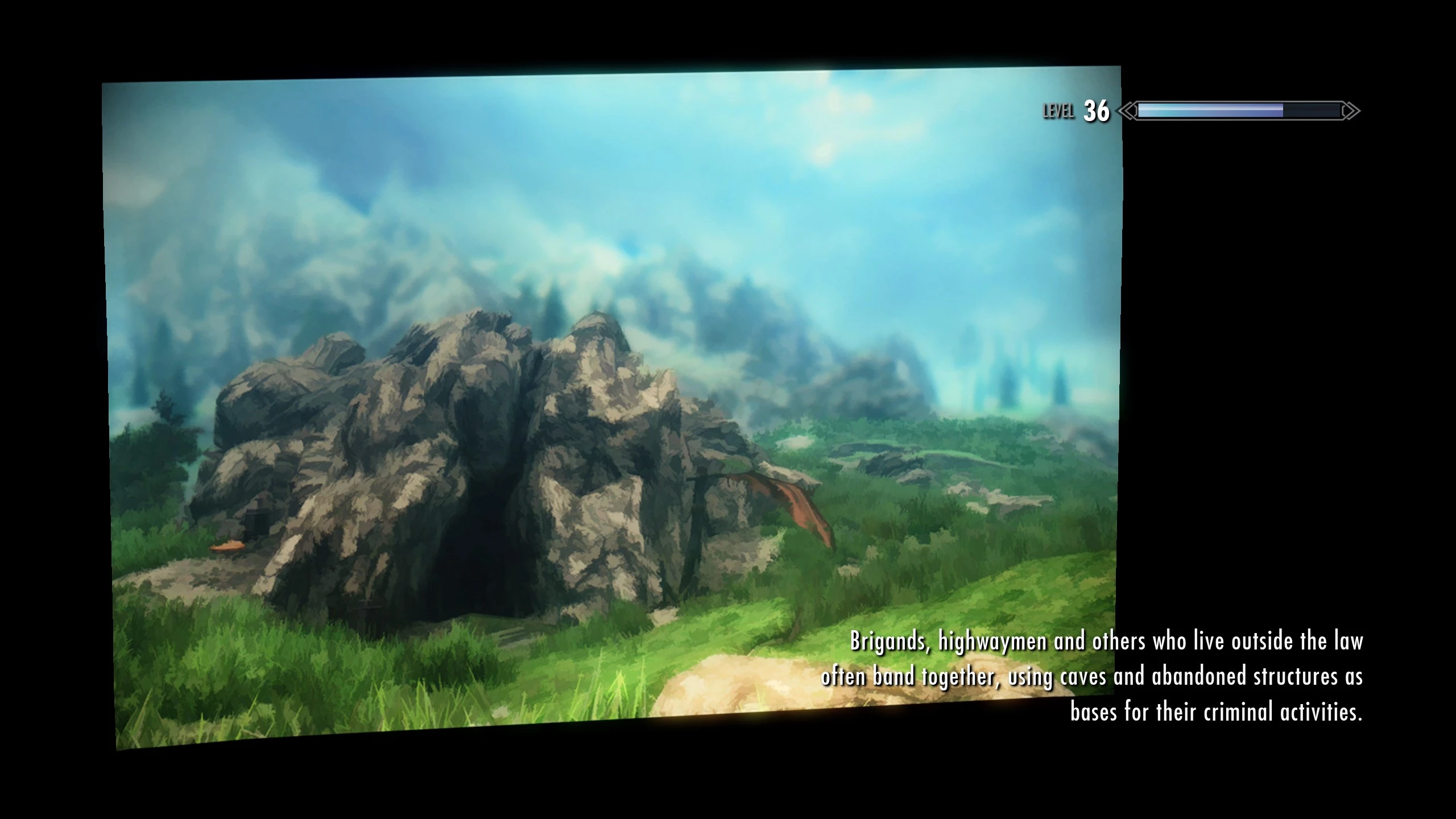
This mod replaces the loading screens in Skyrim with 205 screenshots that have been processed to resemble paintings. The screenshots in the mod were all submitted and voted on by the /tesg/ community.
The mod comes in two main flavours - fullscreen and small. The fullscreen versions will fill 16:9 monitors completely and 16:10 monitors with some thin letterboxing. Other aspect ratios may see greater letterboxing or have the image cropped by the edge of the screen. In these cases we have provided the small version, a shrunk image slightly to the left of the screen that can be zoomed and rotated with the mouse, much like the loadscreens in the vanilla game. All versions have original flavour text written pertaining to Elder Scrolls lore, Skyrim, gameplay or the image itself.
By popular request, additional versions removing some of the sillier shots have also been provided in the folders entitled "No Fun". By additional popular request, versions of the mod without any new flavour text are available in the textless pack. There's also a wallapaper pack containing all the screenshots from the mod as .jpg images.
We Dragonporn Now!
--- Manual installation ---
Put the TESGLoadingScreens.bsa file from the BSA folder into Skyrim/Data Choose a version of TESGLoadingScreens.esp from the options folder and put it into Skyrim/Data Make sure TESGLoadingScreens.esp is active in your mod manager and then launch the game!
--- NMM installation ---
lol don't.
--- Translations ---
Russian / Русский (Thanks Hijikili!)
- -- Issues ---
- You'll still be able to zoom the fullscreen versions in and out using the mouse. Engine limitations. Can't do diddley about it.
- After about ten to fifteen seconds flavour text from the vanilla game will appear on the textless versions of the mod. Again, Todd's fault.
- Smoke on the loadscreen can be distracting. Its unaffected by this mod. Use this if you want to get rid of it.
- If you have ENB enabled on loading screens it can misrepresent the colours of the images, flood them with bloom or otherwise make them look horrible. Append your enblocal.ini so that IgnoreLoadingScreen=true under the category.
- Spelling and punctuation issues? I dunno, I checked it five or so times. Send a message if you see something out of place.
--- Buzzwords ---
- Realistic
- Lore Friendly
- Overhaul
- Dynamic
- Enhanced
- Redux
- Immersive
- Ultimate
- Reloaded
- Better
- High Resolution
- Epic
- Redone
- -- Changelog ---
The Elder Scrolls General Loadscreen Replacer replaces Skyrim's loading screens with high-quality artwork curated by /tesg/. With over 2,600 endorsements and 50,000 downloads, it's a popular cosmetic overhaul for players who want a more polished, museum-worthy presentation. Last updated in 2014, it remains a classic choice for visual variety.
✨ Key Features
📊 Pros & Cons
✅ Pros
- Community favorite with 2,635 endorsements and 50k downloads
- Adds a classy, artistic touch to loading screens
- Lightweight and easy to install
⚠️ Cons
- Last updated in 2014 — may not be compatible with the latest Skyrim version or mods
- Only affects loading screens; no other UI improvements
For Skyrim players who want a more refined, artistic loading screen experience without altering gameplay. Perfect for those who appreciate visual polish and don't mind a mod that's been around for years. Skip if you're looking for UI overhauls or gameplay changes.
💡 Beginner Tips
- Since it's a simple texture replacer, just drop the files into your Data folder or use a mod manager like Vortex or Mod Organizer 2.
- If you're using other UI mods, check load order to ensure this one doesn't conflict with custom loading screen mods.
- Make sure to back up your original loading screen files if you manually install, though mod managers handle this automatically.
📊 Mod Details
- Game
- Skyrim LE Mods
- Author
- The Elder Scrolls General
- Version
- 1.nofun
- Downloads
- 50,519
- Endorsements
- 2,635
- Category
- User Interface
- Created
- 12/3/2013
- Updated
- 2/10/2014
🔧 How to Install Skyrim LE Mods
Download from Nexus.
📖 Full step-by-step install guide for Skyrim LE →
Visit the official mod page for specific installation instructions for this mod.
🎮 Need cheat codes or console commands? Check ur gaming wiki for Skyrim LE commands, item IDs, and more.
Keep browsing — more Skyrim LE mods await